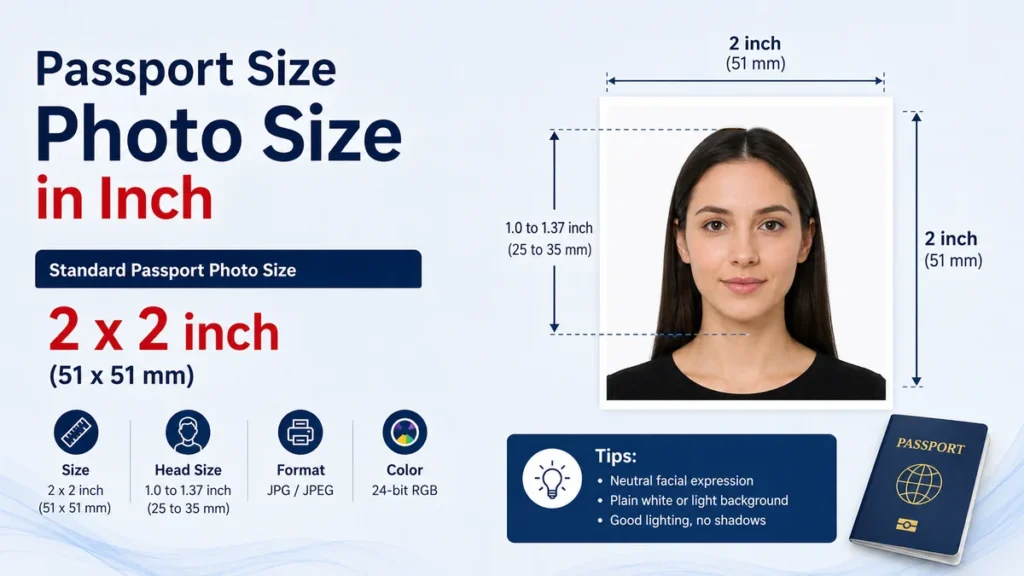
A passport photo can look perfectly fine and still be rejected because its dimensions are wrong. The biggest source of confusion is that there is no single universal passport photo size. A 2 × 2-inch image is standard for a U.S. passport, while many countries use the smaller 35 × 45 mm format.
The quick answer: passport size photo size in inch is commonly 1.38 × 1.77 inches (35 × 45 mm) in countries that use the international 35 × 45 mm format. The United States requires 2 × 2 inches (51 × 51 mm). Canada commonly uses 1.97 × 2.76 inches (50 × 70 mm). Always follow the issuing authority’s exact specification rather than assuming “passport size” means one universal measurement.
What Is the Standard passport size photo size in inch?
When people ask for a “passport-size photo,” they often expect one standard measurement. In practice, passport authorities set their own dimensions.
Two sizes appear particularly often:
- 1.38 × 1.77 inches — equivalent to 35 × 45 mm
- 2 × 2 inches — equivalent to approximately 51 × 51 mm
The 35 × 45 mm format is used for printed British passport photos and is also commonly associated with passport or identification photographs in countries such as India, Pakistan, Australia, and many European countries. The United States uses a square 2 × 2-inch photograph.
Here is a useful comparison:
| Photo format | Size in inches | Size in mm | Size in cm | Approx. pixels at 300 DPI |
|---|---|---|---|---|
| Common 35 × 45 format | 1.38 × 1.77 in | 35 × 45 mm | 3.5 × 4.5 cm | 413 × 531 px |
| U.S. passport | 2 × 2 in | 51 × 51 mm | 5.1 × 5.1 cm | 600 × 600 px |
| Canada-style format | 1.97 × 2.76 in | 50 × 70 mm | 5 × 7 cm | 591 × 827 px |
The pixel values are useful for preparing print-quality files, but pixels and physical dimensions are not interchangeable requirements. An online application may specify its own pixel dimensions, file format, or maximum file size.
35 × 45 mm Passport Photo Size in Inches
One of the most common passport-photo measurements is 35 mm wide × 45 mm high.
Converted precisely:
- Width: 35 ÷ 25.4 = 1.378 inches
- Height: 45 ÷ 25.4 = 1.772 inches
Rounded for practical use, that becomes:
1.38 inches wide × 1.77 inches high
The same dimensions can therefore be written as:
| Unit | Width | Height |
| Millimeters | 35 mm | 45 mm |
| Centimeters | 3.5 cm | 4.5 cm |
| Inches | 1.38 in | 1.77 in |
| Pixels at 300 DPI | ~413 px | ~531 px |
| Pixels at 600 DPI | ~827 px | ~1063 px |
For example, official UK guidance requires printed passport photos to measure 45 mm high by 35 mm wide. The person’s image from the crown of the head to the chin must also meet separate positioning requirements.
Why is 35 × 45 mm not exactly 1.4 × 1.8 inches?
You may see websites or photo studios describe a 35 × 45 mm photograph as 1.4 × 1.8 inches.
That’s simply a rounded measurement.
The more accurate conversion is approximately 1.38 × 1.77 inches because one inch equals exactly 25.4 millimeters.
For document preparation, it is safer to work from the authority’s original measurement. If the official specification says 35 × 45 mm, set the photo to exactly 35 × 45 mm rather than creating a literal 1.4 × 1.8-inch file.
Quick Takeaway: 35 × 45 mm = approximately 1.38 × 1.77 inches. The values 1.4 × 1.8 inches are convenient approximations rather than exact conversions.
Is passport size photo size in inch 2 × 2?
Sometimes—but not universally.
A 2 × 2-inch passport photo is specifically the standard printed size required for U.S. passports. The U.S. Department of State states that the correct printed passport photograph measures exactly 2 × 2 inches, or 51 × 51 mm.
Its dimensions are:
- Width: 2 inches
- Height: 2 inches
- Metric size: 51 × 51 mm
- Shape: square
- Approximate 300-DPI equivalent: 600 × 600 pixels
There is another requirement people sometimes miss: the face cannot simply be placed anywhere inside that square.
For U.S. passport photos, the head—from the bottom of the chin to the top of the head—must measure between 1 inch and 1⅜ inches (25–35 mm).
So having a 2 × 2-inch canvas alone does not make a photo compliant.
2 × 2 inches in centimeters
Two inches equals 5.08 centimeters.
Therefore:
2 × 2 inches = 5.08 × 5.08 cm
U.S. government guidance normally expresses this as approximately 51 × 51 mm.
This is substantially wider than a 35 × 45 mm photo, which explains why simply resizing one format into the other can distort the face or create an incorrect crop.
Passport Photo Sizes by Country
Country-specific rules are the most important thing to understand when choosing passport dimensions.
A photographer may call something “standard passport size,” but the destination country’s official requirements always take priority.
United States
For a U.S. passport, the printed photo must measure:
2 × 2 inches (51 × 51 mm)
The head should measure 1 to 1⅜ inches from chin to top of head. The photo must show the applicant facing the camera directly and must meet the government’s lighting, background, quality, and alteration requirements.
United Kingdom
Printed UK passport photographs measure:
35 × 45 mm = approximately 1.38 × 1.77 inches
Official UK guidance specifies a 45-mm height and 35-mm width. The crown-to-chin image should measure between 29 and 34 mm.
The UK distinguishes between requirements for printed photographs and digital photographs, so applicants submitting online should follow the digital-photo instructions rather than simply converting a printed size into pixels.
Pakistan
The commonly specified Pakistan passport-photo format is:
35 × 45 mm = approximately 1.38 × 1.77 inches
At 300 DPI, that physical measurement corresponds to roughly 413 × 531 pixels. Current passport-photo specification resources consistently list the 35 × 45 mm format for Pakistan.
Because background, upload, and application requirements can differ by document or submission route, applicants should verify the current instructions associated with their specific passport application before preparing a final photograph.
India
The frequently used Indian passport-style photo measurement is:
35 × 45 mm = approximately 1.38 × 1.77 inches
This is the familiar portrait-shaped format rather than the square 2 × 2-inch format associated with U.S. passports.
Different Indian documents, visas, overseas applications, and online forms can specify different digital dimensions, however, so the requirements shown on the actual application should take precedence.
Canada
Canada uses a larger portrait-shaped format than the common 35 × 45 mm photograph.
The commonly specified dimensions are:
50 × 70 mm = approximately 1.97 × 2.76 inches
That makes a Canadian-style passport photo noticeably taller than both a U.S. 2 × 2 photo and a 35 × 45 mm photograph.
Australia and European formats
A 35 × 45 mm (approximately 1.38 × 1.77-inch) physical format is also commonly encountered across Australia and European passport or visa systems. However, face positioning and other biometric rules can differ even when the outside dimensions are identical.
That distinction matters: two countries can require the same 35 × 45 mm piece of paper but have different acceptable head heights, backgrounds, or digital-submission rules.
Passport Size Photo in Inches vs Pixels
One of the most common mistakes is treating inches and pixels as if they describe the same thing.
They don’t.
Inches and millimeters describe physical size. Pixels describe digital image dimensions. DPI/PPI connects the two.
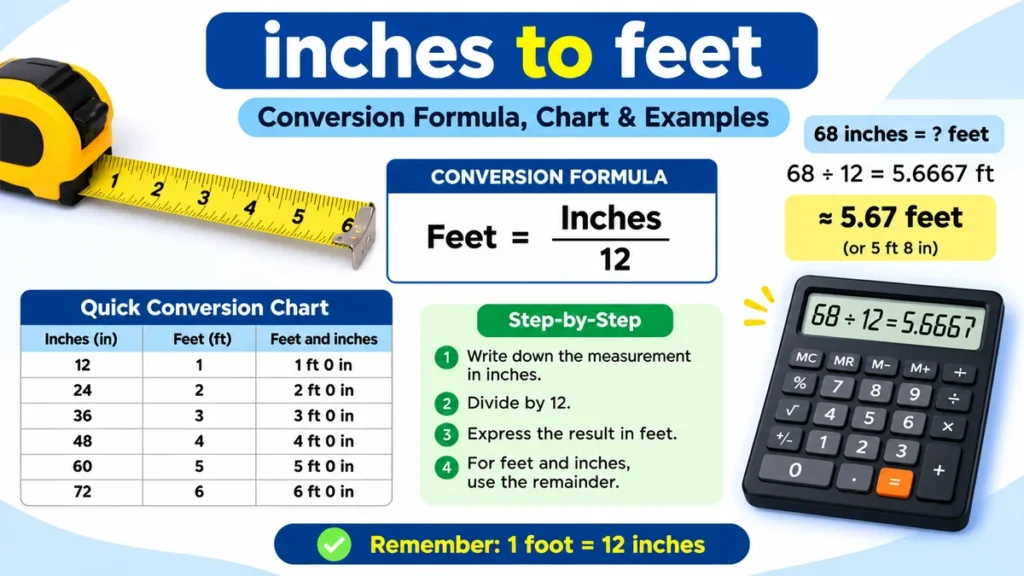
The basic formula is:
Pixels = inches × DPI
For example, a 2-inch-wide photo at 300 DPI becomes:
2 × 300 = 600 pixels
So a 2 × 2-inch image prepared at 300 pixels per inch becomes 600 × 600 pixels.
The U.S. Department of State specifically states that an existing 2 × 2-inch photograph being scanned for certain digital visa uses should be scanned at 300 pixels per inch. Its digital image requirements specify a square image between 600 × 600 and 1200 × 1200 pixels for the relevant visa process.
35 × 45 mm in pixels at 300 DPI
First convert millimeters to inches:
35 ÷ 25.4 ≈ 1.378 inches
45 ÷ 25.4 ≈ 1.772 inches
Then multiply by 300:
1.378 × 300 ≈ 413 pixels
1.772 × 300 ≈ 531 pixels
So:
35 × 45 mm ≈ 413 × 531 pixels at 300 DPI
At 600 DPI, it becomes approximately:
827 × 1063 pixels
Common dimensions at different resolutions
| Physical size | 300 DPI | 600 DPI |
| 35 × 45 mm | 413 × 531 px | 827 × 1063 px |
| 2 × 2 inches | 600 × 600 px | 1200 × 1200 px |
| 50 × 70 mm | 591 × 827 px | 1181 × 1654 px |
These calculations are useful for printing, but don’t automatically use them for an online passport application.
A government portal might specify its own pixel range, JPEG requirement, file-size limit, or image-processing rules.
How to Convert Passport Photo Inches to Pixels
If you know the physical dimensions and required resolution, converting them is straightforward.
Step 1: Check the required physical dimensions
Start with the official measurement.
For example:
1.38 × 1.77 inches
or:
2 × 2 inches
Don’t choose a size based only on what a photo-editing application labels as “passport.”
Step 2: Find the required DPI or PPI
For print preparation, 300 DPI/PPI is a common working resolution.
If the application gives an explicit digital specification, use that specification instead.
Step 3: Multiply inches by DPI
For a 2 × 2-inch image at 300 DPI:
- 2 × 300 = 600
- 2 × 300 = 600
Result:
600 × 600 pixels
For 1.38 × 1.77 inches at approximately 300 DPI, the result is roughly:
413 × 531 pixels
Step 4: Preserve the aspect ratio
Never stretch the image horizontally or vertically just to make it fit.
Crop it to the correct ratio.
ICAO guidance for machine-readable travel documents emphasizes maintaining the portrait’s width-to-height relationship rather than changing proportions by stretching.
Stretching can make facial proportions inaccurate even when the final canvas technically has the correct width and height.
Does DPI Change the Passport Photo’s Physical Size?
DPI can be confusing because changing it does not necessarily mean changing what you see on your screen.
Suppose you have a 600 × 600-pixel image.
Printed at 300 DPI:
600 ÷ 300 = 2 inches
So it prints at 2 × 2 inches.
If the same 600 × 600-pixel image is printed at 600 DPI:
600 ÷ 600 = 1 inch
It would print at 1 × 1 inch.
This is why you should check all three values when preparing a print:
- Physical dimensions
- Pixel dimensions
- Print resolution
A file with lots of pixels is not automatically the correct passport size.
Aspect Ratio: Why It Matters
Aspect ratio describes the relationship between width and height.
A 2 × 2-inch U.S. passport photo has a 1:1 ratio because its width and height are identical.
A 35 × 45 mm photo has a 7:9 ratio:
35:45 simplifies to 7:9.
This is why converting a portrait-shaped 35 × 45 photo directly into a 2 × 2 square without recropping doesn’t work properly.
Common aspect ratios
| Passport-photo format | Approx. dimensions | Aspect ratio |
| U.S. | 2 × 2 in | 1:1 |
| 35 × 45 mm format | 1.38 × 1.77 in | 7:9 |
| 50 × 70 mm format | 1.97 × 2.76 in | 5:7 |
If you need to change from one format to another, return to the original photograph and crop it specifically for the new dimensions.
Correct Photo Size Is Only Part of the Requirement
Knowing passport size photo size in inch solves only one part of the problem.
Passport photographs are biometric identification images, so authorities also care about how the face is presented.
ICAO’s machine-readable travel document specifications address portrait quality, accurate facial representation, image processing, proportions, and resistance to inappropriate alteration.
Depending on the issuing authority, requirements may cover:
- Head position
- Face size
- Eye visibility
- Neutral facial expression
- Background
- Lighting
- Shadows
- Image sharpness
- Recent appearance
- Photo paper
- Digital alterations
- File format and file size
For example, U.S. passport guidance requires the applicant to face the camera directly, use uniform lighting, and submit an original image that has not been altered with software, filters, or artificial intelligence.
UK guidance similarly requires clear, focused, colour printed photographs and prohibits computer alteration of printed passport photos.
Head size matters
A correctly sized outer frame can still contain an incorrectly sized face.
For a U.S. passport photograph, the head must measure 25–35 mm (1–1⅜ inches) from the bottom of the chin to the top of the head.
For UK printed passport photos, the crown-to-chin measurement must be 29–34 mm.
Those two examples show why resizing the entire image without checking facial positioning can cause rejection.
Printed Passport Photo vs Digital Passport Photo
A printed passport photo and a digital passport image should not automatically be treated as the same file in different formats.
Printed photos
For printing, physical dimensions are central.
You may need to specify:
- 35 × 45 mm
- 2 × 2 inches
- 50 × 70 mm
The image must also be printed at sufficient quality and on appropriate photographic paper when the authority requires it.
Digital photos
Online applications may define:
- Minimum width and height in pixels
- Maximum dimensions
- Aspect ratio
- JPEG/JPG format
- Maximum file size
- Colour space
- Compression
- Rules on digital editing
For example, U.S. digital visa image requirements specify a square aspect ratio, minimum dimensions of 600 × 600 pixels, maximum dimensions of 1200 × 1200 pixels, JPEG format, sRGB colour space, and a maximum file size of 240 KB for that particular process.
That does not mean every country’s digital passport photograph should be 600 × 600 pixels.
Always distinguish between physical passport-photo dimensions and the digital upload specification for the document you’re applying for.
How to Prepare the Correct Passport Photo Size
If you’re preparing the photograph yourself, use this sequence rather than resizing randomly.
1. Identify the country and document
Check whether the photograph is for a:
- Passport
- Passport renewal
- Visa
- Residence permit
- National ID
- Immigration application
- Online application
Do not assume the passport and visa requirements of the same country are identical.
2. Find the official dimensions
Look for width and height in millimeters or inches.
For example:
35 × 45 mm
or:
2 × 2 inches
When official instructions are available, those numbers should override generic online “passport size” templates.
3. Check face-position requirements
Find the permitted head height and required position.
This prevents a common mistake where the canvas is correct but the face is too large or too small.
4. Crop instead of stretching
Set the required aspect ratio and crop around the subject.
Never squeeze a portrait photo into a square.
5. Set the required output size
For print, enter the exact physical dimensions.
For an online application, follow the portal’s pixel dimensions.
6. Check image quality
Zoom in before exporting.
Look for:
- Blurriness
- Pixelation
- Excessive compression
- Shadows
- Poor exposure
- Unnatural edges
- Incorrect cropping
7. Verify before submission
Compare your finished photograph with the issuing authority’s current examples and technical requirements.
Requirements can change, and a generic passport-photo template should never replace official instructions.
Quick Takeaway: Start with the country and document, then check physical dimensions, face placement, background, digital specifications, and image quality. “Passport size” by itself is not enough information.
Common Passport Photo Sizing Mistakes
Most sizing problems come from a few predictable errors.
Assuming every passport photo is 2 × 2 inches
The 2 × 2-inch format is strongly associated with the United States, but many countries use 35 × 45 mm or another format.
Confusing 35 × 45 mm with 35 × 45 cm
A passport photograph measuring 35 × 45 mm is:
3.5 × 4.5 cm
not 35 × 45 cm.
Using pixels without checking DPI
A 600-pixel-wide file does not automatically equal two inches.
Physical print size depends on resolution.
Stretching the face
Changing width and height independently can distort facial proportions.
Crop to the required aspect ratio instead.
Ignoring head dimensions
Correct outer dimensions do not guarantee correct facial composition.
Using a generic photo template
Templates are convenient, but your country’s passport authority is the final source of truth.
Reusing one passport photo for every document
A photo prepared for a U.S. passport may not meet UK, Canadian, Pakistani, Indian, European, or other document requirements.
Keep the original high-quality photograph so you can crop a fresh version for each specification.
How Big Is a Passport Photo When Printed?
If you’re holding a 35 × 45 mm photograph, it is surprisingly small.
Its approximate printed dimensions are:
1.38 inches wide × 1.77 inches high
A U.S. passport photograph is:
2 inches wide × 2 inches high
The difference is easy to see side by side:
- 35 × 45 mm: narrow portrait rectangle
- 2 × 2 inches: larger square
- 50 × 70 mm: taller portrait rectangle
If you’re printing at home, don’t judge the size from the image displayed on your monitor. Screens can scale images up or down.
Check the actual print dimensions in your software and disable options such as Fit to Page if they alter the specified size.
Can You Take a Passport Photo With a Smartphone?
A modern smartphone can capture enough resolution for many passport-photo applications, but resolution is only one factor.
The difficult part is producing compliant:
- Framing
- Lighting
- Head position
- Background
- Expression
- Image quality
If taking the photograph yourself is permitted for your application, use even lighting and keep the camera level with the face.
Don’t use beauty filters, face reshaping, skin smoothing, or generative editing. The U.S. Department of State explicitly warns against changing passport photographs with computer software, phone applications, filters, or AI.
Rules vary by authority, so check the applicable instructions before editing a background or modifying any part of the photograph.
Passport Photo Size Quick Reference
For fast reference, these are the measurements people encounter most frequently:
| Question | Answer |
| What is 35 × 45 mm in inches? | 1.38 × 1.77 inches |
| What is a 2 × 2 photo in mm? | About 51 × 51 mm |
| What is 2 × 2 inches in cm? | 5.08 × 5.08 cm |
| What is 35 × 45 mm in cm? | 3.5 × 4.5 cm |
| What is 35 × 45 mm at 300 DPI? | About 413 × 531 px |
| What is 2 × 2 inches at 300 DPI? | 600 × 600 px |
| Is every passport photo 2 × 2 inches? | No |
| Is 35 × 45 mm a common passport size? | Yes, in many countries |
Final Word on passport size photo size in inch
The correct passport size photo size in inch depends on the country and document. For the widely used 35 × 45 mm format, the size is approximately 1.38 × 1.77 inches. For a U.S. passport, the official printed size is 2 × 2 inches (51 × 51 mm).
Don’t stop at width and height. Check the required head size, aspect ratio, background, photo quality, digital dimensions, file format, and rules on image alteration as well. Before printing or uploading your image, compare it with the latest specifications from the passport authority handling your application.