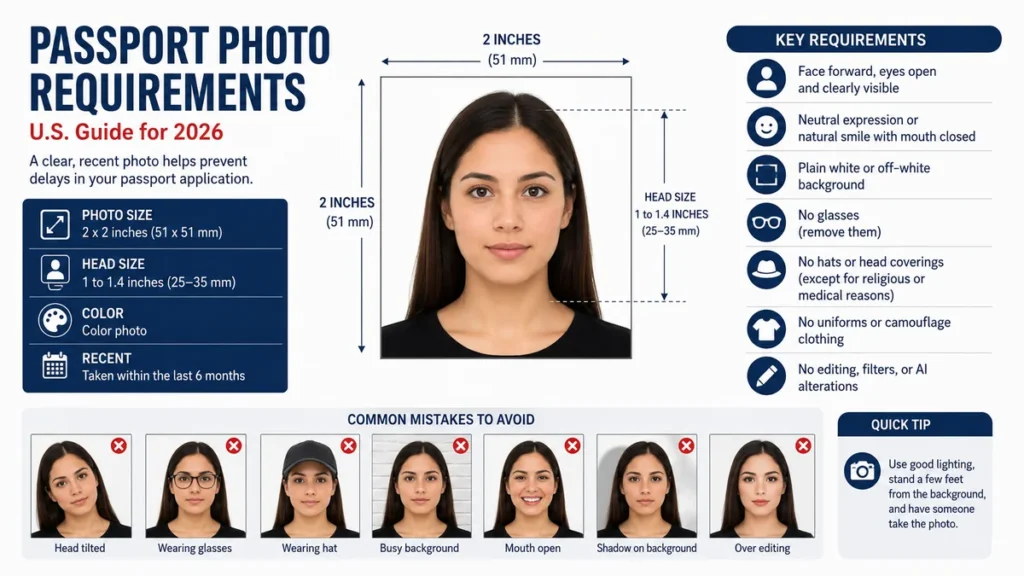
A passport photo looks simple until a small detail—wrong dimensions, shadows, glasses, an edited background, or incorrect head positioning—causes problems with your application. Following the current passport photo requirements before taking or printing your picture can save you from having to submit another photo.
For a U.S. passport, your photo must be a recent, high-resolution color image showing your full face directly toward the camera against a plain white or off-white background. Printed photos must measure 2 × 2 inches (51 × 51 mm), with your head centered and measuring approximately 1 to 1.4 inches (25–35 mm) from chin to top of head.
This guide explains the current U.S. Department of State rules, including photo size, expression, clothing, digital-photo standards, infant photos, religious coverings, glasses, lighting, and the mistakes most likely to make a photo unacceptable.
passport photo requirements at a Glance
The U.S. Department of State evaluates more than just the dimensions of your photograph. Your face, background, lighting, positioning, image quality, clothing, and any digital alterations can affect whether the image is accepted.
| Requirement | Current U.S. Standard |
|---|---|
| Printed photo size | 2 × 2 inches (51 × 51 mm) |
| Head size | About 1–1.4 inches (25–35 mm) |
| Color | Color only |
| Background | Plain white or off-white |
| Photo age | Taken within the last 6 months |
| Face direction | Directly facing camera |
| Eyes | Open and clearly visible |
| Expression | Neutral or natural smile with mouth closed |
| Glasses | Remove them, except limited medical circumstances |
| Hats | Generally prohibited |
| Religious head covering | Permitted under specified conditions |
| Editing and filters | Not permitted |
| Printed paper | Matte or glossy photo-quality paper |
| Image quality | Sharp, clear, high resolution |
| Uniforms | Not permitted |
| Headphones | Not permitted |
A useful rule is to make the picture intentionally plain. Passport photography is designed for accurate identification, not portrait aesthetics.
What Is the Correct Passport Photo Size?
The standard U.S. passport picture is exactly 2 inches wide by 2 inches high, equivalent to 51 × 51 millimeters.
Your head must also occupy the correct proportion of that square. The Department of State currently specifies a head height of approximately 1 to 1.4 inches (25–35 mm), measured from the bottom of the chin to the top of the head. The head should be horizontally centered.
This second measurement matters because simply cropping an ordinary portrait into a two-inch square does not automatically create an acceptable passport picture.
How should your head be positioned?
Look straight into the camera rather than slightly upward, downward, or sideways. Keep your shoulders square and your head upright.
Avoid:
- Tilting your head
- Turning your shoulders
- Looking above or below the lens
- Standing excessively close to the camera
- Cropping part of your head
- Making your face too large or too small in the frame
The Department of State suggests positioning the camera several feet from the subject rather than taking an extremely close portrait.
If you are taking a digital photo for an eligible online renewal, leaving some extra space around your head and shoulders can be useful because the application allows you to reposition or crop the image during upload.
Passport Photo Background and Lighting Requirements
For U.S. passports, use a plain white or off-white background.
The background cannot contain visible:
- Patterns
- Bricks
- Texture
- Furniture
- Windows
- Pictures
- Objects
- Lines
- Strong shadows
A white brick wall, for example, may be white but is still unsuitable because the brick pattern creates texture and lines. The Department of State specifically requires the background to be plain and free from shadows and objects.
How do you avoid background shadows?
Do not stand directly against the wall.
Moving several feet forward helps prevent your body and head from casting defined shadows behind you. Soft, even lighting from the front is preferable to a strong flash or a single harsh lamp.
Your face should be evenly illuminated. One side should not appear dramatically brighter than the other.
Natural daylight can work well when it is indirect and balanced. Avoid standing with a bright window directly behind you because backlighting can make the face too dark.
Quick Takeaway: A plain wall alone is not enough. You need a white or off-white surface, even illumination, accurate skin tones, and no noticeable shadows on either your face or the background.
Facial Expression, Eyes, Hair, and Pose
One common question is: Can you smile in a passport photo?
For a U.S. passport, a restrained natural smile is acceptable. Your eyes should remain open and visible, and your mouth should be closed. An exaggerated expression or open-mouth smile can make the photo unacceptable.
For the safest result, use a relaxed neutral expression.
Your full face should be visible from the front. Hair itself is not prohibited, but it should not obstruct your eyes or significant portions of your face.
Check these points before taking the photograph:
- Look directly at the camera.
- Keep your head level.
- Keep both eyes clearly visible.
- Make sure hair is not covering the eyes or face.
- Keep your mouth closed.
- Avoid exaggerated smiling, frowning, or squinting.
- Keep the full face visible.
The goal is to capture an accurate biometric representation of your current appearance.
passport photo requirements for Glasses, Clothing, Hats, and Accessories
What you wear can determine whether an otherwise perfect photo is accepted.
Can you wear glasses in a passport photo?
Normally, no.
Remove prescription eyeglasses, sunglasses, and tinted glasses before the photo is taken. Do not put your glasses on top of your head for the picture.
If you cannot remove glasses for medical reasons, the State Department says you should include a signed statement from your doctor with the application.
Taking them off is therefore the simplest approach whenever medically possible.
What clothes should you wear?
Ordinary everyday clothing is appropriate.
The Department of State says you cannot wear:
- A uniform
- Clothing resembling a uniform
- Camouflage clothing
You should also remove headphones and wireless hands-free devices worn in or around your ears.
There is no need to dress formally. A simple shirt or top that does not obstruct your face is sufficient.
Can you wear jewelry?
Yes. Jewelry and facial piercings can generally remain as long as they do not obscure your face.
Large accessories that interfere with facial visibility should be removed.
Are Hats or Religious Head Coverings Allowed?
Ordinary hats, caps, and fashion head coverings should be removed.
Exceptions exist for head coverings worn for religious or medical reasons. For in-person or mail applications, supporting statements may be required depending on the reason for wearing the covering.
When an allowed head covering is worn:
- Your entire face must remain visible.
- It cannot cast shadows across your face.
- It should not obscure identifying facial features.
- Current Department of State guidance specifies a single-colored covering without patterns or small holes.
Face coverings and medical masks must be removed because the full face needs to be visible.
How Recent Does Your Passport Photo Need to Be?
Your passport photograph should have been taken within the six months before you submit your application and should represent your current appearance.
Using an old passport picture—even if you think you still look the same—is unnecessary risk.
Take a new photograph if your existing image is older than six months.
The purpose of the recency requirement is straightforward: the passport photograph needs to provide a reliable representation of the person who will use the document.
Digital Passport Photo Requirements for Online Renewal
Digital photos deserve separate attention because their submission process differs from printed photographs.
For eligible U.S. passport online renewals, the Department of State currently accepts JPG, JPEG, PNG, HEIC, and HEIF files. The file size must be between 54 KB and 10 MB, and the photograph must be in color and no more than six months old.
The digital image should still follow the same biometric principles:
- Face the camera directly.
- Center your head.
- Keep the full head visible.
- Show the shoulders.
- Use a plain white or off-white background.
- Avoid shadows.
- Keep your eyes open and visible.
- Use an original high-quality image.
The online application includes a tool that can check basic requirements and lets you reposition or crop the photograph. A passport employee still reviews the submitted image afterward.
Do not scan a printed passport picture
If your application needs a digital image, use the original digital photo.
The State Department specifically advises against scanning a physical passport photograph or taking a new picture of an existing printed photograph because doing so can reduce image quality.
Similarly, avoid sending your original image through messaging services before submitting it, since compression may reduce its quality.
Can You Edit a Passport Photo?
Basic passport-photo preparation should not become photo manipulation.
The U.S. Department of State requires the original, unchanged photograph and warns applicants not to modify it with computer software, mobile apps, filters, retouching tools, or artificial intelligence.
That means you should not:
- Smooth skin
- Reshape facial features
- Remove blemishes digitally
- Change eye color
- Add filters
- Alter skin tone
- Artificially replace or clean up the background
- Stretch the picture
- Compress the subject to change proportions
- Generate portions of the image with AI
- Digitally remove red eye
If the background is wrong, take another photograph against the correct background rather than using generative AI or retouching software to replace it.
If the camera produces red eye, take another picture with different lighting instead of editing the eyes afterward.
This is an increasingly important distinction because a photograph can look visually perfect yet still be unsuitable if software has altered the person’s appearance or the outline of the face, head, or neck. The Department of State explicitly says AI-created or AI-altered passport images are unacceptable.
Printed Passport Photo Quality
If your application requires a physical photograph, use matte or glossy photo-quality paper.
Do not submit:
- Ordinary printer-paper photos
- Photocopies
- Digitally scanned copies
- Blurry pictures
- Grainy pictures
- Pixelated images
- Photos with visible printer dots
- Photos with red eye
- Damaged photographs
- Photos with holes, creases, or smudges
The Department of State recommends using a high-quality camera setting and producing a sharp color image with adequate print quality.
A photograph that has the correct dimensions can still fail if the image itself is poor.
Can You Take Your Own Passport Photo at Home?
Yes. There is no rule requiring every U.S. passport photo to be taken in a professional studio.
The challenge is not the camera. Modern smartphones can capture more than enough detail. The difficult parts are keeping the camera position correct, creating shadow-free lighting, maintaining a compliant background, and sizing the finished print accurately.
A practical home setup works like this:
- Find a plain white or off-white wall.
- Remove pictures, decorations, or visible objects from the frame.
- Stand several feet in front of the wall.
- Use soft, balanced lighting.
- Place the camera around eye level.
- Have another person take the picture rather than holding the camera like a selfie.
- Look directly into the lens.
- Keep your eyes open and mouth closed.
- Capture several images.
- Select the clearest original photograph that meets the requirements.
Do not heavily edit the winning photo afterward. If something is wrong with the background, lighting, pose, or expression, retaking the picture is safer than trying to digitally repair it.
Passport Photos for Babies and Toddlers
Children need passport photographs too, but obtaining a perfectly posed image from a newborn can obviously be difficult.
The Department of State provides some flexibility for infants while maintaining the major identification requirements.
For a baby passport photo:
- Place the baby on a plain white or off-white sheet, or cover a car seat with the sheet.
- Keep shadows away from the baby’s face.
- Make sure no parent, hand, or other person appears in the photograph.
- The baby’s full face should remain visible.
- The child should face the camera.
For infants, the eyes do not have to be completely open. Older children should have their eyes open.
This is an area where some unofficial guides are unnecessarily strict. Current Department of State guidance specifically recognizes that an infant may not keep both eyes completely open.
A useful technique is to place a light-colored sheet underneath a baby lying safely on their back, then take several photos from directly above without casting a shadow across the face.
Common Reasons Passport Photos Are Rejected
Most unsuccessful photos fail because of ordinary technical mistakes rather than complicated passport rules.
Watch especially for these problems:
| Common Problem | Better Approach |
| Wrong photo dimensions | Use exactly 2 × 2 inches for a printed U.S. photo |
| Face too large | Move the camera farther away and crop correctly |
| Face too small | Reframe while keeping the head within required proportions |
| Head tilted | Face straight ahead |
| Visible shadows | Move away from the wall and improve lighting |
| Colored background | Use plain white or off-white |
| Textured wall | Choose a smooth plain background |
| Glasses | Remove them unless medically necessary |
| Open-mouth smile | Use a neutral expression or closed-mouth natural smile |
| Hair hiding face | Move hair away from identifying facial features |
| Blurry image | Retake at higher quality |
| Red eye | Retake instead of digitally fixing it |
| Filter or beauty mode | Disable processing and use the original image |
| AI background replacement | Retake the image against a compliant background |
| Hat or cap | Remove it unless an exception applies |
| Uniform | Wear normal everyday clothing |
One of the easiest final checks is to stop judging the picture as a portrait. Instead, inspect it as an identification image: Can the face be seen clearly, naturally, evenly, and without obstruction?
Do Passport Photo Requirements Differ by Country?
Yes. This point causes considerable confusion online.
A 2 × 2-inch U.S. passport photo is not a universal international passport size.
For example, Canadian passport photos are 50 × 70 mm, with a specified face height between 31 and 36 mm. UK printed passport photos use different dimensions again, while UK digital applications have their own pixel and file requirements.
So if you are applying for a non-U.S. passport, do not simply request a generic “passport-size photo” and assume it is correct.
Check the official passport authority for the country issuing the document.
The same warning applies to visas. Passport photographs and visa photographs sometimes share specifications, but they are not automatically interchangeable.
Final Passport Photo Checklist
Before attaching or uploading your photo, confirm that:
- It was taken within the last six months.
- It accurately reflects your current appearance.
- It is a clear, high-resolution color photograph.
- Your head is centered.
- Your full face is visible.
- You are directly facing the camera.
- Your eyes are visible.
- Your mouth is closed.
- The background is plain white or off-white.
- There are no shadows on your face or background.
- Your glasses are removed.
- You are not wearing an ordinary hat or head covering.
- No headphones or wireless earpieces are visible.
- You are not wearing a uniform or camouflage.
- The image has not been filtered, retouched, AI-generated, or digitally altered.
- A printed U.S. photo measures exactly 2 × 2 inches.
- The printed image is on matte or glossy photo-quality paper.
- A digital renewal image uses an accepted file format and size.
Following these passport photo requirements is mostly about accuracy rather than creating a flattering portrait. Use a recent original photograph, keep the background and lighting simple, make your face clearly visible, and verify the exact dimensions before submission. Those few checks eliminate many of the avoidable problems that can lead to a request for a replacement photo.