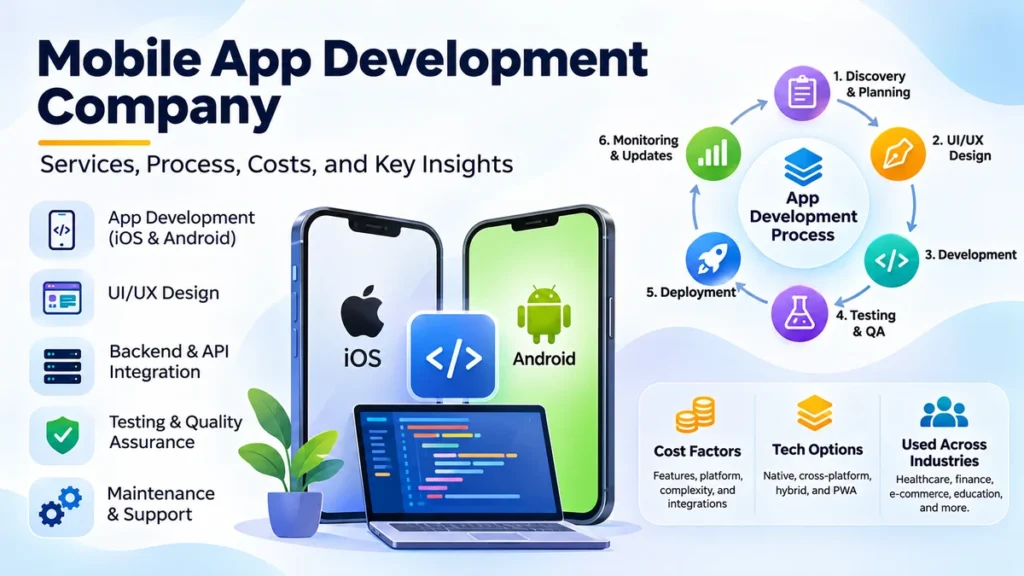
Building a successful mobile application requires much more than writing code. It involves understanding user needs, selecting suitable technologies, creating an intuitive interface, and maintaining the application after launch.
A mobile app development company is a software development business that designs, builds, tests, deploys, and maintains applications for smartphones, tablets, and other mobile devices. These companies combine product strategy, UI/UX design, software engineering, backend development, and quality assurance to create functional applications for Android and iOS platforms.
From simple booking applications to complex banking platforms, mobile application development companies help transform ideas into digital products that solve real-world problems.
What Does a Mobile App Development Company Do?
A mobile application development company manages the technical and creative processes involved in creating mobile software. Its responsibilities typically extend from initial product planning to ongoing maintenance and performance improvement.
A full-service development team commonly includes:
- Business analysts: Identify business requirements and functional specifications.
- Project managers: Coordinate development activities, resources, and deadlines.
- UI/UX designers: Create interfaces, prototypes, and user journeys.
- Mobile app developers: Build Android, iOS, and cross-platform applications.
- Backend developers: Develop databases, servers, and application programming interfaces.
- Quality assurance engineers: Test functionality, security, and performance.
- DevOps engineers: Manage infrastructure and automated deployment processes.
These specialists work together to ensure that the application meets its intended requirements and operates reliably across supported devices.
For example, an online shopping application requires more than product pages. It also needs inventory management, secure authentication, payment processing, order tracking, and administrative controls.
Each component contributes to the overall functionality of the application.
Main Mobile App Development Services
Professional app development agencies provide several services depending on the project’s requirements, industry, and target audience.
iOS App Development
iOS application development focuses on creating software for Apple devices, including iPhones and iPads.
Developers commonly use Swift, SwiftUI, UIKit, and Xcode to create applications that integrate with Apple’s operating system and hardware features.
Typical iOS applications include banking platforms, productivity tools, fitness trackers, educational applications, and subscription-based services.
Developers must also follow Apple’s App Store requirements and applicable privacy standards.
Android App Development
Android development involves creating applications for devices running Google’s Android operating system.
Kotlin, Java, Android Studio, and Jetpack Compose are widely used technologies within the Android development ecosystem.
One challenge is ensuring compatibility across different manufacturers, screen sizes, hardware configurations, and operating system versions.
Android development is particularly useful for businesses seeking to reach a diverse range of mobile users.
Cross-Platform App Development
Cross-platform development enables developers to share much of an application’s code between Android and iOS.
Popular frameworks include:
- Flutter
- React Native
- Kotlin Multiplatform
- Ionic
- .NET MAUI
Flutter uses the Dart programming language, while React Native primarily uses JavaScript or TypeScript.
These technologies can reduce duplicated development work, simplify maintenance, and accelerate product releases. However, some functionality may still require platform-specific implementation.
Custom Mobile App Development
Custom application development focuses on building software around specific organizational or user requirements rather than relying on predefined templates.
Examples include warehouse management applications, hospital appointment systems, delivery tracking platforms, customer portals, and manufacturing management tools.
Custom software offers greater flexibility but usually requires more planning, development resources, and ongoing maintenance.
UI/UX Design and Prototyping
User interface (UI) design determines how an application looks, while user experience (UX) design focuses on how people interact with it.
Design teams frequently use tools such as Figma to develop wireframes, interactive prototypes, navigation structures, and design systems.
Prototyping allows teams to identify usability problems before investing heavily in software development.
Backend Development and API Integration
Many mobile applications rely on backend infrastructure to process information and manage services.
Common backend technologies include Node.js, Python, Firebase, Supabase, PostgreSQL, Amazon Web Services (AWS), and Google Cloud.
Backend systems support features such as user authentication, database management, payment gateways, push notifications, real-time messaging, and third-party integrations.
Mobile App Testing and Maintenance
Quality assurance identifies technical problems before an application reaches its users.
Post-launch maintenance addresses software bugs, security vulnerabilities, operating system compatibility, infrastructure performance, and changing application requirements.
Without ongoing maintenance, even a well-designed application can gradually become unreliable.
Native vs. Cross-Platform vs. Hybrid App Development
Choosing a development approach affects application performance, project costs, accessibility, and long-term maintenance.
There is no single approach that works best for every project.
| Feature | Native Apps | Cross-Platform Apps | Hybrid Apps |
|---|---|---|---|
| Codebase | Usually platform-specific | Mostly shared | Shared web-based code |
| Performance | Excellent | Generally high | Varies by implementation |
| Development cost | Generally higher | Moderate | Often lower |
| Development time | Generally longer | Moderate | Often shorter |
| Hardware access | Direct | Plugins or native modules | Bridge and plugin dependent |
| Technologies | Swift, Kotlin | Flutter, React Native | Ionic, Capacitor |
| Best suited for | Hardware-intensive apps | General business applications | Content and utility applications |
| Maintenance | Separate platform work | Mostly shared | Mostly shared |
When Is Native Development Better?
Native development is often preferable when applications require advanced graphics, complex animations, extensive hardware integration, or immediate access to new operating system capabilities.
Applications involving augmented reality, sophisticated camera controls, or specialized Bluetooth functionality may benefit from native implementations.
When Is Cross-Platform Development Better?
Cross-platform development can be suitable for e-commerce stores, appointment booking applications, educational platforms, customer portals, and startup products targeting both major mobile operating systems.
A shared codebase can reduce development effort without necessarily compromising the experience required by typical business applications.
What About Progressive Web Apps?
A progressive web app (PWA) is a web application that provides certain app-like capabilities through a browser.
PWAs can offer home-screen installation, offline functionality, and notifications on supported platforms.
They are useful when accessibility through a URL matters more than extensive device integration or conventional app store distribution.
Quick takeaway: Application requirements should determine the technology. Choosing a framework solely because it is popular can introduce unnecessary limitations.
How Does the Mobile App Development Process Work?
A structured development process helps reduce technical risks, control project costs, and improve software quality.
Most professional development teams follow a combination of product discovery, design, implementation, testing, deployment, and continuous improvement.
1. Product Discovery and Requirement Analysis
The first stage establishes what the application needs to accomplish.
Developers and stakeholders identify the target audience, business objectives, essential features, technical limitations, competing products, and measurable success criteria.
The result is usually a project scope document or product requirements document (PRD).
Clearly defined requirements reduce misunderstandings and prevent unnecessary development expenses.
2. UI/UX Design and Wireframing
Designers create a visual representation of the application before developers begin implementing its functionality.
This stage typically involves creating user personas, mapping user journeys, designing wireframes, developing interactive prototypes, and conducting usability tests.
For example, an appointment booking application should allow users to select an available time, confirm their details, and complete a booking without unnecessary navigation.
3. Technology Stack and Architecture Selection
The development team determines which programming languages, frameworks, databases, and infrastructure services are appropriate.
Technical decisions consider:
- Expected number of users.
- Application performance requirements.
- Data storage and security.
- Third-party integrations.
- Offline functionality.
- Long-term scalability.
- Platform compatibility.
A sound architecture makes future updates easier and reduces the likelihood of expensive rebuilding.
4. Application Development
Developers build the frontend and backend components of the application.
Many teams use Agile development methodology, dividing projects into shorter development cycles known as sprints.
During each sprint, developers implement features, resolve technical issues, and deliver working software for review.
Continuous integration and continuous delivery (CI/CD) systems can automate parts of the testing and release process.
5. Quality Assurance and Security Testing
Before publication, the application undergoes multiple types of testing.
| Testing Type | Purpose |
|---|---|
| Functional testing | Verifies that features work correctly |
| Usability testing | Evaluates ease of use |
| Performance testing | Measures speed and responsiveness |
| Security testing | Identifies security weaknesses |
| Compatibility testing | Checks different devices and OS versions |
| Regression testing | Ensures updates do not break existing functionality |
| User acceptance testing | Verifies that the application meets agreed requirements |
Tools such as Apple TestFlight and Google Play testing tracks allow teams to distribute pre-release versions to testers.
6. Application Deployment
Once development and testing are complete, the application can be submitted to the Apple App Store and Google Play Store.
The submission process typically requires screenshots, application descriptions, privacy disclosures, age classifications, signed application builds, and compliance documentation.
App Store Optimization (ASO) helps improve application discoverability by optimizing relevant keywords, descriptions, screenshots, and other listing elements.
Store approval is controlled by Apple and Google. No development company can guarantee acceptance.
7. Post-Launch Monitoring and Updates
Launching an application is the beginning of its operational lifecycle.
Development teams use tools such as Firebase Crashlytics, Firebase Analytics, and Sentry to monitor technical issues and understand user behavior. Flutter & Native+1
Useful performance indicators include crash-free sessions, loading times, user retention, application responsiveness, and feature adoption.
Monitoring this information helps teams prioritize future improvements based on actual usage rather than assumptions.
How Much Does a Mobile App Development Company Charge?
Mobile application development costs vary considerably depending on functionality, platform selection, development team location, integrations, and technical complexity.
A simple application with a limited number of features may cost several thousand dollars, while a sophisticated enterprise platform can require hundreds of thousands of dollars.
The following figures are illustrative planning estimates based on published development company pricing, rather than guaranteed market averages.
| Application Type | Estimated Cost | Estimated Timeline |
|---|---|---|
| Simple mobile application | $5,000–$25,000 | 6–10 weeks |
| Minimum viable product (MVP) | $10,000–$50,000 | 2–4 months |
| Medium-complexity business app | $25,000–$70,000 | 3–5 months |
| E-commerce or marketplace app | $30,000–$150,000+ | 4–8 months |
| Complex enterprise application | $70,000–$350,000+ | 5–12+ months |
Published estimates differ significantly between providers, particularly for applications requiring custom infrastructure and advanced features. Mobile App Development+3
Factors That Influence App Development Costs
The most significant pricing factors include:
- Number of features and application screens.
- Native or cross-platform development.
- Complexity of UI/UX design.
- Backend infrastructure and database requirements.
- Payment gateway and API integrations.
- Security and regulatory compliance.
- Real-time communication and offline synchronization.
- Testing and device compatibility.
- Maintenance and technical support.
For instance, adding real-time delivery tracking to an ordering application introduces requirements for GPS integration, location updates, mapping services, and backend processing.
These requirements increase development effort and operational costs.
Fixed-Price vs. Hourly Development
Development companies typically offer three pricing models.
| Pricing Model | How It Works | Best For |
|---|---|---|
| Fixed price | An agreed payment for a defined scope | Clearly specified projects |
| Time and materials | Payment based on development hours and resources | Evolving requirements |
| Dedicated development team | Ongoing payment for assigned professionals | Long-term software projects |
Fixed-price contracts offer greater initial budget predictability, while time-and-materials arrangements provide flexibility when requirements change.
Hidden Costs of Mobile Application Development
The initial development budget does not represent the complete cost of owning an application.
Additional expenses may include cloud hosting, database storage, third-party API subscriptions, payment processing fees, security audits, developer account fees, and operating system compatibility updates.
Evaluating the total cost of ownership provides a more realistic picture than considering development charges alone.
Industries That Use Mobile Application Development Services
Mobile applications serve different purposes across industries, ranging from consumer convenience to internal business automation.
| Industry | Common Applications |
|---|---|
| Healthcare | Telemedicine, appointment scheduling, patient portals |
| Finance | Mobile banking, digital wallets, expense management |
| E-commerce | Online shopping, order tracking, loyalty programs |
| Education | Learning management systems, quizzes, virtual classrooms |
| Transportation | Ride booking, fleet management, navigation |
| Real estate | Property listings, virtual tours, property management |
| Manufacturing | Inventory tracking, production monitoring |
| Travel | Hotel reservations, itinerary management |
| Food and hospitality | Restaurant ordering, reservations, delivery |
| Fitness | Workout tracking, activity monitoring |
Industry-specific requirements influence application design and technical architecture.
A mobile banking application, for example, requires stronger authentication, transaction monitoring, and security controls than a basic informational application.
Similarly, healthcare applications handling sensitive patient information may need additional privacy safeguards and regulatory compliance measures.
How to Evaluate a Mobile App Development Company
The quality of a development partner can influence application reliability, project expenses, and future maintenance requirements.
Evaluating technical capabilities is generally more useful than relying exclusively on advertised prices or marketing claims.
Review Previous Application Projects
A company’s portfolio provides insight into its design capabilities, technical experience, and familiarity with different industries.
Where possible, examine published applications rather than relying entirely on screenshots.
Check loading speed, navigation, functionality, recent updates, and user feedback. Remember that negative reviews may also reflect business operations rather than software quality alone.
Examine Technical Expertise
An experienced development team should explain why specific programming languages, frameworks, and architectural approaches are appropriate for a project.
Warning signs include recommending the same technology for every application, overlooking security requirements, and providing detailed estimates before understanding the project scope.
Understand Source Code and Intellectual Property Ownership
Ownership arrangements should be established before development begins.
A development agreement should clearly address ownership or licensing of source code, design files, databases, technical documentation, and other intellectual property.
Organizations should also understand which third-party components are subject to separate licensing conditions.
Maintaining organizational control over app store accounts, cloud infrastructure, and source code repositories can reduce dependence on a single vendor.
Evaluate Security and Privacy Practices
Mobile applications frequently process personal information and sensitive business data.
Development teams should implement appropriate security controls, including secure authentication, encrypted network communication, access management, secure data storage, and regular dependency updates.
The OWASP Mobile Application Security Verification Standard (MASVS) provides a useful framework for assessing mobile application security.
Depending on the application’s purpose and jurisdiction, regulatory considerations may include GDPR, HIPAA, and PCI DSS requirements.
Not every application is subject to every standard. Applicability depends on the data processed, industry, and applicable laws.
Assess Communication and Project Management
Clear communication helps prevent misunderstandings and unexpected expenses.
Useful project management practices include regular progress reports, milestone reviews, accessible development builds, documented requirements, and transparent change request procedures.
Tools such as Jira, GitHub, and Trello can help teams organize development activities and track issues.
Understand Maintenance and Support Terms
Every application requires some level of ongoing support.
A maintenance agreement should explain which services are included, expected response times, security update responsibilities, hosting arrangements, and the cost of additional feature development.
Without clear support terms, unexpected technical issues can become expensive after launch.
Compare Development Companies and Freelancers
A development company is not the only way to build a mobile application.
| Factor | Development Company | Freelance Developer |
|---|---|---|
| Team structure | Multiple specialists | Usually one individual |
| Development cost | Generally higher | Often lower |
| Project management | Usually structured | Depends on the individual |
| Technical capabilities | Broader specialization | Based on individual skills |
| Scalability | Generally easier | Limited by availability |
| Maintenance | May offer dedicated support | Depends on agreement |
| Suitable projects | Medium and complex applications | Smaller, clearly defined projects |
Freelancers can be effective for prototypes and straightforward applications. Development companies may be more appropriate when projects require multiple technical disciplines and coordinated long-term support.
Emerging Mobile App Development Technologies
Mobile development continues to evolve as hardware, software frameworks, and user expectations change.
Several technologies are influencing modern application capabilities.
Artificial intelligence and machine learning: AI-powered applications can support intelligent search, personalized recommendations, image recognition, document processing, and conversational assistants.
Augmented reality: AR technologies, including Apple’s ARKit and Google’s ARCore, allow applications to overlay digital information onto physical environments.
Internet of Things (IoT): Mobile applications can connect with smart home devices, wearable technology, industrial equipment, and environmental sensors.
Cloud computing: Cloud-based infrastructure enables remote data synchronization, scalable backend services, and access across multiple devices.
Low-code and no-code development: Platforms such as FlutterFlow and Microsoft Power Apps can support faster development of selected business tools and prototypes, although complex functionality may still require custom engineering.
On-device processing: Performing selected computational tasks directly on mobile devices can improve responsiveness, reduce network dependence, and support privacy-conscious application design.
These technologies should be adopted according to practical user requirements rather than added simply because they are trending.
Common Mistakes When Planning a Mobile Application
Many application projects encounter difficulties because of planning decisions made before development begins.
Common mistakes include:
- Building too many features before validating user demand.
- Choosing technologies without evaluating project requirements.
- Underestimating backend development expenses.
- Neglecting accessibility and usability testing.
- Failing to establish source code ownership.
- Ignoring application performance on older devices.
- Overlooking post-launch maintenance costs.
- Collecting unnecessary personal information.
- Assuming app store approval is guaranteed.
Starting with a minimum viable product allows organizations to test core functionality with real users before committing additional resources.
Conclusion
A mobile app development company brings together product planning, software engineering, user experience design, quality assurance, and infrastructure management to create mobile applications.
Understanding the differences between native, cross-platform, and hybrid development helps businesses make informed technical decisions. Equally valuable is recognizing how project complexity, security requirements, integrations, and long-term maintenance influence overall development costs.
The foundation of a successful mobile application is a clearly defined purpose, realistic development scope, appropriate technology, and continuous improvement based on user feedback.
Before beginning an application project, document the target audience, essential features, available budget, technical requirements, and expected outcomes. These details provide a practical foundation for building reliable, secure, and sustainable mobile software.