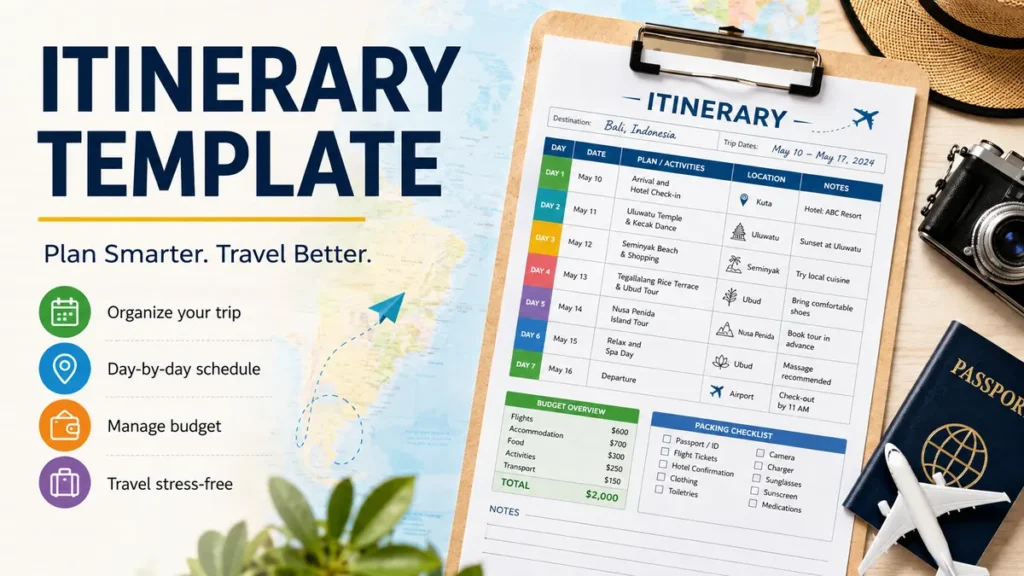
A trip can look simple until flights, hotel confirmations, restaurant bookings, attraction tickets, transportation times, and several different addresses start piling up. An itinerary template brings those details into one organized travel plan so you can see what happens, when it happens, and where you need to be.
An itinerary template is a reusable document or spreadsheet that organizes a journey by date, time, location, transportation, accommodation, activities, reservations, and notes. A good template gives you enough structure to avoid missed bookings and inefficient routes while leaving enough flexibility for delays, rest, spontaneous stops, and changes during the trip.
Templates can be built in Microsoft Excel, Word, Google Sheets, Google Docs, Canva, or dedicated itinerary-planning tools. Current template libraries also commonly support printable PDFs, collaborative sharing, maps, links, photos, and editable schedules.
What Is an Itinerary Template?
An itinerary template is a pre-arranged framework used to record the important details of a trip in chronological order.
Instead of keeping your flight confirmation in email, hotel address in a messaging app, restaurant booking in your browser, and activity tickets in another application, the itinerary becomes the central reference point for your journey.
A basic travel itinerary usually records:
- Travel dates
- Destination
- Flight or train details
- Accommodation information
- Daily activities
- Meeting or tour times
- Locations and addresses
- Transportation arrangements
- Reservation details
- Useful links
- Contact information
- Notes and reminders
More detailed templates may also contain a trip budget, packing list, travel checklist, confirmation numbers, maps, emergency information, and assigned responsibilities for people traveling together.
Current Excel-based travel templates frequently combine the itinerary itself with budget planning, packing, and pre-trip checklists, demonstrating how useful it can be to keep related information in one place.
Itinerary vs. travel plan
The two terms are often used interchangeably, but there is a small practical difference.
A travel plan may describe your overall intentions:
Spend four days in Rome, visit the Vatican, explore the historic center, and take a day trip.
An itinerary turns that idea into an actionable schedule:
Tuesday, 9:00 a.m. — Vatican Museums
Tuesday, 1:00 p.m. — Lunch near Prati
Tuesday, 3:00 p.m. — Castel Sant’Angelo
Tuesday, 6:00 p.m. — Return to hotel
The travel plan tells you what you hope to do. The itinerary helps determine when, where, and in what order you will do it.
What Should an Itinerary Template Include?
The strongest itinerary is not necessarily the one containing the most information. It is the one that makes the information you actually need easy to find.
Adobe Express recommends structuring travel itineraries day by day and including details such as times, locations, contacts, flights, hotel addresses, and backup plans where appropriate.
For most travelers, the following structure works well.
| Section | Information to Include |
|---|---|
| Trip overview | Destination, dates, travelers |
| Transportation | Flights, trains, buses, rental cars, transfers |
| Accommodation | Hotel name, address, check-in and checkout |
| Daily schedule | Time, activity, location |
| Reservations | Booking references, ticket details |
| Navigation | Addresses, routes, map links |
| Budget | Planned and actual expenses |
| Contacts | Hotel, tour operator, airline, emergency contacts |
| Notes | Dress codes, opening hours, reminders |
| Backup plan | Alternative activities or transportation |
Trip overview
Place the essential trip information at the beginning.
For example:
Destination: Barcelona, Spain
Dates: September 12–17
Travelers: 2
Accommodation: Example Hotel, Eixample
Arrival: September 12, 10:20 a.m.
Departure: September 17, 4:40 p.m.
You should be able to open the document and understand the basic trip at a glance.
Transportation details
Record important transport information instead of writing only something vague such as “fly to Paris.”
Useful fields include:
- Airline or transport provider
- Flight or train number
- Departure airport or station
- Arrival airport or station
- Departure time
- Arrival time
- Terminal
- Seat number, where useful
- Booking reference
- Baggage information
- Transfer arrangements
Allow time between scheduled events.
A flight landing at 2:00 p.m. does not mean you will arrive at your hotel at 2:15. Immigration, baggage collection, transport, traffic, and check-in can easily change the real schedule.
Accommodation
For every hotel, hostel, rental, resort, or other accommodation, record:
- Property name
- Full address
- Check-in time
- Checkout time
- Reservation number
- Phone number
- Map link
- Important instructions
If you are moving between several cities, keeping these details directly beside the corresponding travel dates prevents confusion.
Daily activities
This is the working heart of a travel itinerary template.
Each day’s schedule should contain enough information to make decisions quickly.
| Time | Activity | Location | Notes |
| 8:00 a.m. | Breakfast | Hotel | — |
| 9:00 a.m. | Leave hotel | City center | Metro Line 1 |
| 9:30 a.m. | Museum visit | Museum address | Ticket booked |
| 12:30 p.m. | Lunch | Old Town | Flexible |
| 2:00 p.m. | Walking tour | Main Square | Arrive 10 min early |
| 5:00 p.m. | Free time | Riverside | Optional |
| 7:30 p.m. | Dinner | Restaurant | Reservation confirmed |
You do not need to schedule every hour.
In fact, doing so often creates a worse trip.
How to Create an Itinerary Template Step by Step
A useful itinerary starts with fixed commitments and gradually fills the spaces around them.
1. Add your travel dates and destination
Start with information that is unlikely to change:
- Destination
- Arrival date
- Departure date
- Number of travelers
- Main cities or regions
For a multi-city trip, divide the itinerary by location before adding individual activities.
2. Enter confirmed transportation
Add flights, trains, ferries, buses, transfers, and rental-car bookings.
These are usually your hardest schedule constraints.
If your train leaves Florence at 10:15 a.m., everything planned that morning has to work around that departure.
3. Add accommodation bookings
Next, insert hotels and other stays.
Pay particular attention to check-in and checkout times.
Checking out at 11:00 a.m. and catching a 7:00 p.m. flight may create several hours when you need luggage storage. Identifying that gap while planning gives you time to solve it.
4. Add activities with fixed reservation times
Enter experiences that cannot easily move, including:
- Guided tours
- Museum reservations
- Theatre performances
- Restaurant bookings
- Sporting events
- Cruises
- Classes
- timed-entry attractions
Treat these as anchors.
Your flexible activities can then be arranged around them.
5. Group attractions geographically
One of the most useful improvements you can make is to organize activities according to location.
If three places are within walking distance of one another, put them on the same day rather than crossing the city repeatedly.
Excel itinerary guidance from Cocotrip specifically recommends grouping activities by geographic area and adding direct links to maps.
A beautifully designed schedule that ignores geography can waste hours.
6. Calculate realistic travel time
Check how long it actually takes to move between locations.
Consider:
- Walking
- Public transportation
- Traffic
- Parking
- Airport security
- Border procedures
- Waiting for transfers
- Finding unfamiliar entrances
If Google Maps estimates a 25-minute journey, scheduling the next reservation exactly 25 minutes later leaves no room for anything to go wrong.
7. Add meals and breaks
Meals do not always need reservations, but they need space.
A common itinerary mistake is scheduling attractions continuously from morning until evening and assuming food will somehow fit between them.
Leave room for:
- Breakfast
- Lunch
- Dinner
- Coffee
- Rest
- Shopping
- Getting ready
- Unexpected discoveries
8. Add reservation links and confirmation details
Whenever possible, link directly to the useful information.
For example:
- Google Maps location
- Booking confirmation
- Digital ticket
- Hotel website
- Airline booking
- Restaurant reservation
- Tour meeting instructions
Online templates increasingly support interactive links, embedded maps, and other media, while offline copies can commonly be exported as PDF or image files.
9. Create backup options
Not every plan survives contact with reality.
Weather changes. Attractions close. Trains are delayed. Someone gets tired.
For important days, keep one or two alternatives.
For example:
Primary plan: Outdoor botanical garden
Rain option: Art museum nearby
A backup option lets you adapt without restarting your research in the middle of the trip.
10. Save an offline version
Cloud-based itineraries are convenient, but connectivity can disappear exactly when you need an address or reservation number.
Keep a PDF, screenshot, downloaded spreadsheet, or printed summary containing essential information.
Current Excel itinerary guidance also recommends storing the main file in the cloud while keeping a printable PDF version as a fallback.
Simple Itinerary Template You Can Copy
Here is a flexible structure that works for weekend breaks, longer vacations, road trips, solo travel, and group journeys.
Trip summary
Destination:
Travel dates:
Travelers:
Arrival details:
Departure details:
Accommodation:
Emergency contact:
Day 1 — [Date]
Morning
- Time:
- Activity:
- Location:
- Transportation:
- Reservation:
- Notes:
Afternoon
- Time:
- Activity:
- Location:
- Transportation:
- Reservation:
- Notes:
Evening
- Time:
- Activity:
- Location:
- Transportation:
- Reservation:
- Notes:
Day 2 — [Date]
Morning
- Time:
- Activity:
- Location:
- Transportation:
- Reservation:
- Notes:
Afternoon
- Time:
- Activity:
- Location:
- Transportation:
- Reservation:
- Notes:
Evening
- Time:
- Activity:
- Location:
- Transportation:
- Reservation:
- Notes:
Duplicate the daily section for the length of your trip.
For detailed planning, you can replace morning, afternoon, and evening with hourly time slots.
Daily Itinerary Template for Detailed Trips
An hourly layout works particularly well when you have several reservations, short transfers, meetings, tours, or transportation connections.
| Time | Plan | Address | Transport | Booking | Notes |
| 7:30 | Breakfast | Hotel | — | — | — |
| 8:30 | Depart | Hotel lobby | Taxi | — | Allow traffic time |
| 9:15 | Guided tour | Meeting point | — | ABC123 | Arrive early |
| 12:00 | Lunch | Market district | Walk | — | Flexible |
| 2:00 | Museum | Museum address | Metro | XYZ456 | Timed ticket |
| 5:00 | Hotel break | Hotel | Metro | — | — |
| 7:30 | Dinner | Restaurant | Walk | DEF789 | Reservation |
This structure is especially useful for a business trip itinerary or a fast-paced city break.
For a relaxed beach holiday, it may be excessive.
Match the level of detail to the trip.
Itinerary Template Formats: Which One Works Best?
There is no single best file format because travelers organize information differently.
Several leading template resources currently provide or discuss options involving Microsoft Word, Microsoft Excel, Google Sheets, Google Docs, Canva, PDFs, and dedicated itinerary applications.
| Format | Best For | Main Advantage | Main Limitation |
| Google Sheets | Detailed or group trips | Collaboration and flexibility | Can look complex |
| Microsoft Excel | Budgets and structured schedules | Filters and formulas | Less convenient for some mobile users |
| Google Docs | Simple written itineraries | Easy to read and share | Weak for calculations |
| Microsoft Word | Printable documents | Familiar formatting | Collaboration can be less seamless |
| Canva | Visual itineraries | Strong presentation | Less efficient for complex data |
| Offline reference | Reliable and portable | Hard to edit | |
| Travel app | Active trip management | Mobile-friendly features | Depends on app functionality |
Google Sheets itinerary template
Google Sheets is one of the strongest choices when several people need to edit the same trip.
You can create columns for:
- Date
- Time
- Activity
- Location
- Cost
- Reservation
- Person responsible
- Status
- Notes
Filters and conditional formatting can make large itineraries easier to manage.
It is particularly useful for group trips because travelers can update the same document rather than passing multiple versions back and forth.
Excel itinerary template
Microsoft Excel works well for travelers who want precise control.
You can combine several worksheets:
- Trip overview
- Daily itinerary
- Budget
- Packing list
- Reservations
- Transportation
- Travel checklist
Excel also makes it easy to use formulas for expenses, filters for activities, drop-down lists, and reusable formats.
Google Docs or Word itinerary template
Documents are better when readability matters more than calculations.
A Word or Google Docs itinerary may resemble a compact travel guide, with headings for each day and paragraphs or tables containing the schedule.
The format works particularly well when you want to print the itinerary or send it to someone who does not need to edit complex data.
Canva itinerary template
Canva is useful when presentation matters.
For example, a travel agent, wedding group, school tour organizer, or person planning a surprise vacation may want something visually polished rather than spreadsheet-like.
Canva currently offers editable itinerary and itinerary-planner templates for vacations, business trips, and events.
The disadvantage is that visual design can become a distraction. Your itinerary should still make practical information easy to locate.
Itinerary planning apps
Dedicated applications can be useful when you want more automation.
TripIt and Wanderlog are two established examples mentioned by experienced travel planners as alternatives to traditional documents and spreadsheets.
Trip-planning applications may help centralize reservations, maps, collaborative plans, or transportation information.
However, a spreadsheet or document often provides more freedom to create exactly the structure you prefer.
How to Make an Itinerary Template Actually Useful
The difference between a useful itinerary and an annoying one usually comes down to how realistically it represents travel.
Build around fixed commitments
Flights, trains, ticketed attractions, meetings, and reservations come first.
Everything else should fit around them.
If you build the sightseeing schedule first and add transportation later, you may discover that the plan is physically impossible.
Leave buffer time
Do not schedule:
- Hotel checkout at 10:00
- 30-minute taxi ride at 10:05
- Train departure at 10:35
The schedule technically adds up. Real travel rarely does.
Add extra time around important connections.
Separate essential and optional activities
A simple labeling system works well:
Must do: reservation already made
Would like: high-priority flexible activity
Optional: do it if time and energy allow
This prevents the itinerary from turning into an obligation list.
Record addresses, not just names
Writing “Museum” or “Central Station” is not always enough.
Cities may have several stations, similarly named attractions, multiple entrances, or branches of the same restaurant.
Save the full address and preferably a map link.
Consider opening hours
Do not assume an attraction is open simply because it appears on your travel dates.
Check:
- Opening days
- Seasonal schedules
- Last entry
- Holiday closures
- Reservation requirements
Also check the information again shortly before your visit because operating details can change.
Plan by neighborhood
Geographic coherence is more important than filling every available hour.
If your morning attractions are on one side of a city, schedule lunch and afternoon activities nearby.
Recent itinerary-planning research likewise treats geographic coherence and schedule feasibility as fundamental parts of constructing useful itineraries rather than simply generating lists of attractions.
Put critical information near the top
Someone standing in an airport arrival hall usually needs:
- Hotel address
- Transfer instructions
- Reservation reference
- Contact number
They probably do not need next Thursday’s restaurant notes.
Design the itinerary according to how information will actually be used.
Quick Takeaway: A useful itinerary prioritizes logistics over decoration. Start with fixed bookings, group activities geographically, add realistic transit and buffer time, and keep essential addresses and confirmation details easy to find.
Itinerary Template for a Multi-Day Vacation
Longer trips benefit from both a summary and a daily schedule.
For example:
Day 1 — Arrival
- Airport arrival
- Transfer to hotel
- Check-in
- Neighborhood walk
- Early dinner
- Rest
Day 2 — Historic center
- Major attraction
- Walking route
- Lunch
- Museum
- Flexible evening
Day 3 — Day trip
- Train departure
- Destination arrival
- Main activities
- Lunch
- Return journey
- Dinner near hotel
Day 4 — Flexible day
- Optional attraction
- Shopping
- Café
- Park
- Packing
Day 5 — Departure
- Breakfast
- Checkout
- Airport transfer
- Flight
Notice that not every minute is occupied.
That is deliberate.
The itinerary creates structure without turning a vacation into a work schedule.
Itinerary Template for Group Travel
Group trips introduce another layer: coordination.
Your template may need additional columns.
| Item | Detail |
| Activity | What the group is doing |
| Time | When it begins |
| Meeting point | Where everyone gathers |
| Organizer | Who handles it |
| Cost | Price per person |
| Paid? | Payment status |
| Reservation | Booking details |
| Notes | Special requirements |
Shared documents are especially helpful here.
Assigning responsibilities also prevents one traveler from becoming the unofficial manager of the entire trip.
For example:
Alex: rental car
Maya: accommodation
Sam: restaurant reservation
Jordan: attraction tickets
A group itinerary should also clearly show which activities are optional. Not everyone needs to spend every hour together.
Itinerary Template for Business Travel
Business itineraries usually require greater precision because meetings, transport, and professional commitments may be difficult to move.
Include:
- Flight details
- Airport transfers
- Hotel information
- Meeting schedule
- Company names
- Attendee names
- Office addresses
- Phone numbers
- Conference information
- Dinner reservations
- Preparation time
- Travel time between meetings
Template libraries currently distinguish business, corporate, executive, overseas meeting, and work-trip itineraries, reflecting the more structured requirements of professional travel.
A business itinerary should also account for time zones.
A meeting at “9:00” becomes risky if the schedule does not make clear which local time applies.
Should an Itinerary Include a Budget?
It does not have to, but combining the two can be useful.
A simple budget section might include:
| Category | Planned | Actual |
| Flights | $600 | $575 |
| Accommodation | $800 | $820 |
| Local transport | $150 | $135 |
| Food | $400 | — |
| Activities | $300 | $290 |
| Other | $150 | — |
For group travel, add a “paid by” column.
That makes it easier to track shared expenses without rebuilding the information later.
Some modern Excel travel templates place budgeting alongside the daily itinerary for exactly this reason.
Common Itinerary Planning Mistakes
A template can improve a trip, but poor planning can still produce a bad schedule.
Planning too many activities
This is probably the most common problem.
Seeing six attractions on a map does not mean you should visit all six in one day.
Every activity also requires:
- Getting there
- Finding the entrance
- Waiting
- Eating
- Resting
- Leaving
- Getting to the next location
Three meaningful experiences may create a better day than seven rushed ones.
Ignoring transportation
An itinerary that says:
9:00 — Museum
11:00 — Old Town
1:00 — Beach
3:00 — Mountain viewpoint
may look organized while being completely unrealistic.
Always calculate the movement between stops.
Treating the itinerary as mandatory
Your plan is a decision-making tool, not a contract.
If you love a neighborhood, stay longer.
If everyone is exhausted, cancel the evening activity.
If the weather is perfect, move an indoor attraction to another day.
Planning should create freedom, not remove it.
Keeping confirmation numbers scattered
Centralize your important reservation information.
You should not need to search through hundreds of emails while standing outside a hotel or tour meeting point.
Depending entirely on internet access
Keep essential information offline.
At minimum, save:
- Hotel addresses
- Important phone numbers
- Transportation details
- Booking references
- Copies or screenshots of key reservations
How Detailed Should an Itinerary Be?
The right level of detail depends on the trip.
For a weekend resort stay, this may be enough:
Saturday: beach, lunch, spa, dinner.
For a multi-country rail trip, you may need exact train numbers, platforms, hotel addresses, transfer durations, and reservation references.
A useful rule is:
The more consequences there are for being late or confused, the more detail the itinerary should contain.
Add precision around:
- Flights
- Trains
- Ferries
- Tours
- Performances
- Meetings
- Timed-entry tickets
Keep discretionary time flexible.
Can AI Create an Itinerary Template?
AI can help generate a first draft, organize ideas, suggest categories, and transform trip details into a readable schedule.
Canva, for example, currently offers an AI trip-planning workflow using Magic Write alongside its design and itinerary tools.
However, generated itineraries should not be accepted without checking them.
Verify:
- Opening hours
- Transportation schedules
- Travel times
- Ticket requirements
- Addresses
- Local closures
- Reservation availability
This distinction matters because itinerary generation is not simply a writing task. A schedule must also be geographically and temporally feasible. Current research into AI itinerary planning continues to focus heavily on constraints, opening hours, route coherence, traveler preferences, and feasibility.
AI is useful for organizing information. Real-world details still require verification.
Printable vs. Digital Itinerary Template
Both formats have advantages.
Digital itinerary
Best when you want:
- Easy editing
- Shared access
- Clickable links
- Maps
- Collaborative planning
- Quick schedule changes
Printable itinerary
Best when you want:
- Offline reliability
- A simple daily reference
- Something accessible without a device
- A backup during connectivity or battery problems
Many itinerary platforms allow plans to be exported to PDF or image formats for offline use.
A practical approach is to use both: maintain the editable version online and save a simplified offline copy before departure.
Final Checklist for Your Itinerary Template
Before considering the schedule finished, check that it contains:
- Correct travel dates
- Flight, train, or transportation details
- Accommodation names and addresses
- Check-in and checkout times
- Daily activities
- Confirmed reservation times
- Travel time between locations
- Important confirmation numbers
- Map links
- Restaurant or meal plans where needed
- Free time
- Buffer time
- Backup activities
- Essential phone numbers
- Budget information if useful
- Offline access to critical details
The best itinerary template is not the prettiest or the most complicated one. It is the one you can glance at during a trip and immediately understand what happens next.
Start with transportation and accommodation, add fixed reservations, organize attractions by location, allow realistic buffer time, and leave some parts of each day open. That balance gives you the real benefit of an itinerary: enough organization to avoid unnecessary stress without planning away the freedom that makes travel enjoyable.