Knowing how to use a computer for everyday activities does not necessarily mean you are ready for a computer skills assessment. Most proficiency tests require you to demonstrate specific technical skills accurately within a limited time.
A computer proficiency exam (CPE) assesses a person’s ability to operate computers, manage digital files, use productivity software, navigate the internet, and complete practical computing tasks. Universities, employers, and recruitment agencies use these examinations to evaluate digital literacy, academic readiness, and workplace computer skills.
Understanding the syllabus, examination format, scoring requirements, and practical exercises can help you prepare effectively and avoid unnecessary mistakes.
What Is a computer proficiency exam?
A computer proficiency examination is a standardized or institution-specific assessment designed to measure an individual’s computer knowledge and practical abilities.
Unlike programming examinations, most basic computer proficiency tests focus on everyday applications and essential information technology skills rather than software development.
The examination may be required for:
- University admission or graduation.
- Academic course exemptions.
- Government recruitment examinations.
- Administrative and clerical positions.
- Professional computer skills certification.
- Employee competency assessments.
- Educational placement and training programs.
For example, the University of South Alabama uses a Computer Proficiency Exam to assess basic computing abilities and help eligible students satisfy a graduation requirement.
The exact requirements depend on the institution administering the assessment.
Computer Literacy vs. Computer Proficiency
Although these terms are closely related, they measure slightly different abilities.
| Computer Literacy | Computer Proficiency |
|---|---|
| Understanding basic computer concepts | Applying computer knowledge effectively |
| Recognizing hardware and software | Operating hardware and software |
| Knowing spreadsheet functions | Using formulas to solve problems |
| Understanding email communication | Managing professional digital correspondence |
| Basic theoretical knowledge | Demonstrated practical competence |
Computer literacy provides the foundation, while computer proficiency demonstrates how effectively you can apply that knowledge.
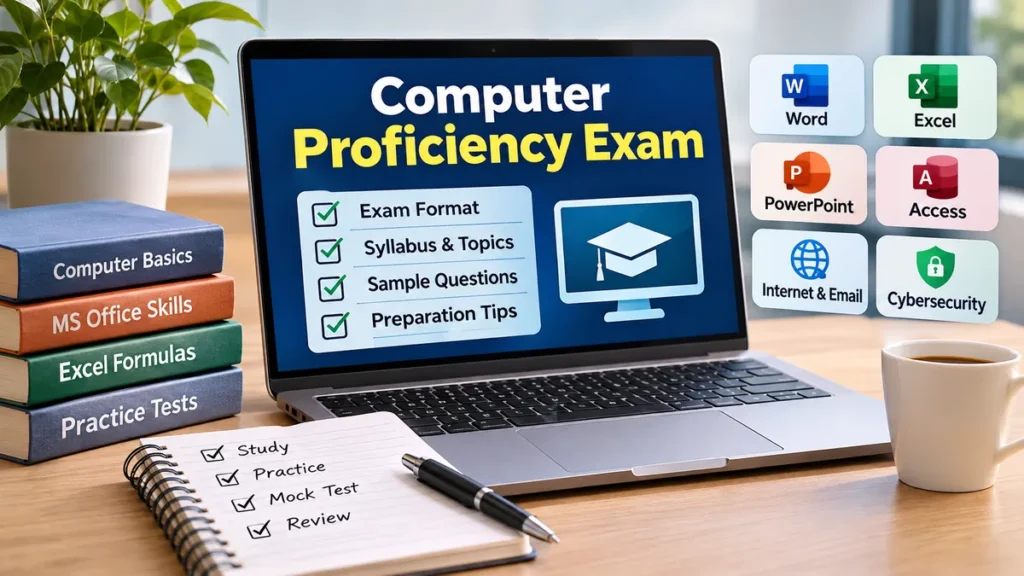
computer proficiency exam Syllabus and Topics
Most examinations assess a combination of fundamental computing knowledge, operating system navigation, productivity applications, and digital communication.
| Subject | Skills Assessed |
|---|---|
| Computer fundamentals | Hardware, software, memory and storage |
| Operating systems | Windows navigation and file management |
| Microsoft Word | Document creation and formatting |
| Microsoft Excel | Formulas, functions and spreadsheets |
| Microsoft PowerPoint | Presentation design and slide management |
| Microsoft Access | Database management |
| Internet and email | Browsing, communication and online research |
| Cybersecurity | Password protection and safe computing |
| Typing skills | Speed and accuracy |
Not every examination includes all these subjects. Always review the official syllabus before preparing.
Computer Fundamentals and Operating Systems
This section evaluates your understanding of computer components and everyday system operations.
Common topics include the central processing unit (CPU), random access memory (RAM), solid-state drives (SSD), input and output devices, system software, application software, and operating systems.
Practical tasks may require you to create folders, rename documents, move files between directories, install applications, or identify different file extensions.
Microsoft Word
Word processing is one of the most frequently assessed computer competencies.
Candidates should understand how to:
- Create, open, edit and save documents.
- Format fonts, paragraphs and page margins.
- Insert tables, images and page numbers.
- Manage headers and footers.
- Use spelling and grammar tools.
- Perform find and replace operations.
- Prepare documents for printing.
- Complete basic mail merge tasks.
A practical assessment might provide an unformatted document and ask you to reproduce a specific layout.
Microsoft Excel
Spreadsheet skills are particularly useful for administrative, financial and academic work.
Common Excel examination topics include worksheets, workbooks, cell references, data formatting, sorting, filtering, charts and mathematical formulas.
| Excel Function | Purpose | Example |
|---|---|---|
| SUM | Adds numerical values | =SUM(A1:A10) |
| AVERAGE | Calculates the mean | =AVERAGE(A1:A10) |
| MAX | Identifies the highest value | =MAX(A1:A10) |
| MIN | Identifies the lowest value | =MIN(A1:A10) |
| COUNT | Counts cells containing numbers | =COUNT(A1:A10) |
| IF | Evaluates a condition | =IF(A1>=50,"Pass","Fail") |
Understanding how formulas work is more useful than memorizing individual commands because practical examinations often use unfamiliar datasets.
Microsoft PowerPoint and Access
PowerPoint assessments usually involve creating presentations, selecting layouts, inserting visual elements, applying transitions, and organizing slides.
Some institutions also test Microsoft Access. California State University, Long Beach, for example, provides preparation materials covering Word, Excel, PowerPoint and Access.
Database-related questions may involve tables, records, fields, queries, primary keys, forms and reports.
Internet, Email and Digital Security
Digital literacy assessments may examine your ability to browse websites, use search engines, manage email attachments, identify suspicious messages and protect sensitive information.
Understanding phishing, malware, antivirus software, secure passwords, HTTPS and multi-factor authentication can also help you answer cybersecurity-related questions.
Computer Proficiency Test Format, Duration and Passing Score
Computer proficiency examinations do not follow a universal format. Some assess theoretical knowledge, while others focus heavily on performing tasks in software applications.
The three principal assessment formats are:
| Examination Format | Description |
|---|---|
| Theoretical assessment | Multiple-choice, matching and short-answer questions |
| Practical assessment | Tasks completed using computer applications |
| Combined assessment | Both theoretical questions and practical exercises |
Online examinations may use simulated software environments instead of fully installed desktop applications.
How Long Does a Computer Proficiency Test Take?
The duration depends on the number of subjects, questions and practical assignments.
Here are examples of examination structures published by educational institutions.
| Institution | Published Examination Structure |
|---|---|
| University of South Alabama | Three performance-based sections, 100 minutes |
| Midwestern State University | 80 questions covering concepts and Office skills |
| California State University, Long Beach | Preparation areas include Word, Excel, PowerPoint and Access |
These examples demonstrate why candidates should consult their own institution rather than assume every CPE follows the same structure.
What Is the Passing Score?
There is no universal passing score for a computer proficiency examination. Each university, employer or testing organization establishes its own assessment criteria.
Some examinations require an overall minimum grade, while others require candidates to demonstrate competency in individual sections.
For example, Midwestern State University requires a grade of C or higher to award course credit through its computer proficiency assessment. Its published policy also states that unsuccessful candidates cannot retake that particular examination.
Before registering, check the minimum passing score, permitted attempts, retake policy, examination fees and any section-specific requirements.
Computer Proficiency Exam Sample Questions and Answers
Practicing theoretical questions alongside practical exercises helps identify weaknesses before examination day.
The following original practice questions illustrate common computer proficiency topics. They are not taken from an official examination paper.
Computer proficiency practice test
/8 answered
Your score
/8
[Reset test]
Practical Computer Proficiency Exercises
Practical assignments measure your ability to complete real computer-based tasks.
| Application | Sample Assignment |
|---|---|
| Windows | Create a folder, rename a file and move it into the folder. |
| Word | Create a one-page report with headings, a table and page numbers. |
| Excel | Calculate total expenses and create a column chart. |
| PowerPoint | Create a five-slide presentation with images and transitions. |
| Access | Create a database table containing student records. |
| Compose a professional message and attach a document. |
Try completing these exercises without consulting tutorials. This provides a more realistic assessment of your current abilities.
How to Prepare for a Computer Proficiency Test
Effective preparation involves regular hands-on practice rather than relying entirely on reading study materials.
Begin by obtaining the official study guide and identifying the applications included in your examination. Focus your study time on the areas where you struggle most.
Follow a Seven-Day Study Plan
| Day | Study Topic | Recommended Practice |
|---|---|---|
| Day 1 | Computer fundamentals | Hardware, software and operating systems |
| Day 2 | Microsoft Word | Documents, formatting and tables |
| Day 3 | Microsoft Excel | Formulas, functions and charts |
| Day 4 | PowerPoint and Access | Presentations and basic databases |
| Day 5 | Internet and cybersecurity | Email, browsing and digital safety |
| Day 6 | Practical exercises | Timed software-based assignments |
| Day 7 | Mock examination | Review mistakes and weak areas |
This schedule is a suggested preparation framework, not an official examination requirement. Beginners may need several weeks of practice.
Learn Essential Keyboard Shortcuts
Keyboard shortcuts can improve efficiency during timed practical assessments.
| Shortcut | Function |
|---|---|
| Ctrl + C | Copy |
| Ctrl + V | Paste |
| Ctrl + X | Cut |
| Ctrl + S | Save |
| Ctrl + Z | Undo |
| Ctrl + Y | Redo |
| Ctrl + A | Select all |
| Ctrl + F | Find |
| Ctrl + P | |
| Ctrl + B | Bold |
| Ctrl + H | Replace |
| Alt + Tab | Switch applications |
Practice these shortcuts until they become familiar, but remember that some simulated testing platforms may restrict particular commands.
Use Reliable Computer Skills Study Resources
Useful preparation resources include:
- Microsoft Support for Office application tutorials.
- GCFGlobal for basic computer and productivity skills.
- University of South Alabama CPE Guide for examination concepts.
- California State University, Long Beach CPE Resources for subject-specific preparation materials.
Prioritize resources that match the software version and examination syllabus specified by your institution.
Registration, Eligibility and Examination-Day Requirements
Registration procedures vary depending on whether you are taking the examination for academic credit, employment or professional certification.
Universities may limit eligibility to enrolled students or individuals who have not previously completed an equivalent course. Recruitment organizations may require candidates to pass an earlier screening assessment.
Typical registration requirements include:
- Completing an examination application.
- Providing a valid identification document.
- Meeting academic or employment eligibility requirements.
- Paying the applicable examination fee.
- Selecting an available examination session.
- Obtaining registration confirmation or an admission card.
Some institutions offer examination accommodations for eligible candidates. Contact the testing organization beforehand if you require accessibility support.
Can You Take a Computer Proficiency Test Online?
Yes, some institutions provide online computer proficiency assessments. However, an online examination does not automatically mean that you can complete it from home.
Certain assessments use online testing software within supervised computer laboratories, while others may allow remote participation.
The University of South Alabama, for example, uses McGraw Hill’s SIMnet platform to evaluate practical computing skills in a simulated environment.
Always confirm the examination location, technical requirements and supervision rules before your scheduled session.
Common Mistakes to Avoid
Candidates sometimes lose marks on simple tasks despite understanding the underlying software.
Frequent mistakes include saving files in the wrong location, using incorrect filenames, overlooking formatting requirements, entering inaccurate spreadsheet formulas and spending too much time on individual questions.
Save your progress regularly when permitted, read each instruction carefully, and verify that your completed work matches the requested output.
Is a Computer Proficiency Examination Difficult?
The difficulty depends on your existing computer skills and the examination syllabus.
Someone who regularly creates Word documents, manages spreadsheets and organizes digital files may find a basic proficiency assessment relatively straightforward. Candidates with limited hands-on experience may need additional practice.
More advanced examinations can include complex spreadsheet calculations, database queries, information security concepts and detailed document formatting.
A useful way to determine readiness is to complete a timed mock examination without external assistance.
If you can independently perform the required tasks accurately and within the allotted time, you are likely better prepared than someone who has only memorized theoretical answers.
Benefits of Passing a Computer Proficiency Assessment
Passing the examination can demonstrate practical computer competence and support academic or professional development.
Depending on the examination provider, successful results may help candidates satisfy graduation requirements, obtain course credit, meet recruitment criteria or document essential workplace skills.
However, an institution-specific proficiency assessment is not necessarily equivalent to a professional certification such as Microsoft Office Specialist (MOS) or International Certification of Digital Literacy (ICDL).
Check how the qualification is recognized before relying on it for academic credit or employment.
Final Thoughts
A computer proficiency exam measures essential digital abilities that support education, employment and everyday computer use. Most assessments cover computer fundamentals, operating systems, office productivity software, internet communication and practical problem-solving.
The most effective preparation combines theoretical understanding with regular practical exercises, keyboard shortcut practice and timed mock examinations.
Start by reviewing your institution’s official syllabus, identifying your weaker subjects and practicing the required software applications independently. Consistent preparation can improve both examination performance and long-term computer confidence.