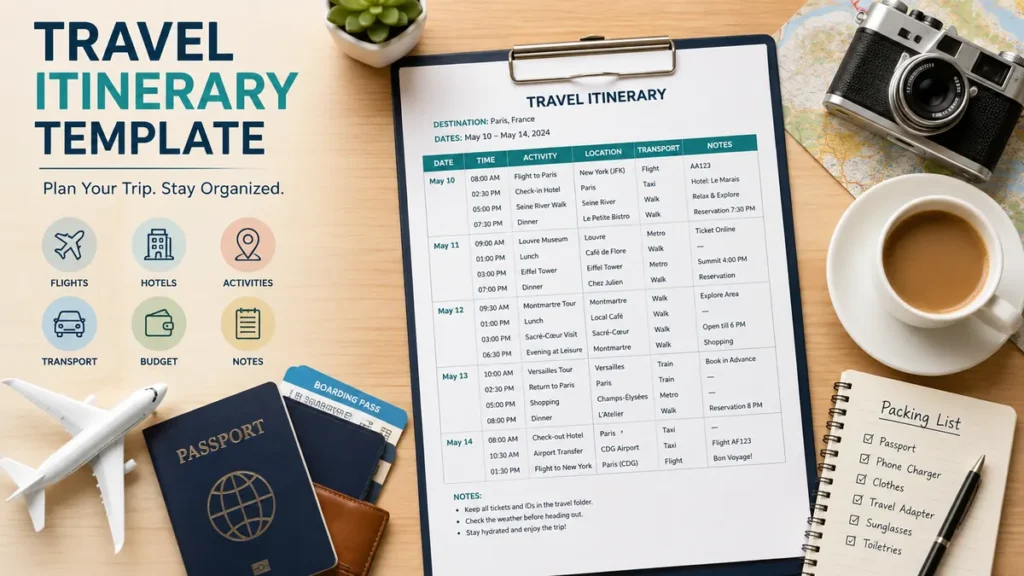
A great trip can become surprisingly stressful when flight details are buried in email, hotel addresses are saved somewhere else, and everyone in the group has a different idea of the daily plan. A travel itinerary template solves that problem by putting the essential details of a trip into one clear, usable schedule.
A travel itinerary template is a reusable document or spreadsheet that organizes trip dates, destinations, transportation, accommodation, reservations, activities, costs, and important notes. It can be created in Google Sheets, Google Docs, Microsoft Excel, Word, Notion, Canva, PDF, or a travel-planning app and customized for anything from a weekend getaway to a multi-city journey.
The real value is not creating a rigid minute-by-minute vacation. It is having enough structure that you know where you need to be, when you need to be there, and where to find the information when something changes.
What Is a Travel Itinerary Template?
A travel itinerary is essentially a schedule of events connected with planned travel, usually showing destinations, timing, activities, and transportation between locations. A template turns that schedule into a reusable framework rather than requiring you to start with a blank page for every journey.
Most good templates combine two types of information:
- Fixed information, such as flights, train departures, hotel check-in times, tours, and reservations.
- Flexible information, such as sightseeing ideas, restaurants, free time, shopping, beaches, museums, and optional activities.
That distinction matters.
Your 7:45 a.m. flight cannot move because you decide to sleep longer. Your plan to visit a particular café probably can.
The best itinerary therefore acts as a guide rather than a timetable you are afraid to break.
What should a travel itinerary include?
At minimum, include:
- Trip name and destination
- Travel dates
- Flight, train, bus, or driving information
- Accommodation details
- Daily activities
- Reservation times
- Addresses and locations
- Transportation between stops
- Confirmation numbers
- Important links
- Estimated costs
- Emergency information
- Notes for each day
More detailed travel planners may also contain a packing list, pre-trip checklist, expense tracker, maps, and task assignments for different travelers. Current Google Sheets-based planners commonly combine daily itineraries, costs, destinations, packing information, notes, and links in one file.
Travel Itinerary Template Structure You Can Copy
You do not need complicated software to build an effective itinerary. A simple table is often enough.
Here is a practical daily structure:
| Date | Time | Activity | Location | Transport | Booking Details | Cost | Notes |
|---|---|---|---|---|---|---|---|
| May 10 | 8:00 AM | Breakfast | Hotel | Walk | — | $15 | Leave bags at reception |
| May 10 | 9:30 AM | Museum visit | City Center | Metro | Ticket #2457 | $25 | Entry at north gate |
| May 10 | 12:30 PM | Lunch | Riverside | Walk | Reservation 12:30 | $30 | Outdoor table |
| May 10 | 2:00 PM | Old Town walk | Historic District | Walk | — | Free | Flexible |
| May 10 | 7:30 PM | Dinner | Downtown | Taxi | Reservation 7:30 | $45 | Smart casual |
For longer journeys, add a separate trip-summary section above the daily schedule.
Trip overview
Include:
Destination:
Departure date:
Return date:
Travelers:
Main accommodation:
Emergency contact:
Travel insurance information:
Total estimated budget:
Transportation summary
Record:
Outbound flight/train:
Departure terminal/station:
Arrival terminal/station:
Booking reference:
Baggage allowance:
Airport or station transfer:
Repeat the same fields for the return journey.
Accommodation summary
For each property, record:
Hotel/property name:
Address:
Check-in:
Check-out:
Reservation number:
Phone:
Map link:
Amount paid:
Amount due:
Keeping these logistics together is especially useful when your internet connection disappears just as you arrive somewhere unfamiliar.
How to Create a Travel Itinerary Template Step by Step
An itinerary becomes useful when information is added in the right order. Starting with sightseeing usually creates unnecessary revisions because flights, hotels, travel distances, and reservation times determine what is realistically possible.
1. Add your destination and travel dates
Start with the basic boundaries of the trip.
Record your:
- Departure date
- Arrival date
- Return date
- Cities or regions
- Number of travelers
For multi-city trips, write the overnight destination for every date.
For example:
| Date | Overnight Location |
| June 2 | Rome |
| June 3 | Rome |
| June 4 | Florence |
| June 5 | Florence |
| June 6 | Venice |
This simple step prevents one of the most common planning mistakes: confusing a travel day with a full sightseeing day.
2. Enter transportation before activities
Add all fixed transportation next:
- Flights
- Trains
- Buses
- Rental cars
- Ferries
- Airport transfers
- Long-distance drives
Record departure and arrival times rather than only the total journey duration.
A 90-minute flight might consume five hours once transportation to the airport, security, boarding, baggage collection, and travel into the destination are considered.
Include confirmation numbers and direct reservation links when possible.
3. Add accommodation details
Next, enter every hotel, hostel, apartment, resort, campground, or other accommodation.
Include check-in and check-out times.
This becomes especially important on hotel-change days. If checkout is 11:00 a.m. and your next property accepts guests from 3:00 p.m., decide in advance what happens to your luggage.
4. Add fixed reservations
Now enter anything that already has a specific time:
- Museum tickets
- Guided tours
- Restaurant reservations
- Theatre performances
- Sporting events
- Attraction tickets
- Spa appointments
- Excursions
These become the anchors around which the rest of your day is organized.
5. Group activities geographically
Avoid planning purely from a list of attractions.
Look at a map.
If three places you want to visit are within walking distance of one another, schedule them together rather than crossing the city repeatedly.
This is one of the simplest ways to make an itinerary more realistic. Spreadsheet-focused travel planners also recommend grouping activities by geographic area and adding direct map links to reduce unnecessary travel between stops.
6. Estimate transportation time between activities
Write down how you will move between major stops.
Examples include:
- Walk — 12 minutes
- Metro — 20 minutes
- Taxi — approximately 15 minutes
- Train — 1 hour 40 minutes
- Drive — approximately 2 hours
Add a buffer when timing matters.
Google Maps and similar mapping tools are useful during the planning stage, while dedicated spreadsheet tools such as Travel Mapper can connect itinerary locations with map-based planning and Google My Maps.
7. Include meals without scheduling every bite
Meals deserve space in the itinerary, but they do not always require a specific restaurant.
You might write:
12:30–2:00 p.m. — Lunch near the museum
instead of forcing yourself to reach one particular restaurant at exactly 12:45.
Reserve restaurants only when advance booking is worthwhile or when visiting them is part of the experience.
8. Add flexible time
Leave empty space.
A good schedule should survive:
- Delayed transportation
- Long queues
- Bad weather
- Tired travelers
- A museum you unexpectedly love
- A restaurant that takes longer than expected
- Discovering something interesting on the way
Trying to maximize every hour often makes the trip worse rather than better.
Quick Takeaway: Treat flights, trains, accommodation changes, ticketed attractions, and reservations as fixed anchors. Keep ordinary sightseeing flexible around them.
Travel Itinerary Template Formats: Which One Works Best?
There is no single best format. The right choice depends on how you plan and how much information your trip contains.
Current template providers commonly support formats such as Google Docs, Google Sheets, Microsoft Word, Excel, PDF, Canva, and Notion.
| Format | Best For | Main Strength | Main Limitation |
| Google Sheets | Detailed or group trips | Flexible, sortable, collaborative | Less visually polished |
| Excel | Detailed offline planning | Powerful organization and formulas | Collaboration can be less convenient |
| Google Docs | Simple itineraries | Easy to read and share | Harder to manage large datasets |
| Word | Printable travel plans | Familiar document format | Limited live collaboration |
| Notion | Trips with lots of research | Databases, links, notes and pages | Can become overly complex |
| Canva | Attractive printable plans | Strong visual design | Less practical for calculations |
| Final reference copy | Easy to save and print | Usually less convenient to edit | |
| Travel app | Mobile-focused planning | Maps and itinerary features together | Less customizable than a spreadsheet |
Google Sheets travel itinerary template
Google Sheets is particularly effective for complex trips.
You can create separate tabs for:
- Daily itinerary
- Flights
- Hotels
- Budget
- Packing
- Restaurants
- Attractions
- Reservations
- Travel checklist
It also works well for groups because multiple travelers can edit the same itinerary. Google Sheets travel planners are particularly suited to multi-day, multi-city, road-trip, budget-tracking, and collaborative planning.
Excel travel itinerary template
Microsoft Excel provides many of the same advantages.
It is particularly useful when you want:
- Expense formulas
- Budget calculations
- Drop-down menus
- Filters
- Category tracking
- Offline access
An Excel workbook can place the itinerary, travel checklist, trip budget, and packing list on separate sheets while keeping everything inside one file.
Google Docs or Word itinerary
Choose a document format when your travel schedule is fairly straightforward.
A document is often easier to read on a phone than a large spreadsheet, especially when your itinerary is mainly chronological.
Use headings such as:
Day 1 — Arrival
Day 2 — Historic Center
Day 3 — Day Trip
Day 4 — Departure
Then list times, locations, bookings, and notes underneath.
Printable PDF itinerary
A printable travel itinerary is useful as a backup.
Template collections commonly provide printable PDF versions alongside editable Word and Excel files.
Even if you normally use your phone, carrying a one-page summary containing your hotel address, transportation information, booking references, and emergency contacts can be useful when your battery dies or mobile data is unavailable.
Notion travel planner
Notion works well if your planning process involves large amounts of research.
You can keep:
- Destination research
- Reservations
- Restaurants
- Activities
- Notes
- Packing information
- Trip schedule
inside interconnected pages and databases. Notion’s travel templates are designed for scenarios ranging from solo journeys and group travel to business and multi-destination trips.
Canva itinerary
Canva is useful when presentation matters.
It works particularly well for:
- Family vacation handouts
- Group trip summaries
- Destination weddings
- Tour schedules
- Visually designed travel plans
Canva offers customizable itinerary planner templates that can be personalized and printed, while similar design-focused tools such as Adobe Express allow users to combine itinerary information with maps, photos, graphics, and notes.
How Detailed Should a Travel Itinerary Template Be?
Detailed enough to remove uncertainty, but not so detailed that following it becomes work.
Include exact times when the time matters.
For example:
Good use of precision:
7:20 a.m. — Leave hotel
8:15 a.m. — Train departure
10:05 a.m. — Arrive Florence
For casual sightseeing, use broader time blocks:
Morning: Historic center
Lunch: Near central market
Afternoon: Museum and riverside walk
Evening: Dinner and free time
This approach creates structure without making the schedule brittle.
A useful rule is to separate your day into three levels:
Fixed
Cannot easily change:
- Flights
- Trains
- Tours
- Tickets
- Hotel changes
- Restaurant bookings
Planned
Things you intend to do:
- Museums
- Beaches
- Neighborhoods
- Shopping areas
- Landmarks
Optional
Things you can skip without damaging the trip:
- Extra cafés
- Viewpoints
- Shops
- Secondary attractions
- Additional restaurants
This makes replanning far easier when something unexpected happens.
Add a Travel Budget to Your Itinerary
Money and scheduling are closely connected.
A wonderful itinerary that exceeds your budget halfway through the trip is not a particularly good itinerary.
Consider tracking:
| Category | Estimated | Actual |
| Flights | $600 | $610 |
| Accommodation | $800 | $795 |
| Local transport | $200 | $175 |
| Food | $450 | — |
| Attractions | $250 | — |
| Shopping | $150 | — |
| Emergency buffer | $200 | — |
If traveling with others, add:
Paid by
Split between
Amount owed
Expense-management sections are commonly included in spreadsheet travel planners, especially when couples or groups are sharing costs.
Do not budget every dollar so tightly that a small change creates a problem. Keep a contingency amount for unexpected transportation, baggage costs, schedule changes, or other surprises.
Travel Itinerary Template for Group Trips
Group trips need slightly different planning.
The problem is no longer simply deciding what to do. It is keeping several people working from the same information.
Use a shared itinerary and add columns for:
- Person responsible
- Booking status
- Payment status
- Who paid
- Meeting point
- Votes or preferences
Google Sheets is useful here because collaborators can work from the same document. Notion can perform a similar role for travelers who prefer pages and databases.
You may also use dedicated travel apps. Wanderlog, for example, has collaborative trip-planning and mapping features, while TripIt can organize itinerary information from reservation emails. Google Docs, Sheets, and Maps remain common alternatives for travelers who prefer familiar collaborative tools.
The essential rule is simpler than the technology: maintain one source of truth.
If part of the itinerary lives in a spreadsheet, part in a messaging group, and the latest restaurant reservation exists only on one person’s phone, confusion becomes almost inevitable.
Include Reservation and Quick-Reference Information
A useful itinerary should reduce the number of apps and emails you need to search while traveling.
Create a quick-reference section containing:
- Airline
- Flight number
- Departure terminal
- Hotel address
- Hotel telephone number
- Rental-car company
- Booking references
- Tour meeting points
- Important reservation numbers
- Emergency contacts
- Travel insurance details
Add booking links when convenient.
A short summary section is one of the most useful additions because it provides immediate access to critical information without scrolling through several days of activities.
Add a Packing and Pre-Trip Checklist
Your itinerary describes what happens during the journey. A travel planner can also cover what needs to happen before departure.
A simple pre-trip checklist might include:
- Passport or identification checked
- Visa requirements reviewed
- Travel insurance arranged
- Accommodation confirmed
- Transportation booked
- Airport transfer planned
- Attraction tickets saved
- Bank cards checked
- Mobile data or eSIM arranged
- Essential medication packed
- Chargers packed
- Offline maps downloaded
- Copies of important documents saved
Detailed spreadsheet templates often place the packing list and pre-trip tasks on separate sheets alongside the itinerary and budget.
For packing, categories work better than one long list.
Use:
- Clothing
- Footwear
- Toiletries
- Documents
- Electronics
- Medication
- Accessories
- Carry-on essentials
Then mark each item as packed.
Common Travel Itinerary Planning Mistakes
A template does not automatically create a realistic schedule. How you use it matters more than how attractive it looks.
Planning too many activities
Three meaningful experiences with enough time to enjoy them usually create a better day than eight attractions connected by rushed transportation.
Prioritize.
Keep secondary activities as backups.
Ignoring travel time
Two attractions may both be in Paris, London, Tokyo, or New York without being conveniently close together.
Check actual routes before building the day.
Forgetting arrival-day fatigue
An overnight flight followed by immigration, baggage claim, transportation, hotel check-in, and six hours of sightseeing is rarely as appealing in reality as it appears on a spreadsheet.
Keep arrival days light.
Forgetting opening days and reservation windows
Some attractions close on particular weekdays or operate seasonal schedules.
Verify current opening times directly before finalizing the itinerary.
Scheduling every meal
Unless a restaurant is genuinely important to you, leave some meals flexible.
Travel frequently produces unexpected discoveries.
Keeping no offline copy
Save the finished itinerary to your phone and consider keeping a PDF or printed summary.
Do not assume mobile data will always work.
Treating estimated times as guarantees
Traffic, queues, public transport delays, weather, and tiredness change schedules.
Buffers protect the rest of your day.
Sample 3-Day Travel Itinerary Template
Here is a simple structure you can adapt.
Day 1 — Arrival and Orientation
8:30 a.m. — Arrive at destination
9:30 a.m. — Transfer to hotel
10:30 a.m. — Leave luggage
11:00 a.m. — Breakfast or early lunch
12:30 p.m. — Explore neighborhood
3:00 p.m. — Hotel check-in
4:00 p.m. — Rest
6:00 p.m. — Sunset viewpoint
7:30 p.m. — Dinner
Evening — Free time
Day 2 — Main Sightseeing Day
8:00 a.m. — Breakfast
9:00 a.m. — Major attraction
11:30 a.m. — Historic district
1:00 p.m. — Lunch
2:30 p.m. — Museum
5:00 p.m. — Café/rest
6:00 p.m. — Flexible activity
8:00 p.m. — Dinner
Day 3 — Flexible Exploration and Departure
8:30 a.m. — Breakfast
9:30 a.m. — Local market
11:00 a.m. — Optional attraction
12:30 p.m. — Lunch
2:00 p.m. — Collect luggage
2:30 p.m. — Transfer to airport/station
5:00 p.m. — Departure
Notice that the template does not try to account for every minute. It identifies the important anchors and leaves enough space for the trip to breathe.
How to Make Your Travel Itinerary Easier to Use During the Trip
Before departure, simplify the detailed planning document into something you can scan quickly.
Use clear categories for:
- Transport
- Accommodation
- Food
- Activities
- Reservations
Add map links to difficult-to-find locations.
Put confirmation numbers beside the relevant activity rather than keeping them on a separate page.
Save important tickets to your phone wallet or offline storage when supported.
Share the current version with anyone traveling with you.
And update the master itinerary when a booking changes. Do not rely on everyone remembering a correction from a group chat.
For particularly complicated journeys, keep both versions:
Master planner: Detailed spreadsheet or workspace containing budgets, research, links, reservations, and notes.
Travel copy: Simplified day-by-day itinerary containing only the information you will actually need while moving around.
A Travel Itinerary Template Should Create Freedom, Not More Work
The purpose of a travel itinerary template is not to control every moment of your vacation. It is to remove avoidable uncertainty.
Organize your transportation and accommodation first, add fixed reservations, group activities by location, allow realistic travel time, track essential costs, and leave space for flexibility.
Google Sheets or Excel works well for detailed planning. Google Docs and Word suit simpler schedules. Notion can organize research-heavy trips, while Canva or PDF formats work well when you want a clean visual or printable itinerary. Dedicated travel apps can be useful when mapping and mobile collaboration matter most.
Once the essential information is in one place, stop trying to perfect the schedule. Save an offline copy, share it with your travel companions, and use the itinerary as a reference—not a rulebook.
That is what a useful travel plan should do: help you spend less time managing the trip and more time experiencing it.