Passport photos may look almost identical, but their required dimensions are not universal. A photo accepted for a UK passport, for example, may be the wrong physical size for a U.S. or Canadian passport.
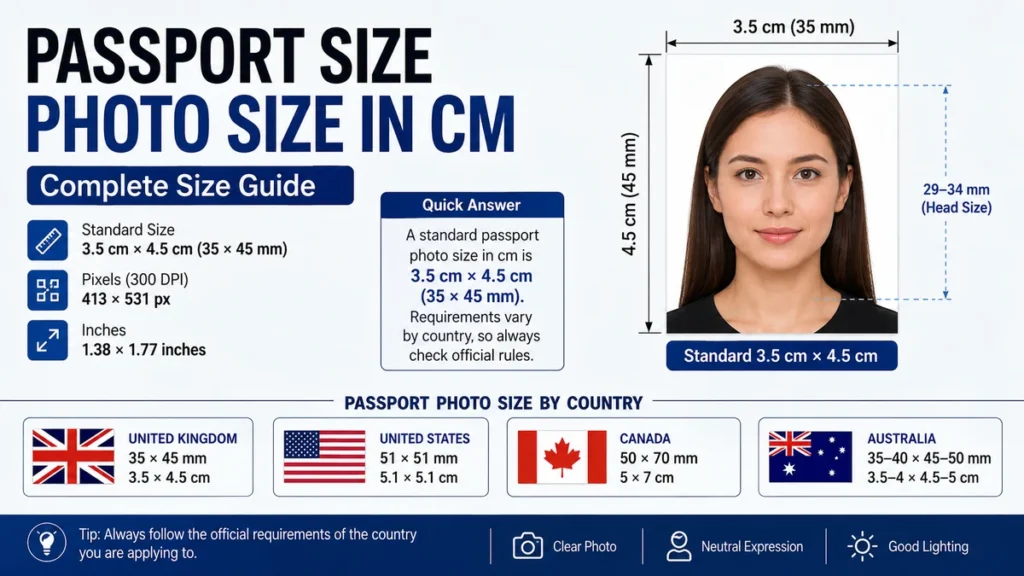
The most commonly used passport size photo size in cm is 3.5 cm × 4.5 cm, equivalent to 35 × 45 mm. However, passport authorities set their own requirements. The United States uses 5.1 × 5.1 cm, Canada uses 5 × 7 cm, and Australia permits a size range rather than one exact measurement.
Quick answer: A standard passport-style photo is often 3.5 cm wide × 4.5 cm high (35 × 45 mm). At 300 DPI, that is approximately 413 × 531 pixels. This is common in many countries, but it is not an international universal size, so always check the requirements of the passport authority handling your application.
What Is the Standard passport size photo size in cm?
When people ask for a “standard passport-size photo,” they usually mean a small biometric portrait measuring:
| Measurement | Common 35 × 45 Format |
|---|---|
| Centimeters | 3.5 × 4.5 cm |
| Millimeters | 35 × 45 mm |
| Inches | About 1.38 × 1.77 inches |
| Pixels at 300 DPI | About 413 × 531 pixels |
| Orientation | Portrait |
A 35 × 45 mm photo converts exactly to 3.5 × 4.5 cm because 10 millimeters equal one centimeter.
This format is used for UK printed passport photos and appears widely in passport, visa, residence-document, and identity-photo specifications around the world. The UK government, for example, requires printed passport photographs to be 35 mm wide and 45 mm high.
The crucial point is that “passport size” is not a measurement by itself. You need to know which country’s passport or document you are preparing the photograph for.
passport size photo size in cm by Country
Passport authorities can specify different widths, heights, facial proportions, backgrounds, and digital-image requirements.
Here are several common examples based on current official requirements.
| Country | Passport Photo Size | Size in cm |
| United Kingdom | 35 × 45 mm | 3.5 × 4.5 cm |
| United States | 51 × 51 mm | 5.1 × 5.1 cm |
| Canada | 50 × 70 mm | 5 × 7 cm |
| Australia | 35–40 × 45–50 mm | 3.5–4 × 4.5–5 cm |
Official UK guidance requires a printed photograph measuring 45 mm high × 35 mm wide.
The U.S. Department of State requires a passport photo measuring 2 × 2 inches, or 51 × 51 mm, which is approximately 5.1 × 5.1 cm.
Canada requires passport photographs to measure 50 mm wide × 70 mm high, or 5 × 7 cm.
Australia allows a small range: 35–40 mm wide and 45–50 mm high.
Why isn’t there one international passport photo size?
International standards support consistent biometric identification and machine-readable travel documents, but individual issuing authorities still establish their own application and photograph specifications.
ICAO’s Doc 9303 treats the facial portrait as a key biometric component of machine-readable travel documents and emphasizes standardized, high-quality facial images. That does not mean every country must use the same printed photograph dimensions.
This distinction explains why two passport photos can both follow biometric principles while having different physical dimensions.
Is Passport Size Photo 3.5 × 4.5 cm?
Yes, 3.5 × 4.5 cm is one of the most common passport-photo formats, but it should not automatically be used for every passport application.
In millimeters:
3.5 cm × 4.5 cm = 35 mm × 45 mm
In inches:
3.5 cm × 4.5 cm ≈ 1.38 × 1.77 inches
For UK printed passport applications, 35 × 45 mm is the official size.
For a U.S. passport, however, using a 3.5 × 4.5 cm print would be incorrect because the required photograph is square at 51 × 51 mm.
So if a photo studio asks which “passport size” you need, give them the country or exact document requirement instead of simply requesting a passport-size picture.
Is 35 × 45 mm the same as 3.5 × 4.5 cm?
Yes.
The conversion is straightforward:
- 35 mm ÷ 10 = 3.5 cm
- 45 mm ÷ 10 = 4.5 cm
Therefore:
35 × 45 mm = 3.5 × 4.5 cm
There is no rounding involved in this conversion.
What Is 2 × 2 Inch Passport Size in CM?
A 2 × 2 inch passport photograph measures exactly:
5.08 × 5.08 cm
Because:
1 inch = 2.54 cm
Therefore:
2 × 2.54 = 5.08 cm
In practical passport specifications, this is commonly stated as 51 × 51 mm, or approximately 5.1 × 5.1 cm.
The United States uses this square format for passport photographs. The U.S. Department of State also requires the applicant’s head to measure roughly 25–35 mm from the bottom of the chin to the top of the head.
This is why treating 5 × 5 cm and 2 × 2 inches as perfectly identical can cause a small measurement error. Two inches is technically 5.08 cm, not exactly 5 cm.
passport size photo size in cm and Pixels
Centimeters describe a photograph’s physical printed dimensions, while pixels describe its digital dimensions.
They cannot be converted correctly without knowing the resolution, usually expressed as DPI or PPI.
For a common 3.5 × 4.5 cm image at 300 DPI, the approximate dimensions are:
413 × 531 pixels
This follows the conversion:
- Convert centimeters to inches.
- Multiply the dimensions in inches by 300 pixels per inch.
For width:
3.5 ÷ 2.54 × 300 ≈ 413 pixels
For height:
4.5 ÷ 2.54 × 300 ≈ 531 pixels
A 35 × 45 mm passport-style image is therefore approximately 413 × 531 pixels when prepared at 300 DPI.
Common print dimensions at 300 DPI
| Physical Size | Approximate Pixels at 300 DPI |
| 3.5 × 4.5 cm | 413 × 531 px |
| 5.08 × 5.08 cm | 600 × 600 px |
| 5 × 7 cm | 591 × 827 px |
These pixel figures are useful when preparing a print file, but do not assume they automatically meet an online passport application’s requirements.
Digital applications can impose separate rules for pixel dimensions, file format, file size, image quality, and cropping.
For example, UK digital passport photographs must be at least 600 pixels wide and 750 pixels tall, while printed UK photos use the separate 35 × 45 mm physical specification.
That is an important distinction: printed-photo dimensions and digital-upload dimensions are not always interchangeable.
How Large Should Your Face Be in a Passport Photo?
Getting the outer dimensions right is only part of the job. Passport authorities also control how large your face appears inside the frame.
A photograph can measure exactly 3.5 × 4.5 cm and still fail if the head is too large, too small, tilted, poorly positioned, or partially obscured.
For example, UK printed photographs require the image from the crown of the head to the chin to measure 29–34 mm.
The U.S. requires a centered head measuring about 25–35 mm from chin to the top of the head.
Canadian passport photos are 50 × 70 mm, with the facial height from chin to crown required to measure 31–36 mm.
Australian passport guidance similarly specifies a chin-to-crown face height of 32–36 mm.
Quick Takeaway: Do not resize only the photo canvas. Check both the outer dimensions and the required head size or facial positioning.
How to Make a Passport Photo the Correct Size
If you already have a suitable portrait, use this process before printing or uploading it.
- Check the issuing authority’s current requirements.
Confirm the country, document type, physical dimensions, and whether the application requires a print or digital upload. - Crop to the required aspect ratio.
A 35 × 45 mm photograph is rectangular, while a U.S. 51 × 51 mm photograph is square. Do not stretch a rectangular picture into a square. - Position the head correctly.
Keep your face centered and match the required chin-to-crown measurement or facial proportion. - Set the final physical dimensions.
For a 35 × 45 mm requirement, set the image to exactly 3.5 × 4.5 cm. - Choose adequate resolution.
For printing, 300 DPI is a useful working resolution because it produces approximately 413 × 531 pixels for a 3.5 × 4.5 cm photograph. - Print without automatic scaling.
If your printer enlarges or shrinks the image using options such as “Fit to Page,” the final print may no longer have the required dimensions. - Measure the printed result.
Use a ruler before submitting it. A correctly prepared file can still be printed at the wrong physical size if the printer settings alter its scale.
For an online application, follow the digital-upload rules instead of assuming a print-ready image is suitable.
Passport Photo Background, Expression, and Quality
Correct passport size photo size in cm does not guarantee acceptance. The photograph also has to represent you clearly enough for identity and biometric checks.
Requirements vary between countries, but common principles include a clear front-facing portrait, appropriate lighting, an unobstructed face, natural skin tones, and a simple background.
For U.S. passport photos, the Department of State requires a recent color photograph, with a white or off-white background and the head centered in the image.
Australian rules require a clear, in-focus photograph with uniform lighting, a plain white or light-grey background, and the applicant looking straight at the camera.
ICAO guidance also emphasizes standardized facial portraits because the facial image is an important biometric used to connect the travel document with its holder.
Common problems to avoid include:
- Incorrect width or height
- Face positioned too high or too low
- Head too large or too small
- Cropping off part of the head
- Strong shadows on the face or background
- Blurry or pixelated images
- Distorted aspect ratios
- Incorrect background
- Excessive digital retouching
- Printing with automatic enlargement or reduction
A technically sharp image can still be rejected when its composition fails the relevant authority’s rules.
Printed vs. Digital Passport Photos
One of the easiest mistakes is assuming a digital passport photo must have the same fixed dimensions as a printed photograph.
A printed photo is measured physically in centimeters or millimeters.
A digital photo is normally assessed using characteristics such as:
- Pixel width and height
- Aspect ratio
- File format
- File size
- Image quality
- Facial positioning
- Background
- Digital alteration
The UK illustrates this difference clearly. Printed passport photos must measure 35 × 45 mm, but digital photos are subject to digital specifications, including minimum pixel dimensions.
For U.S. visa digital images, official guidance specifies a square image between 600 × 600 and 1200 × 1200 pixels.
Always identify whether the application asks for a printed photograph, digital image, or photo captured during the application process before resizing anything.
Is a Passport Photo the Same Size as a Visa Photo?
Not necessarily.
A passport photo and visa photo may share dimensions in some countries or applications, but “visa photo” and “passport photo” are different document requirements.
Never assume that a photograph used successfully for one document will automatically work for another.
The issuing government, embassy, consulate, or visa application system should be treated as the final authority.
The same principle applies to driving licences, residence permits, national ID cards, citizenship applications, and other identity documents. They may look like standard passport photographs while following different measurements.
How to Check Passport Photo Size Before Submission
A simple final check can prevent an avoidable application problem.
For printed photographs:
- Measure the width with a ruler.
- Measure the height.
- Check that the photograph has not been stretched.
- Measure the chin-to-crown height when the authority specifies it.
- Compare the photograph with the latest official application instructions.
For digital photographs:
- Open the image properties.
- Check the pixel dimensions.
- Confirm the file type.
- Check the file size.
- Make sure the aspect ratio has not changed.
- Review the official composition and background requirements.
Do not rely solely on a photo studio’s “standard passport size” preset. A preset may be correct for one country but unsuitable for another.
Final Answer: What Passport Photo Size Should You Use?
The commonly recognized passport size photo size in cm is 3.5 × 4.5 cm, equivalent to 35 × 45 mm and approximately 413 × 531 pixels at 300 DPI. This is a useful reference size, especially for countries using the 35 × 45 mm format.
But there is no single passport-photo dimension accepted worldwide. The United States uses approximately 5.1 × 5.1 cm, Canada uses 5 × 7 cm, and Australia accepts photographs within a defined dimensional range.
Before cropping, printing, or uploading your image, check the current instructions from the passport authority for your country and application type. The correct dimensions, facial proportions, background, and digital specifications all matter—not just the words “passport size.”