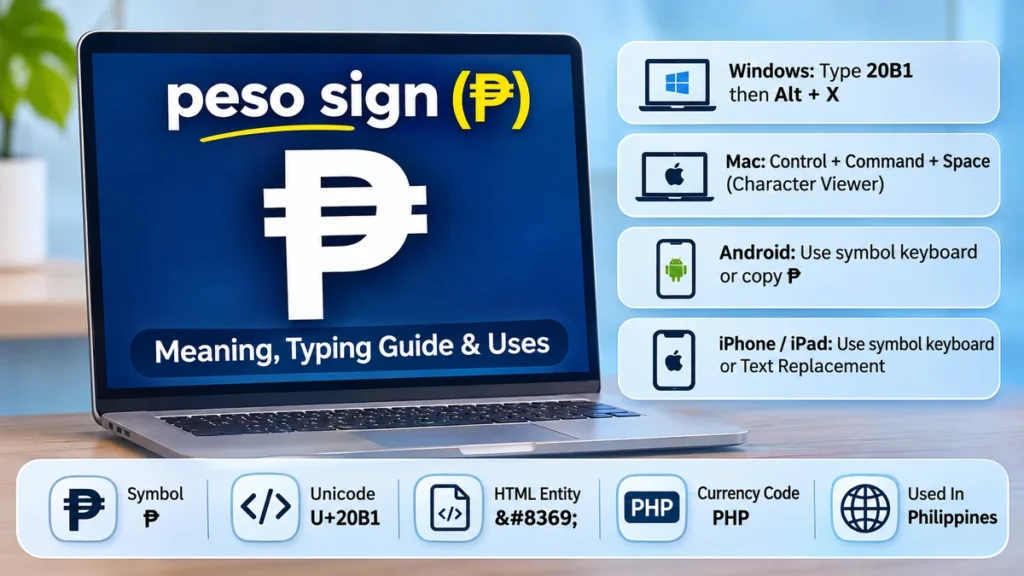
The peso sign can look different depending on which country’s currency you are referring to. The Philippine peso uses ₱, while several other peso currencies commonly use $.
The peso sign (₱) is the official currency symbol of the Philippine peso, abbreviated PHP. It resembles a capital P with two horizontal strokes. Its Unicode code point is U+20B1, and its HTML entity is ₱. You can type or insert it on computers, smartphones, spreadsheets, and websites.
Understanding the difference between ₱, $, and PHP helps avoid confusion when writing prices, handling international payments, or displaying financial information online.
What Is the peso sign?
The peso sign is a monetary symbol used to represent a currency called the peso. Although several countries use currencies with that name, their symbols are not always identical.
In the Philippines, the official currency symbol is ₱. It identifies amounts denominated in Philippine pesos and appears on price tags, receipts, banking applications, financial documents, and online stores.
For example:
- ₱100 means 100 Philippine pesos.
- ₱500 means 500 Philippine pesos.
- ₱1,250.50 means 1,250 pesos and 50 centavos.
- PHP 2,000 is an alternative international representation of ₱2,000.
The Philippine peso is divided into 100 centavos. Its international currency code, PHP, follows the ISO 4217 standard.
What does the peso sign look like?
₱
Philippine peso symbolUnicode U+20B1 Copy peso sign
The symbol resembles an uppercase letter P with two horizontal bars crossing its upper stem. Its precise appearance may vary slightly between fonts.
The two strokes distinguish the Philippine peso symbol from the ordinary Latin letter P. However, a plain P is sometimes used informally when the proper currency symbol is unavailable.
Peso sign vs. peso currency code
The symbol ₱ and the currency code PHP both refer to the Philippine peso, but they serve different purposes.
| Feature | ₱ | PHP |
|---|---|---|
| Type | Currency symbol | ISO currency code |
| Length | One character | Three letters |
| Example | ₱750 | PHP 750 |
| Common use | Local prices and displays | International finance and currency systems |
| Meaning | Philippine peso | Philippine peso |
For local price displays, ₱ is generally more compact. For international transactions or datasets containing multiple currencies, PHP is often clearer.
How to Type the peso sign on Different Devices
The easiest way to enter the Philippine peso symbol depends on your operating system, keyboard layout, and application.
Copy the symbol directly Copy ₱
Paste it into Word, Excel, Google Docs, a message, or a website editor.
How to type the peso sign on Windows
Windows offers several methods for entering ₱.
Method 1: Use the Character Map
- Open the Windows Start menu.
- Search for Character Map.
- Choose a font that supports the Philippine peso symbol.
- Find and select ₱.
- Copy the character and paste it into your document.
Method 2: Use Microsoft Word
In Microsoft Word, type 20B1 and then press Alt + X. Word converts the hexadecimal Unicode value into ₱.
This shortcut works in supported Microsoft Office text fields, but it is not a universal Windows keyboard shortcut.
Method 3: Use a Philippine keyboard layout
Some Philippine keyboard layouts support direct entry of the peso symbol through a dedicated key combination. The exact shortcut depends on the layout installed, so check the keyboard mapping rather than assuming every Windows keyboard uses the same combination.
How to type the peso sign on Mac
On macOS, you can use the Character Viewer:
- Place the cursor where the symbol should appear.
- Press
Control + Command + Spaceto open the Character Viewer on supported macOS versions. - Search for “peso.”
- Select the Philippine peso symbol.
You can also enable Unicode Hex Input as a keyboard input source and enter the character using its hexadecimal code, 20B1.
How to type the peso sign on Android
Android keyboards vary by manufacturer and language settings.
Open a text field, switch to the number or symbol keyboard, and look for ₱ among the currency characters. On some keyboards, long-pressing a currency key reveals additional options.
If your keyboard does not provide the symbol, copy ₱ from this page and paste it wherever needed.
How to type the peso sign on iPhone and iPad
On iOS and iPadOS, available currency characters depend on the active keyboard.
You can check the symbol keyboard or use text replacement for frequent entry:
- Open Settings.
- Go to General, then Keyboard.
- Select Text Replacement.
- Add ₱ as the phrase.
- Assign a shortcut such as
phpeso.
Afterward, typing the shortcut can insert the Philippine peso symbol.
peso sign Keyboard Shortcuts and Unicode Codes
The peso sign has a standardized Unicode identity, allowing compatible devices and software to display the same character.
| Format | Value |
|---|---|
| Symbol | ₱ |
| Unicode | U+20B1 |
| Unicode name | PESO SIGN |
| Decimal character reference | ₱ |
| Hexadecimal character reference | ₱ |
| UTF-8 bytes | E2 82 B1 |
| Microsoft Word shortcut | 20B1 then Alt + X |
| ISO 4217 currency code | PHP |
Unicode is particularly useful because it provides a consistent way for software to identify the character independently of the font or operating system.
How to use the peso sign in HTML
Web developers can insert the symbol directly into an HTML document saved with UTF-8 encoding:
<p>Price: ₱1,500</p>Alternatively, use a numeric HTML character reference:
<p>Price: ₱1,500</p>Both approaches display the same Philippine peso symbol in a browser that supports the character.
How to use the peso sign in CSS and JavaScript
In CSS, the Unicode escape can be used in generated content:
.price::before {
  content: "\20B1";
}
In JavaScript, the symbol can be represented through a Unicode escape:
const peso = "\u20B1";
console.log(peso + "500");
For applications that format money dynamically, the internationalization API provides a more reliable approach:
const price = new Intl.NumberFormat("en-PH", {
  style: "currency",
  currency: "PHP"
}).format(1500);

console.log(price);
The output follows the currency formatting rules supported by the runtime and locale. It may include a currency symbol, grouping separators, and decimal places.
How to Insert the peso sign in Word, Excel, and Google Docs
Currency symbols are especially common in documents and spreadsheets. Using the correct symbol improves readability and reduces ambiguity.
In Microsoft Word
The quickest supported method is to type 20B1 and press Alt + X.
You can also open Insert, select Symbol, and choose More Symbols. Search for the Unicode character U+20B1 in a compatible font.
In Microsoft Excel
Excel supports the peso symbol as ordinary text and through number formatting.
For example, a cell can contain the numeric value 2500 while displaying it as ₱2,500.00 through a custom number format.
A possible custom format is:
"₱"#,##0.00This changes how the number appears without converting it into text, so formulas and calculations continue to work.
You can also use:
=UNICHAR(8369)This returns the peso symbol in versions of Excel that support the UNICHAR function.
In Google Docs and Google Sheets
In Google Docs, open Insert, then Special characters, and search for the peso symbol.
In Google Sheets, the formula below generates the character:
=UNICHAR(8369)For financial calculations, use number formatting rather than manually adding a currency symbol to every cell.
The symbol itself does not determine exchange rates or perform currency conversion. It simply identifies the denomination.
Which Countries Use the peso sign?
Several countries have currencies named peso, but the symbol ₱ is specifically associated with the Philippines.
In Latin America, peso currencies generally use the dollar sign ($), sometimes with an abbreviation to distinguish them from other currencies. This distinction is documented in the Unicode Standard. Unicode 18.0.0+1
| Country | Currency | ISO code | Common symbol |
|---|---|---|---|
| Philippines | Philippine peso | PHP | ₱ |
| Mexico | Mexican peso | MXN | $ |
| Argentina | Argentine peso | ARS | $ |
| Chile | Chilean peso | CLP | $ |
| Colombia | Colombian peso | COP | $ |
| Dominican Republic | Dominican peso | DOP | RD$ |
| Uruguay | Uruguayan peso | UYU | $U |
Philippine peso sign vs. Mexican peso sign
The Philippine peso uses ₱, whereas the Mexican peso generally uses $.
For example, ₱500 refers to Philippine pesos, while MX$500 identifies Mexican pesos. Both currencies share the name peso, but they are separate monetary units with different values and exchange rates.
The currency code is particularly helpful in international settings. PHP identifies Philippine pesos, and MXN identifies Mexican pesos.
Is the peso sign the same as the dollar sign?
No. The Philippine peso sign (₱) and dollar sign ($) are different Unicode characters.
However, the dollar sign is not exclusive to the United States dollar. It is also used for Mexican, Argentine, Chilean, and other peso currencies.
This means the context matters. A price written as $100 could refer to different currencies depending on the country or publication.
For international communication, adding the appropriate ISO currency code removes much of this ambiguity.
History and Origin of the peso sign
The word peso comes from Spanish and means “weight.” It reflects the historical relationship between money and measured quantities of precious metals.
During the Spanish colonial period, silver coins and Spanish monetary systems influenced currency development across the Americas and the Philippines.
The Spanish peso, particularly the silver eight-real coin often called the Spanish dollar or piece of eight, became widely used in international trade.
How did the Philippine peso symbol develop?
The Philippines retained the peso as its currency unit after the Spanish colonial period.
Over time, the country developed its own currency institutions and monetary system. The Bangko Sentral ng Pilipinas (BSP) now serves as the country’s central bank and issues Philippine currency.
The distinctive ₱ symbol became a recognizable representation of the Philippine peso.
Unicode formally included U+20B1 PESO SIGN in Unicode version 3.2, released in 2002, making it easier to represent the symbol consistently in digital text. Codepoints
Why does the peso sign have two horizontal lines?
The two horizontal strokes distinguish the Philippine peso symbol from the ordinary capital letter P.
Although different typefaces may draw the strokes differently, they are part of the symbol’s recognizable design.
There is no need to type the letter P and manually add two lines. The proper Unicode character already contains the complete symbol.
Common peso sign Problems and How to Fix Them
Even though ₱ is a standardized character, display and input problems can still occur.
Why does the peso sign appear as a square box?
A square, empty rectangle, or replacement character often indicates that the application or font cannot display the Unicode symbol correctly.
Try switching to a modern font that supports currency symbols, such as Arial, Segoe UI Symbol, or Noto Sans.
If the problem occurs on a website, confirm that the page uses UTF-8 character encoding:
<meta charset="UTF-8">Also verify that the symbol was saved correctly in the source document.
Why does the peso sign not appear when using an Alt code?
Some online guides recommend Alt + 8369, but this is not a universal Windows shortcut. Traditional Alt-code entry and Unicode character input work differently, and application support varies.
For dependable results, use 20B1 followed by Alt + X in Microsoft Word, the Windows Character Map, or copy and paste. iTechGuides
Why does a spreadsheet show PHP instead of ₱?
Currency formatting depends on the spreadsheet application’s locale and number-format settings.
Some applications display a three-letter currency code to avoid confusion between currencies.
If you specifically need the symbol, choose an appropriate Philippine peso currency format or create a custom format.
Do not replace numeric values with manually typed currency strings if those values will be used in calculations.
Should there be a space after the peso sign?
For ordinary Philippine peso prices, the symbol commonly appears immediately before the number:
- ₱100
- ₱1,000
- ₱25,000.50
When using the currency code, a space is typically placed between the code and amount, as in PHP 1,000.
Consistency is especially important in financial reports, price lists, invoices, and databases.
Best Practices for Writing the peso sign
The correct representation depends on where the currency amount appears.
For local Philippine audiences, ₱ is usually concise and immediately recognizable. For international readers, financial reporting, or machine-readable information, PHP may be more appropriate.
A few practical principles help maintain accuracy:
- Use ₱ for Philippine peso amounts, not for Mexican or Argentine pesos.
- Use PHP when an unambiguous international currency identifier is needed.
- Keep currency amounts as numbers in spreadsheets and apply formatting separately.
- Use UTF-8 for websites, applications, and digital documents.
- Check font support before publishing PDFs or graphics containing the symbol.
- Avoid treating the peso sign and dollar sign as interchangeable.
When building software that handles multiple currencies, store the currency code alongside the numerical amount. A symbol alone is not always sufficient to identify a currency.
The same principle applies to financial datasets, exchange-rate calculations, and accounting records.
Final Thoughts on the peso sign
The peso sign (₱) represents the Philippine peso and is identified by Unicode U+20B1. It is distinct from the dollar sign used by several Latin American peso currencies.
For quick entry, copy ₱ directly or use the Unicode insertion method supported by your application. In Microsoft Word, 20B1 followed by Alt + X is a convenient option.
Using the proper symbol, currency code, and number formatting keeps prices and financial information clear across documents, websites, spreadsheets, and international communications.