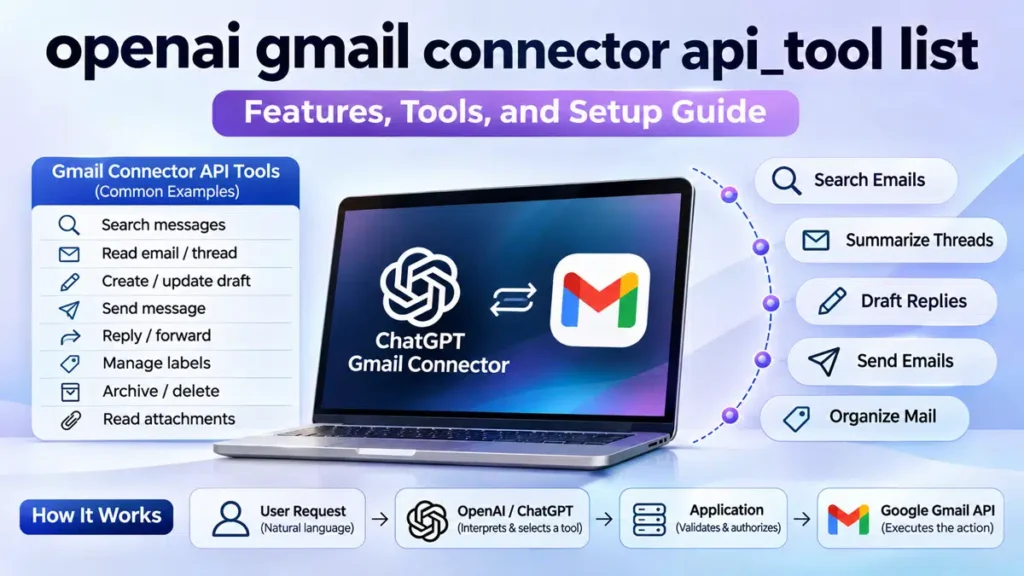
Connecting Gmail to ChatGPT makes it possible to search emails, summarize conversations, prepare replies, and manage supported mailbox operations using natural-language instructions. However, understanding the difference between the Gmail connector, its available tools, and Google’s underlying Gmail API is essential.
The term openai gmail connector api_tool list refers to the collection of Gmail-related operations exposed through an OpenAI integration. These operations can include searching messages, reading threads, creating drafts, sending emails, and organizing mail. The exact tool names and capabilities depend on the integration environment, permissions, and available connector version.
What Is the OpenAI Gmail Connector?
The OpenAI Gmail connector is an integration that allows ChatGPT to interact with information in an authorized Gmail account.
Instead of manually opening Gmail, searching for messages, and copying their contents into a conversation, users can ask ChatGPT to perform supported operations.
For example, a user might request:
- Find emails received from a particular company.
- Summarize an ongoing email conversation.
- Identify messages that require a response.
- Prepare a professional reply to a customer.
- Locate an invoice or order confirmation.
- Create an email draft for review.
The connector uses authorized access to the connected Google account. It does not automatically provide unrestricted access to every Google service or every Gmail feature.
OpenAI’s documentation confirms that connected apps can provide search, information retrieval, and supported actions, subject to authorization and workspace restrictions. OpenAI Help Center
Gmail Connector vs. Gmail API
These two technologies are related but serve different purposes.
| Feature | OpenAI Gmail Connector | Google Gmail API |
|---|---|---|
| Primary purpose | Use Gmail through ChatGPT | Build software that interacts with Gmail |
| Interface | Natural-language requests | Programmatic API requests |
| Authentication | Connected Google account authorization | Google OAuth 2.0 |
| Email search | Supported connector actions | Gmail API endpoints |
| Draft creation | Where enabled | API methods |
| Email sending | Where enabled | API methods |
| Typical users | ChatGPT users and teams | Developers and software engineers |
The connector simplifies supported Gmail workflows, while the Gmail API provides lower-level interfaces for developers building custom applications.
OpenAI Gmail Connector API Tool List
A Gmail connector can expose multiple tools, each designed to perform a specific operation.
The following table describes common tool categories. These are descriptive labels, not a guaranteed official list of internal OpenAI tool identifiers.
| Tool category | Purpose |
|---|---|
| Search messages | Find emails using search conditions |
| Read message | Retrieve an individual email |
| Read thread | Retrieve a conversation and its replies |
| List labels | Inspect available Gmail labels |
| Create draft | Prepare an unsent email |
| Update draft | Modify an existing draft |
| Send message | Send an email from an authorized account |
| Reply to message | Respond within a conversation |
| Forward message | Forward an email |
| Modify labels | Add or remove labels |
| Archive message | Remove a message from the inbox |
| Trash message | Move a message to Trash |
| Read attachment | Access supported attachment content |
Not every connector implementation exposes every operation. Some actions may be unavailable because of account permissions, workspace policies, or product limitations.
Email Search and Retrieval Tools
Search is one of the most useful Gmail integration capabilities.
Users can describe the information they want without manually constructing a complex search query.
For example:
Find emails from example.com received during the last seven days and summarize the important requests.
A supported connector can identify matching messages and retrieve relevant content.
Common search criteria include sender, recipient, subject, date range, labels, and keywords.
Message and Thread Reading Tools
A Gmail message is an individual email. A thread is a conversation containing one or more related messages.
Reading an entire thread provides context that a single message may not contain.
For example, an email conversation might include an original request, a price quotation, a negotiation, and a final agreement.
Reading only the latest message could omit important details.
Thread retrieval helps ChatGPT identify the conversation history before summarizing it or drafting a response.
Drafting and Sending Tools
Draft creation and email sending are separate actions.
Creating a draft prepares content without delivering it. Sending a message transmits the email to its recipients.
This distinction matters when using AI for business communication.
A sensible workflow is to retrieve the relevant conversation, generate a draft, verify the recipient and message, and send only after the appropriate approval.
Some connected actions require additional confirmation, depending on ChatGPT’s app permissions and the account’s configuration. OpenAI Help Center
Gmail Connector Tools Available in ChatGPT
The Gmail integration available in this environment exposes 21 named operations. The following list uses their actual tool identifiers rather than illustrative names.
| Tool name | Function |
|---|---|
search_emails | Search Gmail messages |
search_email_ids | Retrieve matching message IDs |
read_email | Read an individual email |
batch_read_email | Read multiple emails |
read_email_thread | Read an entire conversation |
batch_read_email_threads | Read multiple conversations |
read_attachment | Retrieve an email attachment |
get_profile | Get connected Gmail profile information |
list_labels | List Gmail labels |
create_label | Create a new label |
apply_labels_to_emails | Apply labels to selected emails |
bulk_label_matching_emails | Label messages matching a search |
batch_modify_email | Add or remove labels in bulk |
archive_emails | Archive selected emails |
delete_emails | Move emails to Trash |
create_draft | Create an unsent draft |
list_drafts | List existing drafts |
update_draft | Edit a saved draft |
send_draft | Send an existing draft |
send_email | Send a new email |
forward_emails | Forward selected messages |
These identifiers describe the available Gmail tool actions. They are not necessarily the names of public REST endpoints, and another integration environment may expose a different set.
How to Connect Gmail to ChatGPT
The setup process involves connecting a Google account and authorizing the requested access.
- Open ChatGPT and navigate to Settings → Plugins.
- Locate the Gmail plugin.
- Install or connect it if prompted.
- Select the Google account you want to authorize.
- Review the requested permissions.
- Complete Google’s authorization process.
- Return to ChatGPT and request a supported Gmail action.
If Gmail is already installed and connected, the authorization process generally does not need to be repeated unless permissions change or the connection expires.
OpenAI also supports multiple Google accounts in eligible configurations, allowing users to work with personal and business mailboxes. OpenAI Help Center+1
How Gmail Connector Authentication and Permissions Work
Gmail contains potentially sensitive information, so authorization is a central part of the integration.
Google OAuth Authorization
Google OAuth allows an application to request access to selected account capabilities without requiring the user to provide their Gmail password directly to ChatGPT.
The account holder reviews and approves the requested access.
Google Workspace administrators may also need to authorize certain permissions for managed accounts.
Gmail OAuth Scopes
OAuth scopes define which categories of Gmail access an application can request.
For example, Google’s gmail.modify scope allows reading and modifying supported mailbox information. The exact permissions requested depend on the enabled actions and configuration.
OpenAI’s Google app documentation identifies the Gmail modification scope among the permissions relevant to its Google integrations. OpenAI Help Center
Action-Level Permissions
ChatGPT provides additional permission controls that may include:
- Always ask before accessing connected information.
- Allow read operations without repeated approval.
- Allow selected low-risk actions.
- Allow all supported actions, where eligible.
These settings control when approval is required. They do not expand the access already granted through Google authorization. OpenAI Help Center
How Developers Can Use Gmail With the OpenAI API
Developers who want to build their own Gmail automation should distinguish between ChatGPT’s built-in Gmail connector and a custom application using the OpenAI API.
A custom implementation typically combines the OpenAI API with the official Google Gmail API.
Typical integration architecture
User requestNatural-language instructions
OpenAI APIInterprets the request and selects a function
Application backendValidates arguments and authorization
Google Gmail APIExecutes the authorized mailbox operation
Example: Define a Gmail Search Function
A developer can expose a custom function that allows an AI model to request an email search.
{
  "type": "function",
  "name": "search_gmail",
  "description": "Search authorized Gmail messages",
  "parameters": {
    "type": "object",
    "properties": {
      "query": {
        "type": "string",
        "description": "Gmail search query"
      },
      "max_results": {
        "type": "integer",
        "description": "Maximum number of results"
      }
    },
    "required": ["query"],
    "additionalProperties": false
  }
}
This is an illustrative custom function definition, not an internal Gmail connector tool specification.
When the model requests search_gmail, the developer’s backend must execute the actual search through Google’s authorized API and return the results. Defining the function alone does not connect Gmail or execute an API request.
Relevant Google Gmail API Endpoints
| Gmail API method | Purpose |
|---|---|
users.messages.list | List or search messages |
users.messages.get | Retrieve a message |
users.threads.get | Retrieve a thread |
users.drafts.create | Create a draft |
users.messages.send | Send a message |
users.messages.modify | Change message labels |
users.labels.list | List labels |
users.messages.attachments.get | Retrieve attachment data |
The official Google Gmail API reference provides endpoint definitions, request parameters, and response schemas.
Common Gmail Connector Use Cases
Managing Customer Support Emails
Customer support teams can use Gmail retrieval and summarization to understand previous correspondence.
For example, a user can ask ChatGPT to identify customer questions received during a particular period and prepare draft responses.
The resulting drafts should be checked for factual accuracy before sending.
Handling Business Outreach
Business development teams can use the connector to organize conversations with publishers, suppliers, or potential partners.
Useful workflows include searching for pricing responses, identifying unanswered inquiries, comparing quotations, and drafting follow-ups.
A structured process might involve searching relevant threads, extracting quoted prices and conditions, recording the results in a spreadsheet, and preparing replies for review.
This reduces repetitive inbox work without requiring automatic approval of every outgoing message.
Finding Invoices and Receipts
Users can search for billing messages by sender, subject, or date.
The connector may also retrieve supported attachments, allowing users to review invoices or extract relevant details.
Accuracy checks remain necessary when interpreting financial documents.
Summarizing Large Conversations
Long email threads can contain repeated information, changes in requirements, and decisions spread across multiple replies.
A thread summarization workflow can extract key decisions, outstanding questions, and next actions while retaining the original conversation as the source.
Gmail Automation and Event-Triggered Tasks
Gmail integrations are not limited to one-time searches.
Eligible ChatGPT users can configure event-triggered tasks in Work that respond to new Gmail messages.
For example, a task can react when a message arrives from a specified sender or contains a particular subject.
OpenAI documents support for Gmail-triggered tasks, with availability depending on plan and workspace configuration. OpenAI Help Center
An event-triggered workflow differs from a scheduled workflow.
| Workflow | Trigger | Example |
|---|---|---|
| Manual | User request | Summarize unread emails |
| Scheduled | Specified time | Prepare a daily inbox summary |
| Event-triggered | New matching message | Process an incoming supplier response |
Any subsequent action remains subject to the connector’s capabilities and authorization settings.
Gmail Connector Limitations and Troubleshooting
Although the connector simplifies email operations, several limitations are worth understanding.
Gmail Connection Not Working
If the connection fails, check whether the correct Google account was selected and whether the required permissions were approved.
Managed Google Workspace accounts may require administrator approval.
Reconnect the account when prompted, and review the Google authorization screen carefully.
Missing Messages or Incomplete Results
A search may return unexpected results because the query is too narrow, the wrong account is connected, or the requested information is outside the authorized scope.
Try searching by a broader sender, subject, or date range.
Sending Actions Are Unavailable
A connected Gmail account may support reading messages while restricting write actions.
This can occur because of app permissions, missing OAuth scopes, or workspace restrictions.
Changing ChatGPT’s approval preference alone does not grant additional Google access.
Connector Tool Names Are Different
Internal tool names can vary across implementations.
A developer-defined function named search_gmail is not automatically interchangeable with a connector operation named search_emails.
Applications must use the exact interfaces and schemas available in their environment.
Gmail Rate Limits
Google imposes API quotas and sending restrictions. ChatGPT integrations may also have usage limits.
The connector should not be treated as a way to bypass Gmail’s sending limits or anti-spam policies.
For troubleshooting, OpenAI recommends checking the connected account, permissions, app availability, and any provider restrictions. OpenAI Help Center
Security and Privacy Best Practices
Email integrations should follow a least-privilege approach: grant only the access needed for the intended workflow.
For business use, it is also sensible to separate information retrieval from actions that modify or send messages.
Review recipients and message contents before sending sensitive communications. Avoid placing OAuth tokens, passwords, or private credentials directly into prompts or application logs.
For custom integrations, store access tokens securely, validate function arguments, and restrict backend operations to the authenticated account.
OpenAI states that data directly retrieved from connected Google apps is not used to train its generalized models, subject to the exceptions described in its Google app data controls documentation. OpenAI Help Center
Final Thoughts on the openai gmail connector api_tool list
Understanding the openai gmail connector api_tool list starts with distinguishing three layers: ChatGPT’s Gmail integration, the individual connector tools it exposes, and Google’s underlying Gmail API.
For everyday inbox tasks, the ChatGPT connector offers a natural-language interface for supported searching, reading, drafting, sending, and organization workflows.
For custom software, developers can combine OpenAI function calling with Google’s Gmail API to implement controlled email operations.
The most reliable approach is to inspect the actual tools available in the chosen environment, authorize only the necessary permissions, and verify consequential actions before execution.