Still using a BlackBerry phone and wondering whether you can access WhatsApp Web? The answer depends on which BlackBerry model you own, its operating system, and whether you have access to a currently supported WhatsApp account.
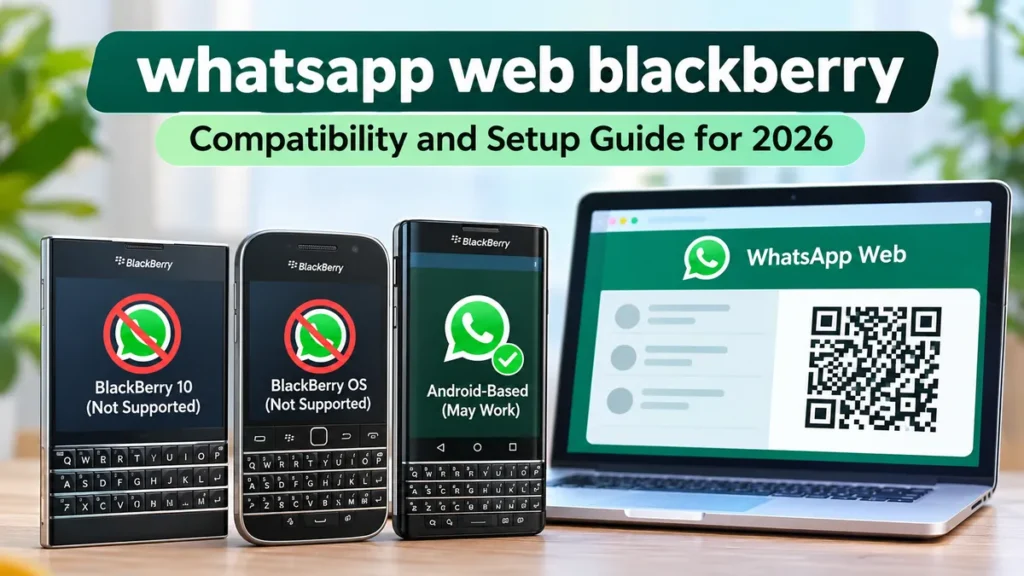
whatsapp web blackberry is not officially supported on older BlackBerry OS or BlackBerry 10 phones in 2026. WhatsApp ended support for these platforms on December 31, 2017. Some Android-based BlackBerry models may offer different possibilities, but their compatibility depends on the installed Android version and current WhatsApp requirements. WhatsApp Blog+1
The distinction matters because BlackBerry produced phones running different operating systems. A BlackBerry Passport and a BlackBerry KEY2 may look similar in purpose, but their software capabilities are very different.
Does whatsapp web blackberry Still Work in 2026?
The short answer is that WhatsApp Web cannot reliably restore WhatsApp functionality to a BlackBerry phone whose operating system is no longer supported.
WhatsApp Web is a browser-based companion service. It allows users to access messages from a linked device, but it does not replace the requirement for a registered WhatsApp account on a supported primary device.
There are three situations to consider:
- BlackBerry OS devices: Native WhatsApp support has ended, and their legacy browsers are unsuitable for dependable modern WhatsApp Web access.
- BlackBerry 10 devices: Models such as the Passport, Classic, Q10, and Z10 are no longer supported by WhatsApp.
- Android-based BlackBerry devices: Models such as the Priv, KEYone, and KEY2 use Android rather than BlackBerry 10, but their older software versions may no longer meet WhatsApp’s requirements.
WhatsApp’s official documentation confirms that web browsers are supported linked-device platforms. However, that does not mean every browser on every older smartphone is compatible. WhatsApp.com+1
BlackBerry compatibility comparison
| BlackBerry model | Operating system | WhatsApp status in 2026 |
|---|---|---|
| BlackBerry Bold 9900 | BlackBerry OS 7 | Unsupported |
| BlackBerry Curve 9320 | BlackBerry OS 7 | Unsupported |
| BlackBerry Z10 | BlackBerry 10 | Unsupported |
| BlackBerry Q10 | BlackBerry 10 | Unsupported |
| BlackBerry Passport | BlackBerry 10 | Unsupported |
| BlackBerry Classic | BlackBerry 10 | Unsupported |
| BlackBerry Priv | Android | Depends on software version |
| BlackBerry KEYone | Android | Depends on software version |
| BlackBerry KEY2 | Android | Depends on software version |
| BlackBerry Motion | Android | Depends on software version |
For Android-based BlackBerry phones, the operating system version is more important than the BlackBerry branding.
Even when an older Android phone meets a published minimum version requirement, installation, Google Play services, device security, and actual app functionality may present additional limitations.
Why WhatsApp Stopped Supporting BlackBerry Phones
BlackBerry was once among the most recognizable names in mobile communication. Its physical keyboards, email integration, and business-oriented security features made it especially popular among professionals.
During the early smartphone era, WhatsApp also supported several operating systems beyond Android and iOS.
That changed as smartphone technology evolved.
The official end of BlackBerry support
WhatsApp initially announced in February 2016 that it would discontinue support for several aging platforms, including BlackBerry OS and BlackBerry 10.
After extending the deadline, the company confirmed that support would end after December 31, 2017. WhatsApp Blog+1
The decision affected:
- BlackBerry OS
- BlackBerry 10
- Several older Nokia platforms
- Outdated Android releases
- Older Windows Phone versions
WhatsApp explained that legacy operating systems lacked capabilities needed for its expanding functionality.
Why older BlackBerry software is incompatible
Modern messaging applications depend on technologies that older smartphone platforms may not support adequately.
These include updated encryption implementations, modern browser engines, security certificates, current authentication methods, and ongoing operating system security updates.
WhatsApp Web also depends on contemporary web technologies for displaying conversations, synchronizing messages, and maintaining secure sessions.
The original BlackBerry browser and older BlackBerry 10 browser were designed for a different generation of websites.
Consequently, simply entering the WhatsApp Web address into one of these browsers does not guarantee that the login interface or messaging features will work.
How to Use whatsapp web blackberry With an Android-Based Phone
If you own an Android-based BlackBerry smartphone, the first step is to determine whether its installed Android version can run the current WhatsApp application.
The following instructions apply only when WhatsApp is already functioning on the BlackBerry phone as the primary device.
Step 1: Check the Android version
Open the phone’s settings and locate its software information.
Depending on the model, the path may resemble:
Settings → System → About Phone → Android Version
Record the Android version displayed.
Older BlackBerry models may not have received updates for many years, so the software version should not be assumed from the model name alone.
Step 2: Check WhatsApp availability
Open Google Play Store and search for WhatsApp Messenger.
Check whether the official application is available and compatible with the device.
If Google Play reports that the app is incompatible, avoid installing modified APK files from unknown websites.
An unofficial installer cannot guarantee compatibility with WhatsApp’s current servers or security requirements.
Step 3: Open WhatsApp Web on a computer
On a supported desktop browser, visit:Official WhatsApp Web
The page should display a QR code or another supported linking option.
Step 4: Link your BlackBerry Android phone
If WhatsApp is working on the phone:
- Open WhatsApp.
- Open the main menu.
- Select Linked devices.
- Choose Link a device.
- Follow the authentication instructions.
- Scan the QR code displayed on your computer.
After successful authentication, WhatsApp Web should load the conversations available to the linked session.
WhatsApp’s official linked-device instructions describe this general QR-code process for supported Android phones. WhatsApp Help Center
Step 5: Verify message synchronization
Send a test message from the linked browser.
Check whether the conversation appears correctly on the primary phone.
You can also test sending an image or document to confirm that basic media sharing works.
Remember that successful linking requires a compatible WhatsApp installation on the primary device. WhatsApp Web cannot independently reactivate a discontinued BlackBerry 10 account.
Can You Use WhatsApp Web on BlackBerry Passport or Classic?
The BlackBerry Passport and BlackBerry Classic remain memorable devices because of their physical keyboards and distinctive designs.
However, both use BlackBerry 10.
BRITAIN-US-IT-BUSINESS-TELECOM-BLACKBERRY
BlackBerry Passport
Wholesale Blackberry Classic Q20-new | Cellular Stockpile
BlackBerry Classic
BlackBerry Passport
The Passport features a wide display and a hardware keyboard designed for productivity.
Although its browser was relatively capable for its time, it is not a supported environment for current WhatsApp Web functionality.
Installing an old WhatsApp version does not restore official compatibility.
BlackBerry Classic
The Classic combines a traditional BlackBerry keyboard with a touchscreen and navigation controls.
Like the Passport, it runs BlackBerry 10 and falls outside WhatsApp’s supported platforms.
Some historical online tutorials recommend installing Android APK files on BlackBerry 10 devices.
These instructions are outdated for current WhatsApp use. BlackBerry 10’s Android compatibility layer is not equivalent to running a modern, supported Android operating system.
Quick takeaway: Neither the BlackBerry Passport nor the Classic offers a dependable, officially supported way to use WhatsApp in 2026.
Can WhatsApp Web Work Without a Supported Phone?
This question causes considerable confusion because WhatsApp introduced multi-device functionality that reduces dependence on a constantly connected phone.
The key distinction is between registering an account and using an already linked device.
WhatsApp allows supported companion devices to operate even when the primary phone is temporarily offline.
However, users still need a supported primary device to register their account and link new devices.
According to WhatsApp’s linked-device documentation:
- Users can link up to four companion devices.
- Linked devices can continue operating without the primary phone remaining continuously online.
- Companion devices may be disconnected after prolonged inactivity.
- Web browsers cannot serve as the primary device for a WhatsApp account. WhatsApp Help Center
Therefore, an unsupported BlackBerry 10 phone cannot become a functioning WhatsApp device simply because multi-device support exists.
Can you use WhatsApp Web with only a phone number?
WhatsApp supports phone-number-based linking for certain companion-device scenarios.
However, this is not the same as registering a completely new WhatsApp account in a browser.
The linking process still requires authorization through the primary WhatsApp account.
If your BlackBerry phone cannot run the current WhatsApp application, entering its phone number on a website will not bypass the platform restriction.
Common whatsapp web blackberry Problems and Fixes
Users attempting to access WhatsApp on older BlackBerry devices may encounter blank screens, browser errors, failed QR codes, or unsupported-device messages.
Not every problem has a software workaround.
| Problem | Likely cause | Recommended action |
|---|---|---|
| WhatsApp Web shows a blank page | Outdated browser engine | Try a current desktop browser |
| QR code does not appear | Browser incompatibility or connection issue | Refresh on a supported browser |
| WhatsApp cannot be installed | Unsupported operating system | Use a supported phone |
| QR code cannot be scanned | Primary app unavailable or camera issue | Verify WhatsApp works on the primary device |
| Session disconnects | Inactivity or account-related issue | Relink using a supported phone |
| Old APK fails | Obsolete app version or server incompatibility | Avoid relying on outdated installers |
| Messages do not synchronize | Connection or linked-session problem | Check connectivity and relink if necessary |
Why does WhatsApp Web show a blank screen?
A blank page can occur when a browser cannot execute the web application’s required scripts.
On a modern computer, refreshing the page, updating the browser, or clearing relevant site data may help.
On a BlackBerry 10 browser, the underlying problem is more fundamental: the browser itself is obsolete.
Clearing cookies cannot add modern browser capabilities that the operating system does not provide.
Why is the WhatsApp QR code not working?
A QR code can fail because it has expired, the camera cannot scan it clearly, or the linking process cannot communicate successfully.
On a supported device, try refreshing the code, checking the internet connection, and cleaning the camera lens.
If the primary phone runs unsupported BlackBerry OS software, those steps cannot resolve the lack of official WhatsApp support.
Can changing the browser user agent help?
A browser user agent identifies the browser and operating system to websites.
Changing it may alter how a website initially responds, but it does not upgrade the browser engine.
If the browser lacks necessary web APIs, encryption support, or other features, disguising its identity will not make WhatsApp Web reliably functional.
Are Third-Party WhatsApp Apps Safe for BlackBerry?
Searching for WhatsApp solutions for older BlackBerry phones may lead to modified applications, archived installation packages, browser wrappers, and unofficial messaging clients.
These options deserve caution.
Risks of unofficial APK files
An APK is an Android application installation package.
APK files are not inherently dangerous, but files from unknown sources may contain malicious or modified code.
Potential risks include:
- Exposure of personal messages or account credentials.
- Malware installation.
- Unauthorized access to contacts and media.
- Failure to receive security updates.
- Temporary or permanent WhatsApp account restrictions.
WhatsApp specifically warns against unofficial applications and websites because their security and privacy practices cannot be verified. WhatsApp Help Center
Why archived BlackBerry WhatsApp versions do not solve the problem
An old installation file may still exist on the internet even after its associated service has been discontinued.
Installing that file does not guarantee that the application can communicate with WhatsApp’s current infrastructure.
Messaging applications depend on both local software and functioning server-side services.
Once support for an operating system ends, an archived installer cannot independently restore the discontinued service.
What about WhatsApp browser wrappers?
A browser wrapper is an application that displays a website inside an embedded browser.
Some third-party apps advertise themselves as alternative WhatsApp clients.
However, a wrapper does not automatically provide a newer browser engine, supported authentication, or compatibility with current WhatsApp requirements.
It also introduces additional privacy considerations when a third party handles the interface used to access private conversations.
The safest approach is to use WhatsApp’s official applications and website.
How to Move WhatsApp From an Old BlackBerry to a New Phone
For someone who still owns a BlackBerry Passport, Q10, Z10, or Classic, moving to a supported device is generally the most practical long-term solution.
The challenge is preserving valuable information from the old phone.
Step 1: Identify what data is still available
Check the BlackBerry for:
- Saved contacts
- Photos and videos
- Downloaded documents
- Archived conversations
- Email attachments
- Locally stored files
Avoid resetting or wiping the phone before reviewing its contents.
Step 2: Back up contacts and media
Depending on the model and available software, contacts may be exportable through synchronization tools or supported contact formats such as VCF.
Photos and documents may be transferable using USB storage or other available file-transfer methods.
Verify that the copied files open correctly on another device before deleting anything from the BlackBerry.
Step 3: Understand the limitations of old WhatsApp chats
A historical BlackBerry WhatsApp conversation archive is not necessarily compatible with the current Android or iPhone WhatsApp backup system.
For example, an exported conversation saved as text can preserve readable messages, but that does not mean it can be imported as a live WhatsApp chat.
WhatsApp historically offered email-based chat exports for older platforms. These exports were intended for retaining readable conversation records rather than guaranteeing full migration to a different operating system. TechSpot
If a chat archive is especially valuable, preserve the original files and a separate backup.
Step 4: Register WhatsApp on a supported smartphone
Install the official WhatsApp application on a compatible Android phone or iPhone.
Register the phone number using WhatsApp’s current verification process.
If a supported backup is available, follow the application’s restoration instructions.
Do not assume that BlackBerry 10 backup files will appear as restorable WhatsApp backups on the new device.
Step 5: Link WhatsApp Web
Once the new phone has a working WhatsApp account, open WhatsApp Web on a computer and complete the linked-device process.
This allows you to continue using a desktop keyboard and larger screen for messaging.
For users who valued BlackBerry’s productivity-focused design, a modern desktop WhatsApp setup can preserve some of that convenient typing experience.
BlackBerry 10 vs Android BlackBerry: What Is the Difference?
The BlackBerry name appears on devices that use fundamentally different software platforms.
Understanding this distinction prevents many compatibility mistakes.
BlackBerry 10
BlackBerry 10 was BlackBerry’s proprietary mobile operating system.
It powered devices including the Z10, Q10, Z30, Passport, Classic, and Leap.
Its applications, browser, and system services differ from those found on modern Android phones.
WhatsApp officially discontinued support for this platform after December 31, 2017.
Android-based BlackBerry phones
BlackBerry later introduced smartphones running Google’s Android operating system.
Examples include the Priv, DTEK50, DTEK60, KEYone, KEY2, and Motion.
These phones use Android applications rather than native BlackBerry 10 applications.
That distinction made them compatible with Android WhatsApp during their supported periods. BlackBerry publicly clarified this difference when WhatsApp support for BlackBerry 10 ended. TechRadar
However, Android compatibility is not permanent.
An Android-based BlackBerry phone can also become unsupported as its installed operating system ages.
Which type is better for WhatsApp?
For current WhatsApp use, a smartphone running a supported, security-maintained Android or iOS version is preferable.
An older Android-based BlackBerry may have more compatibility possibilities than a BlackBerry 10 model, but neither the brand name nor the presence of Android guarantees current support.
How to Keep WhatsApp Web Secure
WhatsApp Web provides convenient access to conversations, but linked sessions should be managed carefully.
Review linked devices
On your primary phone, open WhatsApp’s Linked devices section.
Review the devices associated with your account.
If you see an unfamiliar browser or computer, log it out.
Avoid unknown QR-code websites
Only link your WhatsApp account through official WhatsApp services.
A fraudulent website may imitate a genuine QR-code login screen to trick users into authorizing an unwanted linked session.
Always check the website address before scanning.
Log out of shared computers
If you use WhatsApp Web on a public or shared computer, log out when finished.
Closing the browser window alone may not terminate the session.
Keep supported devices updated
Operating system updates, browser patches, and WhatsApp application updates can address security vulnerabilities.
This is another reason not to depend on discontinued BlackBerry software for sensitive communications.
What Are the Best Alternatives for BlackBerry Users?
If your original BlackBerry phone cannot run WhatsApp, the most suitable alternative depends on whether you want to preserve the device itself or continue using WhatsApp.
Keep the BlackBerry for offline tasks
An older BlackBerry can still have limited uses, depending on its hardware and remaining functionality.
These may include viewing locally stored documents, typing notes, accessing previously saved files, or using certain offline features.
However, discontinued services and unsupported software can restrict its usefulness.
Avoid relying on an obsolete smartphone for sensitive online activities.
Use a supported smartphone for WhatsApp
A modern Android phone or iPhone provides the most straightforward access to the current WhatsApp application.
You can then link a desktop browser for keyboard-based messaging.
Preserve the BlackBerry typing experience
If the physical keyboard is what you miss most, a computer with WhatsApp Web can offer fast, comfortable typing without relying on outdated mobile software.
This is especially useful for long conversations, document sharing, and managing messages while working.
Final Thoughts on whatsapp web blackberry
The situation with whatsapp web blackberry in 2026 comes down to the operating system.
BlackBerry OS and BlackBerry 10 are no longer supported by WhatsApp, and browser tricks or archived applications cannot reliably restore that support.
Android-based BlackBerry models are different, but their compatibility depends on whether their installed software still satisfies current WhatsApp requirements.
For dependable messaging, use a supported Android phone or iPhone as the primary device and link WhatsApp Web through its official website.
If you still own an older BlackBerry, preserve your contacts, documents, and conversation archives before making changes. That protects the information you value while allowing you to move to a supported messaging setup.