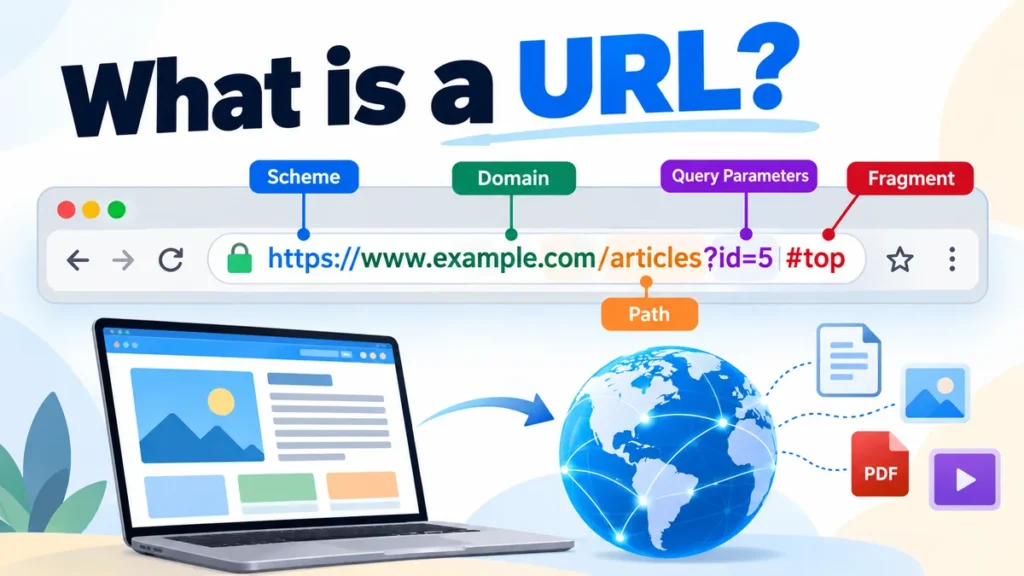
Every time you open a website, click a search result, or share an online article, you use a URL. It is the address that tells your browser where to find a particular resource on the internet.
A URL (Uniform Resource Locator) is a web address that identifies the location of a resource on the internet and specifies how to access it. URLs can point to websites, individual pages, images, documents, videos, and downloadable files. They commonly begin with https:// and contain a domain name, sometimes followed by a path or additional information.
Understanding URLs makes it easier to navigate websites, share accurate links, recognize suspicious addresses, and troubleshoot common browsing problems.
What Is a URL and What Does It Stand For?
URL stands for Uniform Resource Locator. It is a standardized address used to locate and access resources on the internet.
For example:
This address tells a browser which website to contact and which resource to request.
The concept is closely associated with Tim Berners-Lee, who developed the World Wide Web at CERN. URLs became a fundamental part of the web alongside HTML (Hypertext Markup Language) and HTTP (Hypertext Transfer Protocol).
A URL is sometimes called a web address, although the technical term covers more than just webpages. A URL can also identify an image, a PDF document, a downloadable file, or a resource accessed through another supported scheme.
What Is an Example of a URL?
A simple URL example is:
Here, https indicates the protocol, www.example.com identifies the host, and the browser uses that information to request the website.
More examples include:
| URL example | Purpose |
|---|---|
https://www.example.com/about | Website information page |
https://www.example.com/products | Product listing page |
https://www.example.com/image.jpg | Image resource |
https://www.example.com/report.pdf | PDF document |
https://www.example.com/search?q=books | Search results with a query parameter |
mailto:hello@example.com | Email link |
Not every URL starts with https://. Different schemes exist for different purposes, although HTTPS is the standard choice for most modern websites.
What Are the Main Parts of a URL?
A URL can contain several components. Some are essential, while others are optional.
Example URL structure
1. Scheme or Protocol
The scheme appears at the beginning of an absolute URL and indicates how the resource should be accessed.
Common examples include:
https://— secure HTTP communicationhttp://— HTTP communication without transport encryptionftp://— File Transfer Protocolmailto:— email-address linkfile://— local or network file resource
HTTPS uses TLS (Transport Layer Security) to encrypt communication between the browser and the server.
2. Domain Name and Hostname
The hostname identifies the server or network host associated with the resource.
In https://www.example.com, the hostname is www.example.com.
Its components include the second-level domain example, the top-level domain .com, and the www subdomain.
Other top-level domains include .org, .edu, .net, and country-code extensions such as .uk and .pk.
A subdomain can organize a website into separate areas. For instance, blog.example.com and shop.example.com may serve different sections of the same organization.
3. Port Number
A URL can specify a network port after the hostname.
Example:
Here, 8443 is the explicitly specified port.
HTTPS normally uses port 443, while HTTP normally uses port 80. These default port numbers generally do not need to appear in the address.
4. Path
The path identifies a resource or location within the website.
Example:
The path is /guides/internet-basics.
Paths often resemble folders, but modern websites can generate pages dynamically without matching physical directories on the server.
5. Query Parameters
Query parameters provide additional information to a website or application.
Example:
The question mark introduces the query string. The ampersand separates parameters.
In this example, q=technology represents the search term, and page=2 indicates the requested page number.
Websites use query parameters for searching, filtering, pagination, tracking, and application settings.
6. Fragment Identifier
A fragment begins with the hash symbol (#) and identifies a section or location within a resource.
Example:
In a typical webpage, the browser may scroll directly to the element identified by examples.
The fragment is generally handled by the browser and is not sent as part of the HTTP request to the server.
How Does a URL Work?
When you enter a URL into a browser, several technologies work together to retrieve and display the requested content.
How a browser opens a URL
1. Enter URLBrowser reads the address
2. DNS lookupDomain resolves to an IP address
3. Server connectionBrowser establishes a connection
4. HTTP requestServer processes the request
5. Page renderingBrowser displays the content
Step 1: The Browser Interprets the Address
When you type a URL into Chrome, Firefox, Safari, or Edge, the browser identifies the scheme, hostname, path, and other components.
It determines how the resource should be accessed.
Step 2: DNS Finds the Server
The Domain Name System (DNS) translates domain names into IP addresses.
For example, a domain such as example.com can resolve to an IP address that helps the browser reach the appropriate server.
DNS makes internet navigation easier because people can remember domain names rather than numerical addresses.
Step 3: The Browser Establishes a Connection
For an HTTPS URL, the browser establishes a secure connection using TLS. Depending on the HTTP version and network conditions, the connection may use TCP or QUIC.
The connection allows the browser and server to communicate.
Step 4: The Server Responds
The browser sends an HTTP request for the resource.
The server responds with an HTTP status code, headers, and usually content.
A successful response often uses status code 200 OK. Other responses may redirect the browser or report that a resource is unavailable.
Step 5: The Browser Displays the Content
For a webpage, the browser processes HTML, CSS, JavaScript, and other resources to display the page.
Some resources may come from a browser cache or a content delivery network (CDN), which can reduce loading time.
What Are the Different Types of URLs?
URLs can be classified according to their structure, scheme, and purpose.
Absolute URLs vs. Relative URLs
An absolute URL includes the scheme and the information needed to identify the resource independently.
Example:
A relative URL identifies a resource in relation to a base URL.
Example:
/contact
Relative references are frequently used in HTML links, stylesheets, and other website resources.
| Feature | Absolute URL | Relative URL |
|---|---|---|
| Contains scheme and host | Yes | Usually no |
| Depends on a base URL | No | Yes |
| Example | https://example.com/about | /about |
| Common use | External links, canonical URLs | Internal navigation, website assets |
A relative reference is resolved against a base URL to produce an absolute URL.
HTTP URLs vs. HTTPS URLs
HTTP and HTTPS URLs differ primarily in their transport security.
| Feature | HTTP | HTTPS |
|---|---|---|
| Typical prefix | http:// | https:// |
| Encryption | No | Yes, using TLS |
| Default port | 80 | 443 |
| Data protection in transit | Limited | Encrypted and integrity-protected |
| Recommended for modern websites | No | Yes |
HTTPS is recommended for websites because it protects communication against many forms of interception and modification.
However, HTTPS does not guarantee that a website itself is legitimate or trustworthy.
Static URLs vs. Dynamic URLs
A static-looking URL often has a simple, readable path:
A dynamic-looking URL may contain query parameters:
Both can serve dynamically generated content. The visible format alone does not determine whether a page is technically static or dynamic.
Shortened URLs
URL shortening services replace long addresses with shorter redirect links.
Services such as Bitly and TinyURL are commonly used for this purpose.
Shortened links are convenient for sharing but can hide the final destination. It is sensible to verify unfamiliar shortened URLs before opening them.
What Is the Difference Between a URL, URI, and Domain Name?
These terms are closely related, but they are not interchangeable.
A URI (Uniform Resource Identifier) is a general identifier for a resource. A URL is a type of URI that provides information about where or how to access a resource.
A domain name is only one possible component of a URL.
| Term | Meaning | Example |
|---|---|---|
| URL | Identifies a resource and how to access it | https://example.com/about |
| URI | Identifies a resource | urn:isbn:9780131103627 |
| Domain name | Human-readable internet name | example.com |
| IP address | Numerical network address | 192.0.2.1 |
| Hyperlink | Clickable reference to a resource | About Us link |
A hyperlink often contains a URL, but the two are different. The URL is the address; the hyperlink is the clickable element that uses it.
For example, a webpage might display the text “Read our guide” while linking to https://example.com/guide.
The user sees the link text, while the browser uses the underlying URL to navigate.
How to Find, Copy, and Share a URL
Finding a URL is straightforward on both computers and mobile devices.
Finding a URL on a Computer
- Open a webpage in your browser.
- Click the address bar at the top.
- Select the complete address using
Ctrl + Lon Windows orCommand + Lon macOS. - Copy it using
Ctrl + CorCommand + C. - Paste the address wherever you want to share it.
Modern browsers sometimes hide parts of the URL until you select the address bar.
Finding a URL on a Mobile Phone
On Android or iPhone, open the webpage in your browser and tap the address bar or the browser’s sharing option.
Choose Copy Link or Copy to copy the address. The exact wording depends on the browser.
You can then paste the URL into an email, message, document, or another application.
How to Create a URL
A publicly accessible webpage normally receives a URL when it is published on a configured website.
For example, a website using the domain example.com could publish an article at:
The website’s server or hosting application must be configured to serve the resource at that address.
Simply typing an address does not automatically create a working webpage.
How to Identify a Safe URL
URLs are also important for online security. Cybercriminals sometimes create deceptive addresses to imitate trusted websites.
Check the Actual Domain Name
Consider these two examples:
The first is a subdomain of example.com.
The second belongs to login-security.test, despite containing example.com earlier in the hostname.
This distinction matters because attackers can use familiar names in misleading addresses.
Look for HTTPS, but Do Not Rely on It Alone
HTTPS indicates that communication is encrypted and that the connection has been authenticated for the hostname.
It does not prove that the website’s operator is trustworthy.
A phishing website can also use HTTPS.
Watch for Suspicious URL Patterns
Common warning signs include:
- Misspelled brand names or unusual domain extensions.
- Unexpected links requesting passwords or payment information.
- Long, confusing hostnames designed to imitate familiar websites.
- Unfamiliar shortened links that conceal their destination.
- URLs received in unexpected messages claiming urgent account problems.
Before entering sensitive information, verify the actual domain and navigate to the organization’s website independently when possible.
Avoid Sharing URLs Containing Sensitive Information
Some URLs contain query parameters with session identifiers, access tokens, private document references, or other sensitive values.
For example:
Sharing a password-reset link could expose account access if the token is still valid.
Always inspect the complete address before forwarding links containing personal or account-related information.
Why Are URLs Important for SEO?
URLs help search engines discover, crawl, and understand website resources.
A clear URL structure also makes navigation easier for readers.
According to Google Search Central, descriptive URLs and logical website structures can help search engines and users understand website content.
Google for Developers
Use Descriptive URL Slugs
Compare these examples:
Poor structure:
Descriptive structure:
The second address communicates the page’s topic more clearly.
A descriptive URL does not guarantee higher rankings, but it improves readability and makes the resource easier to identify.
Separate Words With Hyphens
For multiword paths, hyphens are generally preferable to underscores.
Recommended:
/what-is-a-url
Less readable:
/what_is_a_url
Google recommends using hyphens to separate words in URLs where appropriate.
Google for Developers
Understand Canonical URLs
Sometimes the same content is available through multiple addresses.
For example:
Search engines may recognize both addresses as versions of the same content.
A canonical URL identifies the preferred version of a page for search indexing purposes. Websites can communicate this preference using the rel="canonical" link element or supported HTTP headers.
Canonicalization helps consolidate duplicate or near-duplicate URL variants, although search engines ultimately determine which URL to select as canonical.
Use Redirects When URLs Change
When a webpage moves permanently to another address, a permanent redirect can guide visitors and search engines to the new location.
An HTTP 301 redirect indicates that a resource has moved permanently. An HTTP 308 redirect also indicates a permanent move while preserving the request method.
Temporary redirects include 302 and 307.
Proper redirects help preserve access to content when websites change their URL structures.
Avoid Unnecessary URL Parameters
Tracking and filtering parameters can produce numerous URL variations.
For example:
Such parameters are useful when they change the information displayed.
However, unnecessary parameters can complicate crawling and create duplicate URLs.
Google recommends using a manageable, understandable URL structure and avoiding unnecessary parameters.
Google for Developers
What Is URL Encoding?
URL encoding represents certain characters in a form suitable for use within a URL.
It is commonly called percent-encoding.
For example, a space can be represented as %20.
Consider:
https://example.com/my%20document.pdf
Here, %20 represents a space in the resource path.
Other examples include:
| Character | Percent-encoded form |
|---|---|
| Space | %20 |
# | %23 |
& | %26 |
? | %3F |
/ | %2F |
@ | %40 |
Whether a character must be encoded depends on its location and purpose.
For example, a question mark separates the path from the query string when used as URL syntax. If it needs to appear as ordinary data inside a path segment, it may require encoding.
Modern browsers and programming libraries handle much of this automatically.
The URL Standard maintained by WHATWG defines modern URL parsing and serialization behavior, while RFC 3986 provides the generic URI syntax framework.
Common URL Problems and How to Fix Them
A URL may be correctly formatted but still fail to open a resource.
Understanding common errors can help identify the cause.
404 Not Found
An HTTP 404 status indicates that the server could not find the requested resource.
Possible causes include a mistyped path, a deleted webpage, or a changed address.
Check the spelling and try navigating from the website’s homepage.
403 Forbidden
A 403 response means the server understood the request but refuses to fulfill it.
This may occur because of permissions, access restrictions, or security policies.
500 Internal Server Error
A 500 response indicates that the server encountered an unexpected condition.
The problem is generally on the server side rather than in the URL itself.
DNS Resolution Errors
If the browser cannot resolve the domain name, it may display a DNS-related error.
Possible causes include an incorrect domain name, unavailable DNS records, or network problems.
Too Many Redirects
A redirect loop occurs when addresses repeatedly redirect between one another.
For example, conflicting HTTP-to-HTTPS or www-to-non-www redirect rules can cause this problem.
Website administrators must correct the redirect configuration.
Invalid URL Format
Some URLs contain malformed syntax, unsupported schemes, or incorrectly encoded characters.
For developers, the JavaScript URL API can help parse and validate addresses.
Example:
const address = new URL("https://example.com/blog?id=10");

console.log(address.hostname);
console.log(address.pathname);
console.log(address.searchParams.get("id"));
The code extracts the hostname, path, and id query parameter.
The browser’s built-in URL interface also supports resolving relative references against a base address.
MDN
What Is a URL Used For in Everyday Life?
URLs support many ordinary online activities beyond opening a website’s homepage.
When someone shares a news article, the link contains a URL pointing to that article. Online stores use URLs for product pages and category listings. Educational platforms use them for lessons, course materials, and downloadable documents.
URLs also support:
- Navigation between related webpages.
- Sharing images, documents, and videos.
- Linking to specific sections of articles.
- Submitting searches and filtering results.
- Accessing web applications and APIs.
- Connecting webpages through hyperlinks.
- Identifying resources for search engine indexing.
For developers, URLs are also essential for API endpoints. An application might request information from an address such as:
The path identifies the requested API resource, while the HTTP method and other request details determine the operation.
Conclusion: what is a url and Why Does It Matter?
A URL is a Uniform Resource Locator: a standardized address that identifies an internet resource and provides the information needed to access it.
Its components can include a scheme, hostname, port, path, query parameters, and fragment identifier. Together, these elements allow browsers, servers, and applications to locate and interact with resources.
Understanding URLs helps you browse confidently, recognize suspicious links, share accurate addresses, and understand how websites are organized.
The next time you open a webpage, look at its address bar and identify the scheme, domain, and path. Those three components provide a practical starting point for understanding how web addresses work.