A website can have a valid SSL certificate and still display a security warning. One common reason is a broken or incomplete certificate chain. Understanding how browsers establish trust helps explain why these errors occur and how to prevent them.
An SSL certificate chain is a sequence of digital certificates that connects a website’s SSL/TLS certificate to a trusted root Certificate Authority (CA). It typically includes a server certificate, one or more intermediate CA certificates, and a root CA certificate. Browsers validate this chain to establish trust in the website’s identity and secure its HTTPS connection.
Although the term SSL remains widely used, modern websites use Transport Layer Security (TLS), the successor to the deprecated Secure Sockets Layer (SSL) protocol.
This guide explains certificate chains, their components, how certificate validation works, common errors, and practical ways to troubleshoot problems.
What Is an SSL Certificate Chain and Why Is It Important?
An SSL certificate chain, also called a certificate chain of trust, allows browsers, operating systems, and applications to verify that a website’s certificate was issued by a trusted authority.
When you visit an HTTPS website, your browser needs more than proof that the server possesses a certificate. It also needs evidence that a recognized Certificate Authority issued or authorized that certificate.
This verification is performed through a series of cryptographically signed certificates.
The chain establishes a connection between the website’s certificate and a root certificate already trusted by the client.
Why websites need a certificate chain
A certificate chain serves several purposes:
- Identity authentication: Helps establish that the certificate belongs to the requested domain.
- Trust verification: Connects the website’s certificate to a recognized Certificate Authority.
- Protection against impersonation: Makes it harder for attackers to present unauthorized certificates without detection.
- Secure HTTPS communication: Supports authentication during the TLS handshake.
- Compatibility: Allows browsers and other clients to recognize certificates issued through intermediate authorities.
The certificate chain does not itself encrypt website traffic. Instead, it authenticates the certificate used during the TLS handshake, which establishes encrypted communication.
The Three Main Components of an SSL Certificate Chain
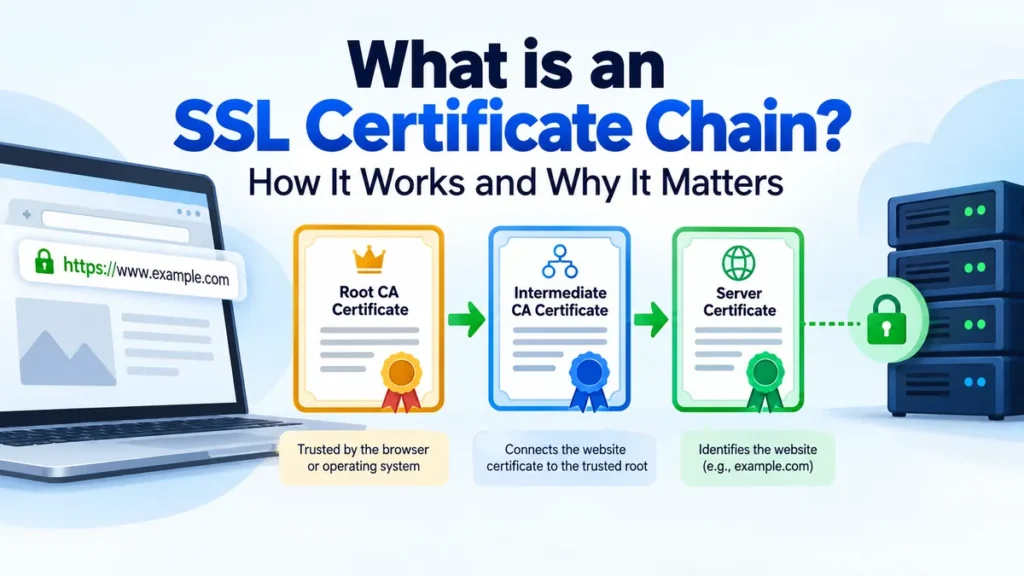
A typical SSL certificate chain consists of three certificate levels: the root certificate, intermediate certificate, and server certificate.
Each has a different role in establishing trust.
Root CA Certificate
Trusted by the browser or operating system
Signs or authorizes
Intermediate CA Certificate
Connects the website certificate to the trusted root
Signs
Server / Leaf Certificate
Identifies example.com and contains its public key
Simplified certificate chain of trust. Some chains contain multiple intermediate certificates.
1. Root CA certificate
A root Certificate Authority is the trust anchor of a certificate chain.
Its certificate is generally self-signed, meaning the root CA signs its own certificate using its private key.
Root certificates become trusted because they are included in trusted certificate stores maintained by operating systems, browsers, or application vendors.
Examples of organizations operating publicly trusted certificate authorities include:
- DigiCert
- Sectigo
- GlobalSign
- Let’s Encrypt, through its parent organization ISRG
- Google Trust Services
A root certificate is not automatically trusted simply because it is self-signed. The client must explicitly recognize it as a trusted authority.
2. Intermediate CA certificate
An intermediate CA certificate connects the website certificate to a trusted root.
Rather than using their root private keys to issue every website certificate, certificate authorities generally issue certificates through intermediate CAs.
This separation improves security because root private keys can remain offline and receive stronger protection.
An intermediate CA can also issue another intermediate CA certificate, creating a longer chain.
If an intermediate certificate is missing, browsers may fail to construct a trusted certification path.
3. Server or leaf certificate
The server certificate, sometimes called an end-entity certificate or leaf certificate, identifies the website or service.
It typically contains:
- The domain name in the Subject Alternative Name (SAN) extension.
- The certificate’s public key.
- Issuer information.
- Validity dates.
- A digital signature from the issuing CA.
- Key usage and extended key usage information.
For example, a certificate issued for www.example.com must match the hostname being requested, according to the applicable hostname validation rules.
A valid server certificate alone does not guarantee that a browser will trust the connection. The client must also successfully validate the certification path.
How Does an SSL Certificate Chain Work?
Certificate chain validation happens as part of the authentication process during an HTTPS connection.
Consider a visitor opening https://www.example.com.
Step 1: The browser initiates a TLS connection
The browser contacts the web server and negotiates supported TLS settings.
Modern connections commonly use TLS 1.3, although TLS 1.2 remains supported in many environments.
Step 2: The server presents its certificate chain
The server sends its leaf certificate and usually the intermediate certificates needed to establish trust.
In a typical public HTTPS deployment, the root certificate is not sent because the client is expected to already possess an appropriate trust anchor.
Step 3: The browser builds a certification path
The browser examines certificate issuer and subject relationships, certificate signatures, and other information to identify a valid path to a trusted root.
The chain is not always a single fixed sequence. Cross-signed certificates and multiple possible intermediates can allow different valid paths.
Step 4: The browser validates the certificates
The client checks whether:
- The leaf certificate matches the requested hostname.
- Each certificate is within its validity period.
- The certificate signatures are cryptographically valid.
- The issuing CAs are authorized to issue subordinate certificates.
- Relevant certificate policies and usage restrictions are satisfied.
- The path terminates at a trusted root.
- Applicable revocation and browser-specific security requirements are met.
Step 5: The TLS handshake completes
If certificate authentication succeeds and the other handshake requirements are satisfied, the browser establishes encrypted communication with the server.
If validation fails, the browser may show a certificate warning or refuse the connection.
SSL Certificate Chain vs. SSL Certificate: What’s the Difference?
An SSL certificate and an SSL certificate chain are related but distinct concepts.
| Feature | SSL certificate | SSL certificate chain |
|---|---|---|
| Meaning | A digital certificate identifying a server | A certification path establishing trust |
| Main purpose | Associate an identity with a public key | Verify that the identity certificate is trusted |
| Components | One certificate | Leaf, intermediate CA certificates, and trusted root |
| Issued by | Usually an intermediate CA | Multiple linked certificate authorities |
| Validation | Hostname, validity, signature, and usage checks | Full certification-path validation |
| Common problem | Expired or mismatched certificate | Missing intermediate or untrusted root |
A website needs a valid leaf certificate and a successfully validated chain for normal publicly trusted HTTPS authentication.
What Is a Full Chain SSL Certificate?
A full chain refers to the certificate material needed to connect a server certificate to a trusted CA.
In common server configurations, a full-chain file contains the server certificate followed by the necessary intermediate CA certificates.
The trusted root certificate is normally excluded from the server’s transmitted chain.
For example, a PEM-encoded full-chain file might contain:
-----BEGIN CERTIFICATE-----
Server Certificate
-----END CERTIFICATE-----

-----BEGIN CERTIFICATE-----
Intermediate CA Certificate
-----END CERTIFICATE-----
These labels are illustrative, not actual certificate data.
A PEM file stores Base64-encoded certificate data between BEGIN CERTIFICATE and END CERTIFICATE delimiters.
Certificate file types explained
| File | Typical purpose |
|---|---|
.crt | Certificate file |
.cer | Certificate, potentially DER or PEM encoded |
.pem | PEM-encoded certificate or other cryptographic data |
.p7b | PKCS#7 certificate collection |
.pfx / .p12 | PKCS#12 container, often including a private key |
fullchain.pem | Leaf certificate and intermediate certificates |
privkey.pem | Private key associated with the server certificate |
File extensions do not always determine the actual encoding. Inspect the file format before configuring a server.
The private key must remain confidential and should never be included in a publicly distributed certificate chain.
Common SSL Certificate Chain Errors and Their Causes
Certificate chain errors occur when a client cannot establish an acceptable certification path from a website certificate to a trusted authority.
Different browsers and operating systems display different error messages, but the underlying causes are often similar.
1. Incomplete certificate chain
An incomplete chain occurs when the server fails to provide one or more necessary intermediate certificates.
For example:
Server Certificate
       |
       X  Missing Intermediate
       |
Trusted Root Certificate
Even when the server certificate is valid, a client may be unable to verify who issued it.
Some browsers can retrieve missing intermediate certificates through caching or Authority Information Access (AIA). Others cannot, which explains why a website might work in one browser but fail in another.
Solution: Install the correct intermediate certificates and configure the web server to present the complete required chain.
2. Untrusted root certificate
An untrusted root error means the certification path does not terminate at a root recognized by the client.
This commonly happens with:
- Self-signed certificates.
- Private enterprise certificate authorities.
- Outdated operating systems or trust stores.
- Root authorities removed from browser trust programs.
A private CA certificate can be valid for an organization’s internal network without being trusted by public browsers.
Solution: Verify that the chain leads to a root trusted by the intended clients. For internal services, distribute the organization’s root certificate through a secure, managed trust-store process.
3. Expired certificate in the chain
Certificates contain validity periods defined by notBefore and notAfter fields.
If a certificate is outside its permitted validity period, the client may reject the chain.
An expired intermediate certificate can also cause problems, even when the website’s leaf certificate has not expired.
Solution: Identify the expired certificate and replace or renew the affected certificate material. If an alternate valid chain exists, it may provide a compatible path.
4. Certificate hostname mismatch
A hostname mismatch occurs when the requested domain does not match the identities authorized by the server certificate.
For example, a certificate for shop.example.com does not automatically cover blog.example.com.
Wildcard certificates cover only the hostname patterns permitted by their names and the applicable validation rules.
Solution: Check the certificate’s Subject Alternative Name extension and install a certificate covering the requested hostname.
5. Incorrect intermediate certificate
A server may present an intermediate certificate that does not correctly connect its leaf certificate to an acceptable trust anchor.
This can happen after certificate renewal, CA migration, or manual replacement of certificate files.
Solution: Obtain the intermediate chain supplied for the issued certificate rather than reusing an unrelated or outdated CA bundle.
6. Revoked or distrusted certificates
Certificate authorities may revoke certificates because of key compromise, incorrect issuance, or other security concerns.
Clients may use Certificate Revocation Lists (CRLs), the Online Certificate Status Protocol (OCSP), or browser-specific revocation mechanisms.
Certificate Transparency (CT) provides another important layer of accountability by allowing publicly trusted certificate issuance to be audited.
CT does not replace certification-path validation, and revocation behavior varies by client.
How to Check an SSL Certificate Chain
You can inspect certificate chains using browser certificate viewers, OpenSSL, or online diagnostic services.
Method 1: Check the chain using OpenSSL
OpenSSL is a widely used toolkit for TLS and public-key cryptography.
Run the following command in a terminal:
openssl s_client -connect example.com:443 -servername example.com -showcertsReplace example.com with the hostname you want to inspect.
The command connects to the server and displays the certificates presented during the TLS handshake.
Look for the Certificate chain section.
A simplified output might resemble:
Certificate chain
 0 s:CN=example.com
   i:CN=Example Intermediate CA

 1 s:CN=Example Intermediate CA
   i:CN=Example Root CA
Here, certificate 0 is the server certificate, while certificate 1 is the intermediate certificate.
The root may be absent because it is already available through the client’s trusted certificate store.
For a more meaningful verification, use an appropriate trusted CA store and hostname checks:
openssl s_client \
  -connect example.com:443 \
  -servername example.com \
  -verify_hostname example.com \
  -verify_return_error \
  -CAfile trusted-roots.pem
The file trusted-roots.pem must contain trusted CA certificates appropriate for your environment.
A successful result may include:
Verification: OK
Verify return code: 0 (ok)
This confirms successful verification under the trust configuration and OpenSSL options used. It does not guarantee that every browser or device will trust the certificate.
Method 2: Check certificate details in a browser
Most modern browsers provide a certificate viewer.
In Google Chrome, you can generally inspect certificate information through the site information or security interface, although the exact navigation varies by version and operating system.
Look for certificate details such as:
- Subject and issuer.
- Validity dates.
- Subject Alternative Names.
- Certification path.
- Public-key information.
Some certificate viewers show a hierarchy connecting the website certificate to an intermediate and root authority.
Method 3: Use online SSL testing tools
Publicly accessible HTTPS websites can be checked using diagnostic services such as Qualys SSL Labs Server Test.
Such services can help identify missing intermediate certificates, protocol configuration problems, certificate compatibility issues, and other HTTPS weaknesses.
Remember that externally hosted testing services may not be able to inspect internal-only websites.
How to Fix an Incomplete SSL Certificate Chain
The correct fix depends on the web server, certificate issuer, and hosting configuration.
The general approach is to obtain the appropriate intermediate certificates, build the required chain, configure the server, and verify the result.
Step 1: Identify the certificate issuer
Inspect the server certificate to determine which CA issued it.
For a local PEM certificate, use:
openssl x509 -in certificate.crt -noout -subject -issuer -datesThis displays the certificate subject, issuer, and validity dates.
Step 2: Obtain the correct intermediate certificates
Download the intermediate certificate files from the certificate issuer’s official documentation or certificate management system.
For example, Let’s Encrypt provides information about its active roots, intermediate authorities, and available certification paths.
Let’s Encrypt
+1
Avoid selecting intermediate certificates based solely on a familiar issuer name. Different certificates can have similar names but different keys or signatures.
Step 3: Create the full-chain file
For a typical PEM-based server setup, combine the leaf certificate and intermediate certificate in the correct order:
cat certificate.pem intermediate.pem > fullchain.pemIf more than one intermediate is required, include them in the appropriate sequence.
The resulting file should begin with the leaf certificate, followed by the issuing intermediate and any additional required intermediates.
Step 4: Configure the web server
The exact configuration depends on the server software.
Nginx configuration
Nginx commonly uses a full-chain certificate file:
server {
    listen 443 ssl;
    server_name example.com;

    ssl_certificate /etc/ssl/fullchain.pem;
    ssl_certificate_key /etc/ssl/privkey.pem;
}
After editing the configuration, test it:
sudo nginx -tIf the test succeeds, reload Nginx:
sudo systemctl reload nginxApache configuration
Modern Apache HTTP Server installations commonly use the SSLCertificateFile directive with a file containing the server certificate and intermediate certificates.
<VirtualHost *:443>
    ServerName example.com

    SSLEngine on
    SSLCertificateFile /etc/ssl/fullchain.pem
    SSLCertificateKeyFile /etc/ssl/privkey.pem
</VirtualHost>
Test the configuration:
sudo apachectl configtestThen reload Apache using the appropriate service-management command.
Some older Apache versions use separate certificate-chain directives, so consult the documentation for the installed version.
Step 5: Verify the repaired chain
After reloading the server, reconnect using OpenSSL or an SSL diagnostic tool.
Check that the server presents all necessary intermediate certificates and that validation succeeds with the expected trust store.
If the website uses a content delivery network, reverse proxy, or load balancer, inspect the public TLS endpoint rather than assuming the origin server’s configuration is what visitors receive.
What Is an SSL Certificate Chain in PKI?
The certificate chain is a fundamental part of Public Key Infrastructure (PKI).
PKI combines digital certificates, asymmetric cryptography, certificate authorities, trust stores, and policies for managing public-key identities.
SSL/TLS certificates generally use the X.509 certificate format.
The Internet X.509 PKI certificate and Certificate Revocation List profile is specified in RFC 5280, which describes certificate structures and certification-path validation requirements.
RFC Editor
Digital signatures and trust
Every certificate in the chain is cryptographically signed by its issuer, except for the self-signed root certificate normally used as a trust anchor.
A digital signature allows a client to verify that the certificate data has not been altered and that the signer possessed the relevant private key.
However, a valid signature is not sufficient on its own.
The client must also determine whether the issuer is trusted and authorized to issue the certificate.
Basic Constraints and Key Usage
X.509 certificates contain extensions that control how they can be used.
The Basic Constraints extension identifies whether a certificate is permitted to act as a CA certificate.
The Key Usage extension can authorize operations such as certificate signing.
For TLS server certificates, Extended Key Usage may indicate server authentication.
These restrictions help prevent a regular website certificate from being treated as a certificate authority.
Certificate path length constraints
An intermediate CA may contain a pathLenConstraint limiting the number of additional non-self-issued intermediate CA certificates permitted beneath it.
This helps certificate authorities control delegation within their hierarchy.
A longer chain is not inherently more secure. The correct structure depends on CA policies, compatibility requirements, and operational design.
Root Certificates, Cross-Signing, and Browser Compatibility
Not every certificate has only one possible trust path.
Cross-signing allows a CA certificate’s public key and identity to be represented by certificates signed by different authorities.
This can help support different client trust stores.
For example, a certificate may chain successfully to one trusted root on a modern operating system but require an alternate chain on an older device.
Let’s Encrypt documents how alternate chains can differ in size and client compatibility.
Let’s Encrypt
Why certificate chains behave differently across devices
Differences can arise from:
- Installed trusted root certificates.
- Operating-system and browser updates.
- Certificate path-building algorithms.
- Availability of cached intermediates.
- Support for certificate signature algorithms.
- Certificate policies and revocation requirements.
A certificate chain that validates on one device is therefore not guaranteed to validate on every other device.
RSA vs. ECDSA certificate chains
RSA and Elliptic Curve Digital Signature Algorithm (ECDSA) certificates use different cryptographic signature mechanisms.
ECDSA certificates can offer smaller keys and signatures for comparable security levels, although compatibility depends on client capabilities.
Certificate authorities may provide different certificate chains for RSA and ECDSA deployments.
Server administrators should select certificate and chain configurations supported by their intended clients.
SSL Certificate Chain Best Practices
Maintaining a healthy certificate chain requires more than installing a certificate once.
Several operational practices help prevent unexpected HTTPS failures.
Use the CA-provided chain
Use the intermediate certificates associated with the issued certificate. Do not assume an intermediate certificate from a previous renewal will always remain suitable.
Automate certificate renewal
Automation tools such as Certbot and other Automatic Certificate Management Environment (ACME) clients can renew certificates and deploy updated certificate material.
The ACME protocol is defined in RFC 8555.
Renewal automation should be accompanied by monitoring to confirm that updated certificates are actually served.
Keep trusted root stores updated
Operating systems, browsers, and application runtimes maintain trusted CA stores.
Outdated trust stores can cause failures when newer CA hierarchies are introduced.
Monitor certificate expiration
Track the validity periods of server and intermediate certificates.
Monitoring should cover all public endpoints, including load balancers and secondary servers.
Protect private keys
Store private keys with appropriate filesystem permissions, access controls, and secure key-management procedures.
For sensitive deployments, Hardware Security Modules (HSMs) can provide additional key protection.
Test from different client environments
A successful test from one workstation is useful but insufficient for environments supporting a wide variety of devices.
Test representative browsers, operating systems, application runtimes, and mobile devices.
Avoid unnecessary root certificates in the served chain
For normal public HTTPS configurations, send the leaf certificate and required intermediate certificates.
Including the root certificate generally adds unnecessary data and does not make an untrusted root trusted.
Does an SSL Certificate Chain Affect SEO?
Certificate chains can affect SEO indirectly through HTTPS availability and website accessibility.
Google uses HTTPS as a ranking signal, but that does not mean a longer certificate chain or a particular CA provides an additional ranking advantage.
The main SEO concern is whether browsers and search crawlers can establish a valid HTTPS connection.
An invalid certificate chain may lead to:
- HTTPS connection failures.
- Reduced website accessibility.
- Browser security warnings.
- Problems accessing or crawling affected URLs.
- Negative user experiences.
A correct certificate chain supports reliable HTTPS access. It does not independently guarantee higher search rankings.
Final Thoughts: what is an ssl certificate chain?
An SSL certificate chain is the trust structure connecting a website’s certificate to a trusted root Certificate Authority through one or more intermediate certificates.
The leaf certificate identifies the website, intermediate certificates establish the issuing relationship, and the trusted root provides the foundation for certification-path validation.
For website administrators, the most practical steps are to install the correct intermediate certificates, serve the appropriate full chain, keep certificate material current, and verify HTTPS connections using trusted diagnostic tools.
Understanding the certificate chain makes SSL/TLS errors easier to diagnose and helps maintain secure, reliable HTTPS connections for visitors.